 Martillolaud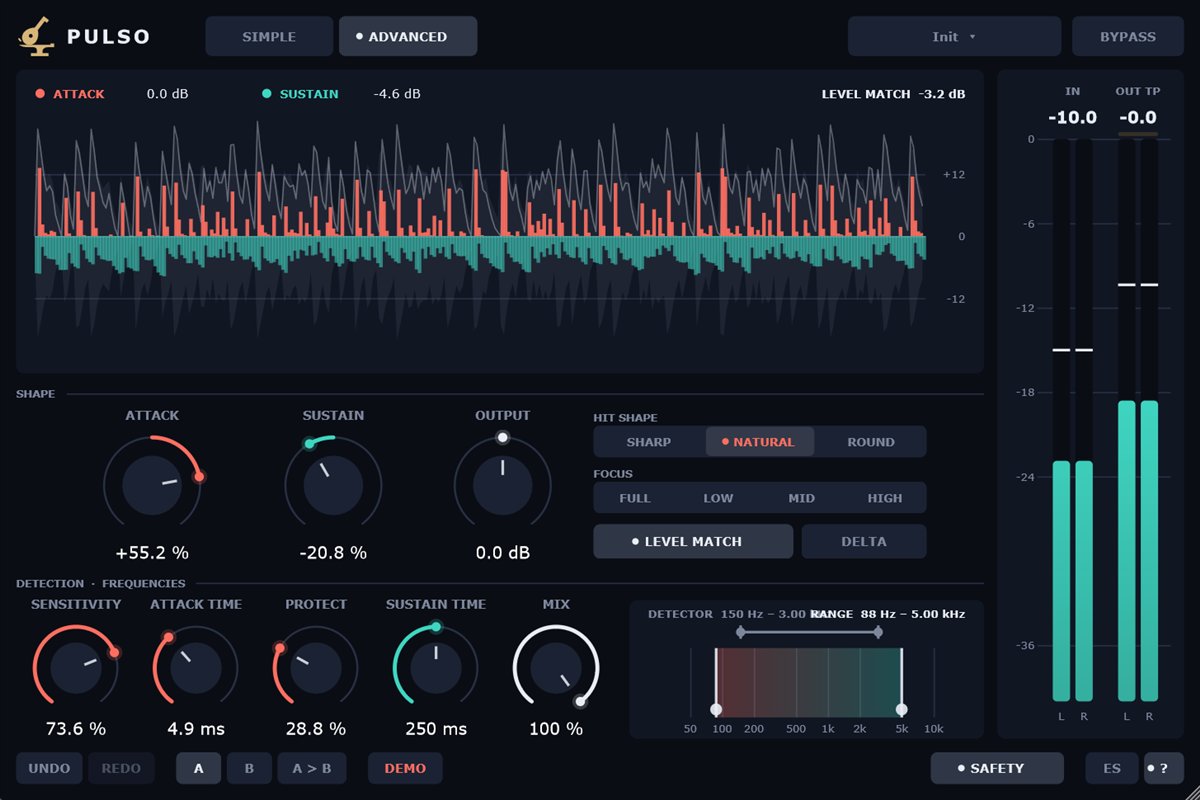
InstalaciónInstallation
- Descarga el zip de tu sistema y descomprímelo.
- Copia
Pulso.vst3en la carpeta de plugins VST3:
WindowsC:\Program Files\Common Files\VST3· macOS/Library/Audio/Plug-Ins/VST3· Linux~/.vst3 - Abre tu DAW y vuelve a buscar plugins si no aparece. Pulso está bajo el fabricante Martillolaud.
- Download the zip for your system and unzip it.
- Copy
Pulso.vst3to your VST3 plugin folder:
WindowsC:\Program Files\Common Files\VST3· macOS/Library/Audio/Plug-Ins/VST3· Linux~/.vst3 - Open your DAW and rescan plugins if it does not show up. Pulso is listed under the manufacturer Martillolaud.
Activar la licenciaActivating your license
Sin licencia, Pulso funciona completo. Al abrir la ventana sale un aviso que se puede cerrar a los pocos segundos, una vez por instancia. Para quitarlo pulsa DEMO en la barra inferior y escribe el correo de la compra y la serie que te llegó. No hace falta internet. Cada plugin tiene su propia serie: la de Temple o Yunque no vale para Pulso.
Without a license Pulso is fully working. Opening its window shows a notice you can close after a few seconds, once per instance. To remove it click DEMO in the bottom bar and enter your purchase email and the serial you received. No internet needed. Each plugin has its own serial: a Temple or Yunque serial does not unlock Pulso.
Modo sencilloSimple mode
Arriba eliges SIMPLE o ADVANCED. Lo avanzado sigue actuando aunque esté oculto, y el modo se guarda con la sesión. Pulso detecta los golpes comparando dos envolventes de la señal, así que no hay umbral: suena igual a cualquier nivel.
At the top you pick SIMPLE or ADVANCED. Advanced settings keep working while hidden, and the mode is saved with the session. Pulso detects hits by comparing two envelopes of the signal, so there is no threshold: it behaves the same at any level.
- Attack
- Positivo realza el golpe de cada nota. Negativo suaviza los golpes agresivos y conserva el cuerpo del instrumento.
- Sustain
- Positivo alarga la cola de cada nota; negativo la acorta: más seco y más cerca.
- Output
- Ganancia de salida (±24 dB). Con LEVEL MATCH es un ajuste sobre el nivel ya compensado.
- Hit shape
- Cómo entra la corrección del ataque, no cuánta. SHARP: inmediata, realza hasta el primer chasquido. NATURAL: rápida y limpia. ROUND: da pegada sin exagerar el primer milisegundo.
- Focus
- Dónde actúa Pulso. FULL todo; LOW los graves (el golpe del bombo sin el clic de la maza); MID los medios (la caja sin los platos); HIGH los agudos (clic, púa, charles). Pone a la vez el detector y el rango del modo avanzado.
- Level match
- Encendido por defecto. Compensa sola la sonoridad que añaden o quitan ATTACK y SUSTAIN, medida a medio plazo como el oído. Así lo más fuerte no te engaña.
- Delta
- Escucha solo lo que Pulso añade o quita. Útil para afinar; no lo dejes puesto al exportar.
- Attack
- Positive brings out the hit of every note. Negative softens harsh hits and keeps the instrument's body.
- Sustain
- Positive lengthens each note's tail; negative shortens it: drier and closer.
- Output
- Output gain (±24 dB). With LEVEL MATCH it trims the already-matched level.
- Hit shape
- How the attack correction comes in, not how much. SHARP: instant, brings out even the first click. NATURAL: fast and clean. ROUND: punch without exaggerating the first millisecond.
- Focus
- Where Pulso works. FULL everything; LOW the lows (the kick's thump without the beater click); MID the mids (the snare without the cymbals); HIGH the highs (click, pick, hi-hat). It sets both the detector and the range from advanced mode.
- Level match
- On by default. Makes up for the loudness ATTACK and SUSTAIN add or remove, measured over the medium term like the ear. So louder never fools you.
- Delta
- Hear only what Pulso adds or removes. Handy for fine-tuning; do not leave it on when exporting.
Modo avanzadoAdvanced mode
- Sensitivity
- Cuánto tiene que subir la señal para contar como golpe. Alta: cualquier subida, también golpes suaves y lo que se cuela por los micros. Baja: solo los golpes claros. Solo afecta al ataque.
- Attack time
- Lo que dura el golpe que se moldea (1 – 50 ms). Corto: solo el primer chasquido. Largo: el golpe entero, con algo del cuerpo.
- Protect
- Protege el cuerpo: la corrección del ataque solo actúa en el núcleo del golpe y se apaga después. Útil al suavizar con ATTACK TIME largo: el golpe baja y el cuerpo se queda.
- Sustain time
- A qué ritmo cae la cola con SUSTAIN al máximo (30 ms – 1,5 s). Más largo, cola más larga.
- Mix
- Cuánto del moldeado se aplica: 100 % todo, 50 % la mitad. No mezcla dos señales, así que no hay filtro de peine.
- Sensitivity
- How much the signal must rise to count as a hit. High: any rise, including soft hits and mic bleed. Low: only clear hits. Affects the attack only.
- Attack time
- How long the shaped hit lasts (1 – 50 ms). Short: just the first click. Long: the whole hit, with some of the body.
- Protect
- Protects the body: the attack correction only acts on the core of the hit and then fades out. Handy when softening with a long ATTACK TIME: the hit drops and the body stays.
- Sustain time
- How fast the tail decays with SUSTAIN at maximum (30 ms – 1.5 s). Longer means a longer tail.
- Mix
- How much of the shaping is applied: 100 % all of it, 50 % half. It does not blend two signals, so there is no comb filtering.
Gráfico de frecuenciasFrequency graph
Arriba, la banda que escucha el detector para decidir qué es un golpe. Abajo, el rango que se moldea: fuera de él la señal pasa intacta. Arrastra sus extremos; en 20 Hz y 20 kHz se leen OFF. Ejemplo, caja con platos: el detector hasta 3 kHz para que los platos no disparen, y el rango hasta 5 kHz para que no suban.
At the top, the band the detector listens to in order to decide what a hit is. At the bottom, the range that gets shaped: outside it the signal passes untouched. Drag their edges; at 20 Hz and 20 kHz they read OFF. Example, a snare with cymbals: detector up to 3 kHz so the cymbals do not trigger it, and range up to 5 kHz so they are not lifted.
Visor y medidoresDisplay and meters
El pulso: en gris la entrada; en coral lo que el ataque sube (hacia arriba) o baja (hacia abajo), y en verde agua lo mismo para el sustain. La línea clara es la salida.
The pulse: the input in grey; in coral what the attack raises (up) or lowers (down), and in teal the same for the sustain. The bright line is the output.
Medidores: IN (pico de entrada) y OUT TP (pico real de salida). Un clic pone las lecturas a cero.
Meters: IN (input peak) and OUT TP (output true peak). Click to reset the readings.
Barra inferiorBottom bar
- Safety
- Limitador de seguridad a 0 dBTP al final de todo, encendido por defecto: subir el ataque crea picos y esto evita que pasen de 0 dB. Si actúa, sale un aviso sobre el visor. Al apagarlo verás SAFETY OFF.
- Bypass
- Señal sin procesar con la misma latencia, para comparar sin saltos.
- A / B
- Dos ajustes completos del plugin para comparar. El botón de copiar pasa el actual al otro.
- Deshacer
- Ctrl+Z / Ctrl+Y.
- Presets
- Guarda los tuyos en
Documentos\Martillolaud\Pulso\Presets. No tocan bypass, SAFETY ni DELTA. - ES / EN · ?
- Idioma de la ayuda y encender o apagar las ayudas al pasar el ratón.
- Safety
- Safety limiter at 0 dBTP at the very end, on by default: raising the attack creates peaks and this keeps them under 0 dB. When it acts a notice shows over the display. Turning it off shows SAFETY OFF.
- Bypass
- Unprocessed signal with the same latency, to compare without jumps.
- A / B
- Two complete plugin settings to compare. The copy button sends the current one to the other.
- Undo
- Ctrl+Z / Ctrl+Y.
- Presets
- Save your own to
Documents\Martillolaud\Pulso\Presets. They leave bypass, SAFETY and DELTA alone. - ES / EN · ?
- Help language, and hover hints on or off.
La ventana se puede agrandar o achicar (75 – 200 %) arrastrando la esquina; el tamaño se guarda con la sesión. Doble clic en una perilla la devuelve a su valor de inicio.
Resize the window (75 – 200 %) by dragging its corner; the size is saved with the session. Double-click a knob to reset it.
PreguntasQuestions
¿Tiene latencia?
Does it add latency?
Unos 5,3 ms a 48 kHz, siempre la misma: 1 ms para que el gesto llegue a tiempo y el resto del limitador de seguridad. El DAW lo compensa.
About 5.3 ms at 48 kHz, always the same: 1 ms so the shaping lands on time and the rest from the safety limiter. Your DAW compensates.
Sin mover nada, ¿es la señal exacta?
With everything at zero, is it bit-identical?
La respuesta es plana, pero el reparto por frecuencias gira un poco la fase, como cualquier proceso multibanda. Para comparar usa BYPASS o DELTA.
The response is flat, but the frequency split shifts phase slightly, like any multiband process. To compare, use BYPASS or DELTA.
Perdí mi serie
I lost my serial
Escríbeme a [email protected] con el correo de la compra.
Write to [email protected] with the email you bought with.