 Martillolaud
InstalaciónInstallation
- Descarga el zip de tu sistema y descomprímelo.
- En macOS, abre
Fiel.pkgy sigue los pasos: instala Fiel en AU, VST3 y AAX. - En Windows y Linux, copia
Fiel.vst3en la carpeta de plugins VST3:
WindowsC:\Program Files\Common Files\VST3· Linux~/.vst3 - Abre tu DAW y vuelve a buscar plugins si no aparece. Está bajo el fabricante Martillolaud.
- Download the zip for your system and unzip it.
- On macOS, open
Fiel.pkgand follow the steps: it installs Fiel as AU, VST3 and AAX. - On Windows and Linux, copy
Fiel.vst3to your VST3 plugin folder:
WindowsC:\Program Files\Common Files\VST3· Linux~/.vst3 - Open your DAW and rescan plugins if it does not show up. It is listed under the manufacturer Martillolaud.
Qué es FIELWhat FIEL is
FIEL es un igualador de sonoridad por parejas. Pones una instancia ANTES al principio de una cadena (o de un solo plugin) y otra DESPUÉS al final. DESPUÉS mide las dos señales con BS.1770 y ajusta la ganancia de lo procesado hasta que suena igual de fuerte que el original.
FIEL is a paired loudness matcher. Put one instance as BEFORE at the start of a chain (or a single plugin) and another as AFTER at the end. AFTER measures both signals to BS.1770 and adjusts the gain of the processed signal until it is as loud as the original.
Así juzgas lo que hace la cadena y no el volumen. Sirve en mezcla para decidir si un compresor o un ecualizador mejoran la pista, en mastering para comparar el máster con la mezcla, y en clase para enseñar qué cambia de verdad cada proceso.
That way you judge what the chain does, not how loud it is. Use it in mixing to decide whether a compressor or EQ really improves a track, in mastering to compare the master against the mix, and in teaching to show what each process actually changes.
FIEL busca solo el retardo de la cadena, alinea el original y no añade latencia. Es gratis, sin licencia ni número de serie. VST3 en Windows, macOS y Linux; AU y AAX en macOS.
FIEL finds the chain delay on its own, aligns the original and adds no latency. It is free, with no licence or serial number. VST3 on Windows, macOS and Linux; AU and AAX on macOS.
- Compensación automática
- CONTINUO con ventana de 3, 10 o 30 s, MEDIR (integrada desde que pulsas) y CONGELAR.
- A/B alineado y sin clics
- PROCESADO, ORIGINAL y DELTA, con el retardo de la cadena compensado y fundidos de 20 ms.
- Medida BS.1770 completa
- MOMENTARY, SHORT-TERM, INTEGRATED, TRUE PEAK y PLR de ANTES y de DESPUÉS.
- Render protegido
- En un render offline sale lo procesado sin compensar, salvo que elijas lo contrario.
- Historia de 60 s
- Short-term de las dos señales y la compensación aplicada, en un solo gráfico.
- Automatic compensation
- CONTINUOUS with a 3, 10 or 30 s window, MEASURE (integrated from the moment you press it) and FREEZE.
- Aligned, click-free A/B
- PROCESSED, ORIGINAL and DELTA, with the chain delay compensated and 20 ms crossfades.
- Full BS.1770 metering
- MOMENTARY, SHORT-TERM, INTEGRATED, TRUE PEAK and PLR for both BEFORE and AFTER.
- Protected render
- An offline render outputs the processed audio uncompensated, unless you choose otherwise.
- 60 s history
- Short-term of both signals and the applied compensation, in one graph.
ANTES y DESPUÉS: la parejaBEFORE and AFTER: the pair
Cada instancia tiene un PAPEL y una PAREJA. Las dos instancias con el mismo número de PAREJA se encuentran solas dentro del DAW, sin cables ni sidechain. Una instancia nueva se abre como DESPUÉS en la PAREJA 1.
Each instance has a ROLE and a PAIR. Two instances with the same PAIR number find each other inside the DAW, with no routing or sidechain. A new instance opens as AFTER on PAIR 1.
- PAPEL: ANTES / DESPUÉS
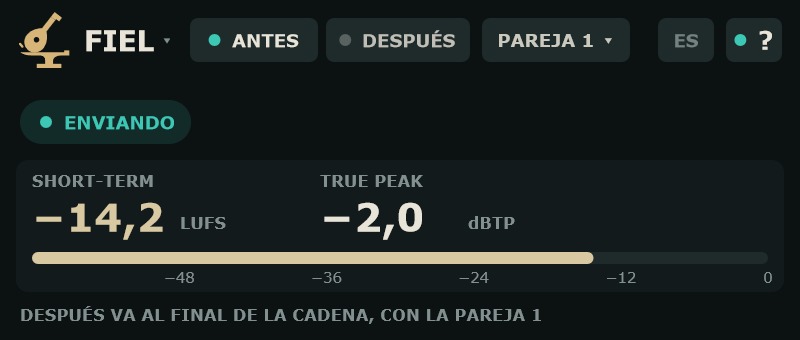
- ANTES va al principio de la cadena: deja pasar el audio intacto y lo envía a su pareja. DESPUÉS va al final: mide, compensa y deja escuchar. Al cambiar el papel la ventana cambia de tamaño.
- PAREJA 1–8
- Une una ANTES con su DESPUÉS. Clic para abrir el menú y elegir el número. Usa un número distinto para cada cadena que compares, hasta 8 a la vez.
- Ventana de ANTES
- Muestra SHORT-TERM (LUFS) y TRUE PEAK máximo (dBTP) de lo que entra. Clic en la lectura: reinicia el TRUE PEAK máximo. Sobre 0 dBTP se ve en rojo. Si no hay DESPUÉS con su número, lo recuerda: DESPUÉS VA AL FINAL DE LA CADENA, CON LA PAREJA n.
- Estado de ANTES
- ENVIANDO, SIN SEÑAL (medio segundo sin audio) o PAREJA DUPLICADA (dos ANTES con el mismo número).
- ROLE: BEFORE / AFTER
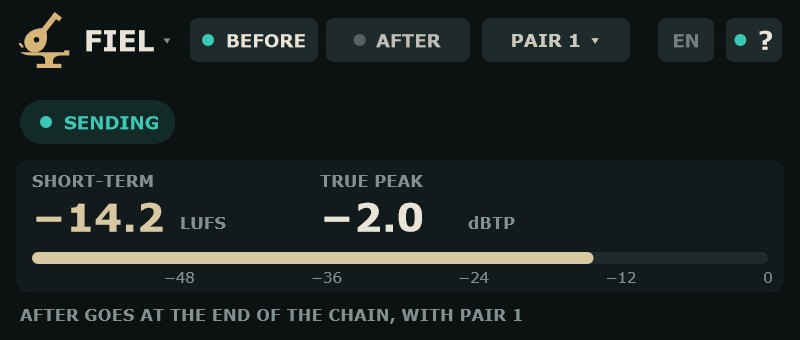
- BEFORE goes at the start of the chain: it passes the audio untouched and sends it to its pair. AFTER goes at the end: it measures, compensates and lets you listen. Changing the role resizes the window.
- PAIR 1–8
- Links a BEFORE with its AFTER. Click to open the menu and choose the number. Use a different number for each chain you compare, up to 8 at once.
- BEFORE window
- Shows SHORT-TERM (LUFS) and maximum TRUE PEAK (dBTP) of the incoming signal. Click the reading to reset the maximum TRUE PEAK. Above 0 dBTP it turns red. If no AFTER shares its number, it reminds you: AFTER GOES AT THE END OF THE CHAIN, WITH PAIR n.
- BEFORE status
- SENDING, NO SIGNAL (half a second without audio) or DUPLICATE PAIR (two BEFOREs on the same number).
Estado del enlace en DESPUÉSLink status on AFTER
- ENLAZADO
- La pareja funciona.
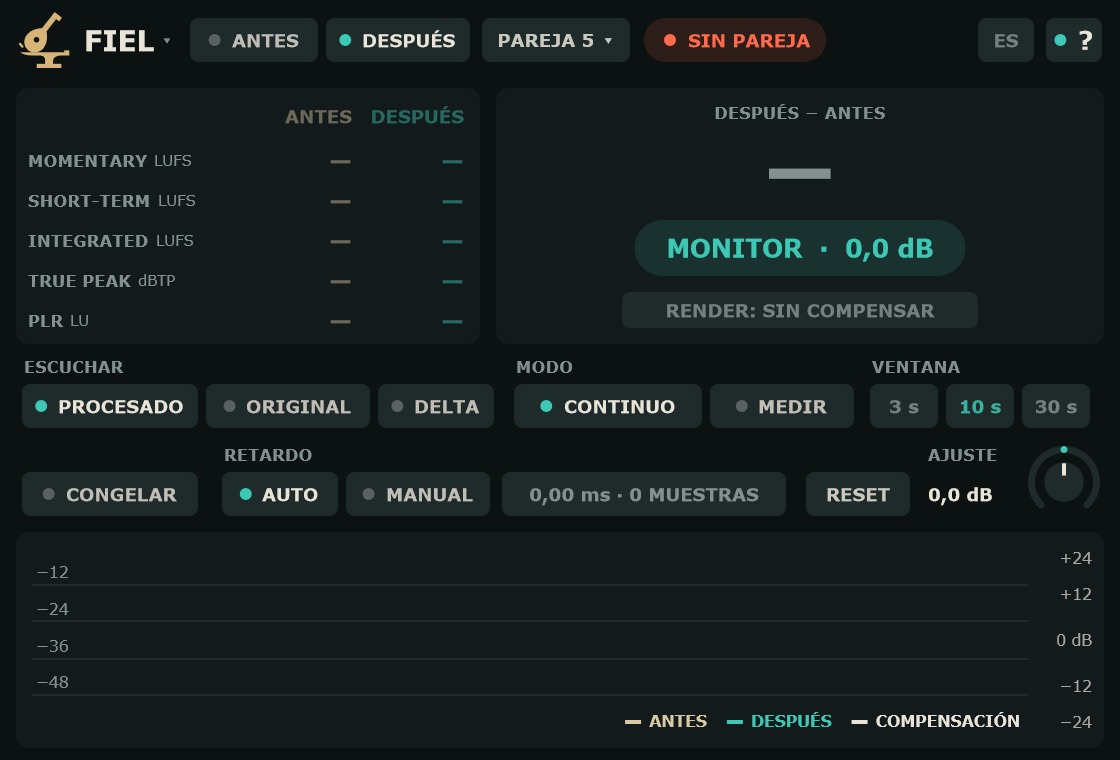
- SIN PAREJA
- No hay ninguna ANTES con ese número.
- SIN SEÑAL DE ANTES
- ANTES existe pero no le llega audio.
- PAREJA DUPLICADA
- Hay dos ANTES con el mismo número.
- FRECUENCIA DISTINTA
- ANTES y DESPUÉS trabajan a distinta frecuencia de muestreo.
- LINKED
- The pair is working.
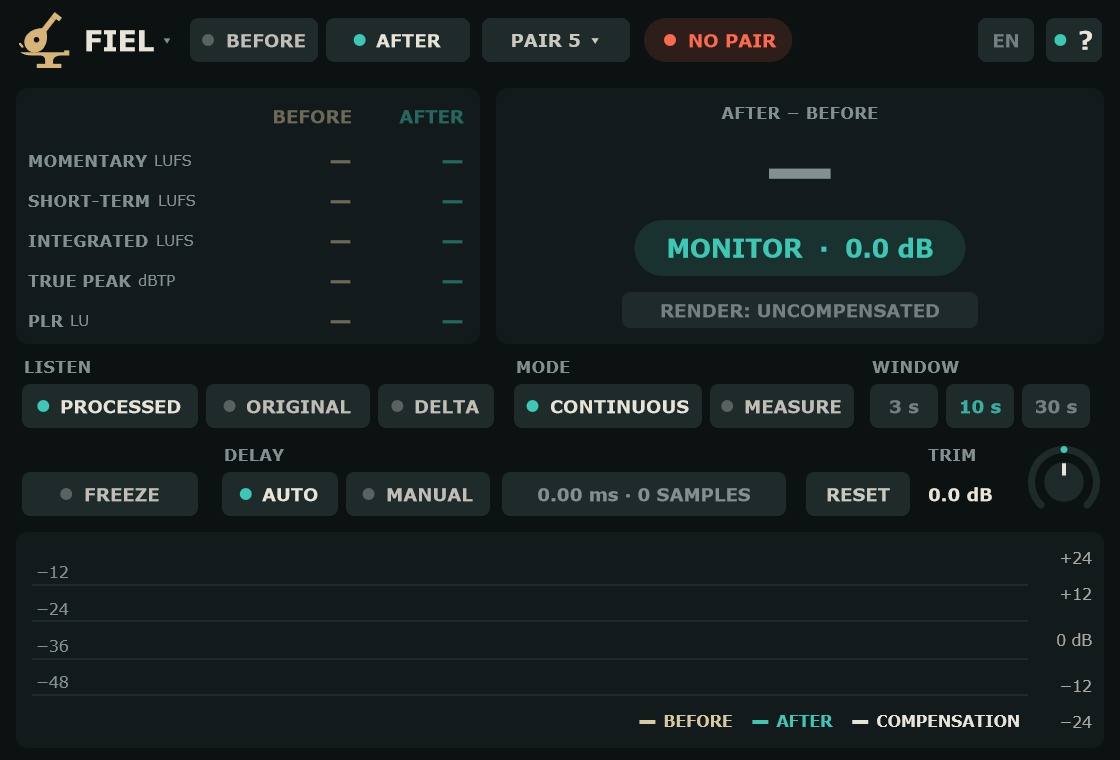
- NO PAIR
- There is no BEFORE with that number.
- NO SIGNAL FROM BEFORE
- BEFORE exists but receives no audio.
- DUPLICATE PAIR
- Two BEFOREs share the same number.
- SAMPLE RATE MISMATCH
- BEFORE and AFTER run at different sample rates.
Sin enlace, las lecturas se apagan y la compensación vuelve a 0 dB con una rampa: DESPUÉS deja pasar lo procesado tal cual.
Without a link, the readings go dark and the compensation returns to 0 dB with a ramp: AFTER passes the processed audio as is.
EscuchaListening
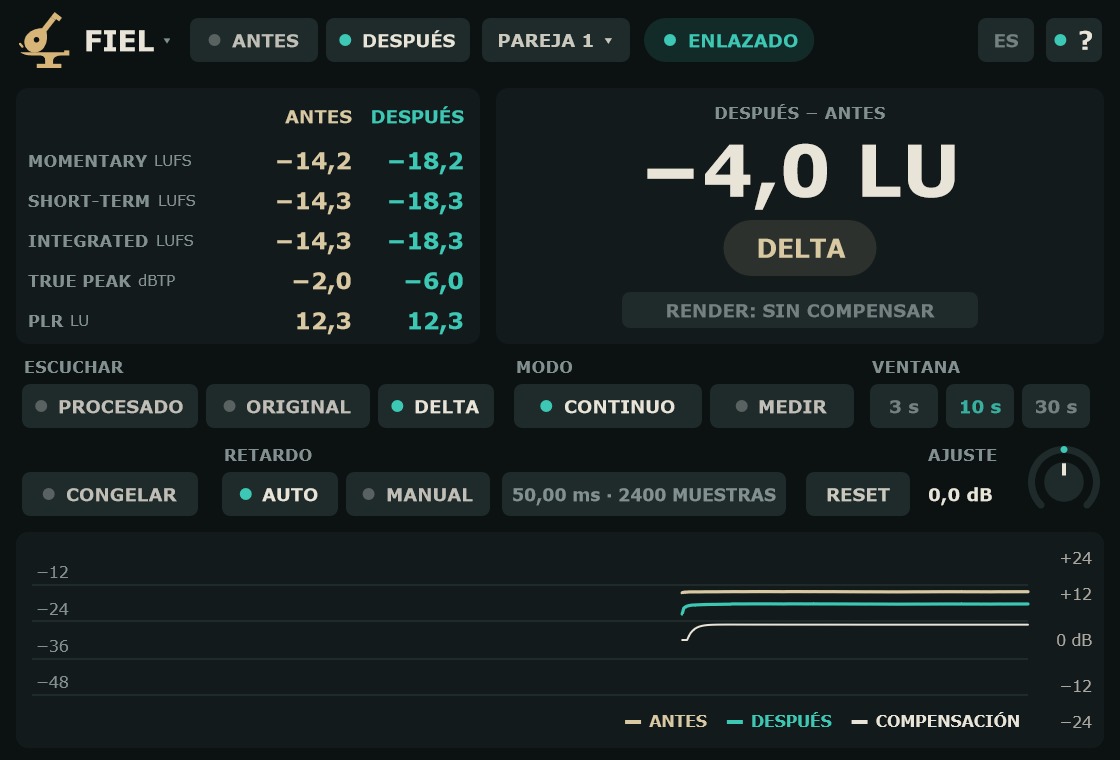
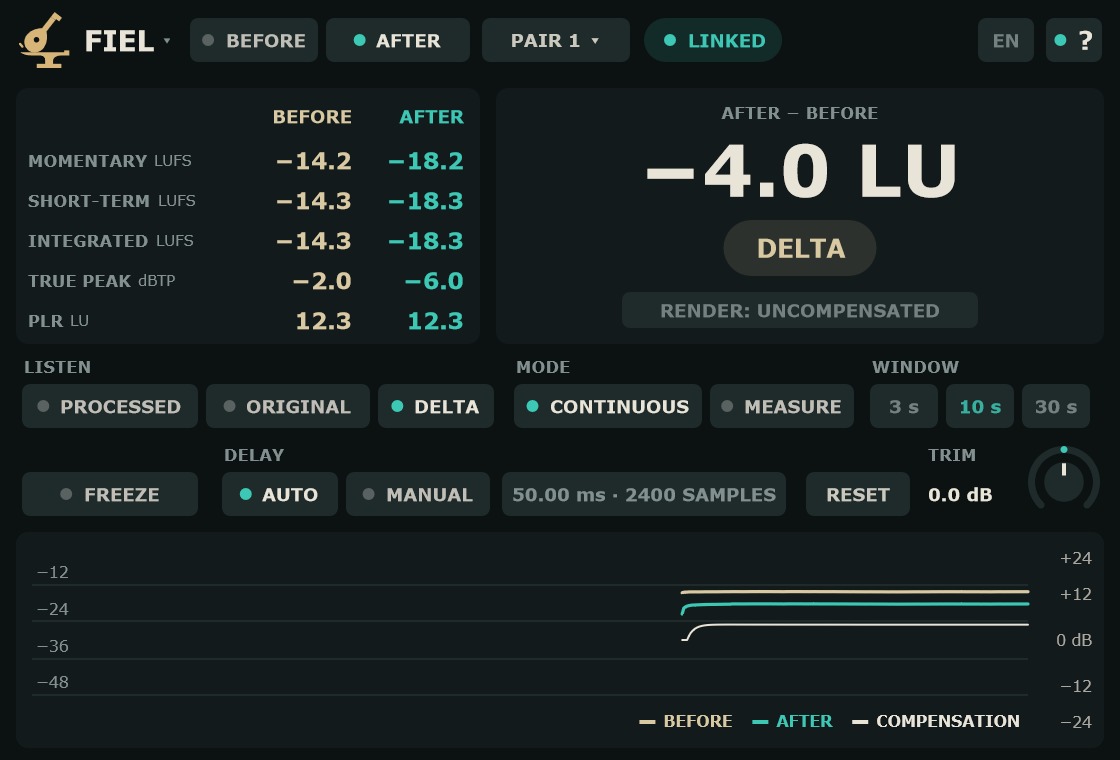
- ESCUCHAR: PROCESADO
- Lo procesado, con la compensación. De serie.
- ESCUCHAR: ORIGINAL
- Lo que entra en ANTES, alineado con el retardo de la cadena.
- ESCUCHAR: DELTA
- Lo que la cadena cambió, ya igualado (PROCESADO − ORIGINAL). Una cadena que solo cambia la ganancia da silencio en DELTA.
- MONITOR
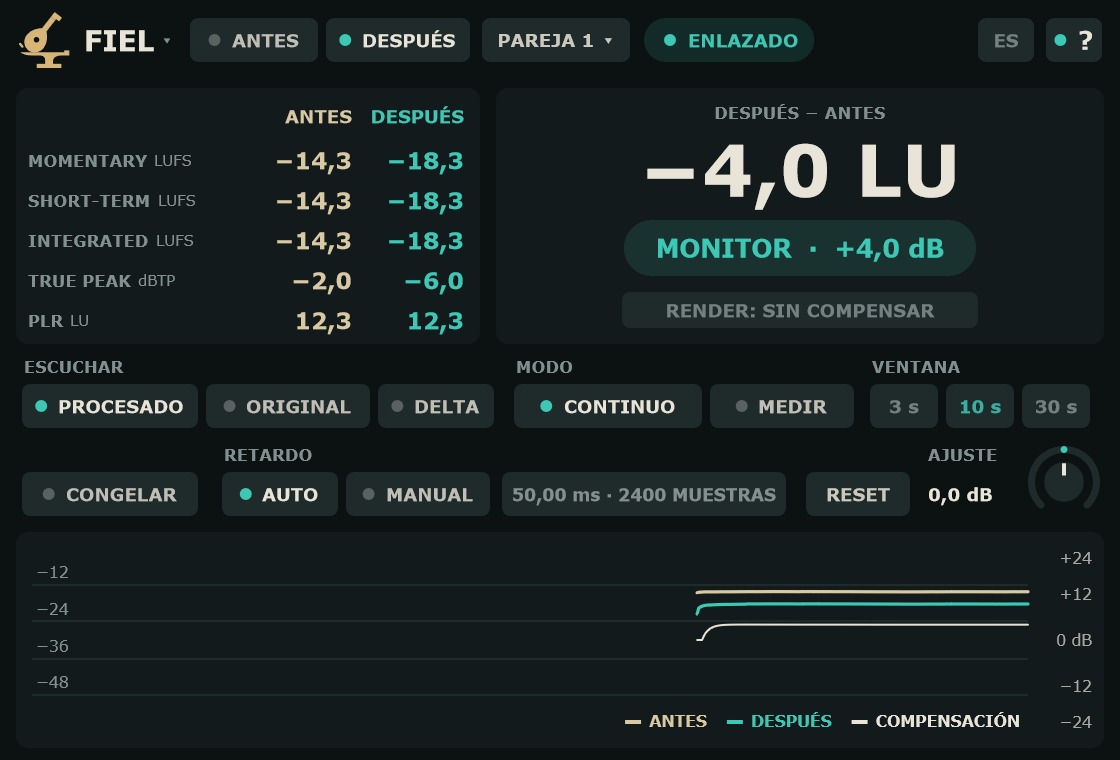
- Indicador bajo la diferencia. En PROCESADO muestra MONITOR · y la compensación que se oye, en dB (turquesa). En ORIGINAL o DELTA muestra ese nombre en arena.
- LISTEN: PROCESSED
- The processed audio, with the compensation. Default.
- LISTEN: ORIGINAL
- What goes into BEFORE, aligned with the chain delay.
- LISTEN: DELTA
- What the chain changed, level-matched (PROCESSED − ORIGINAL). A chain that only changes gain gives silence in DELTA.
- MONITOR
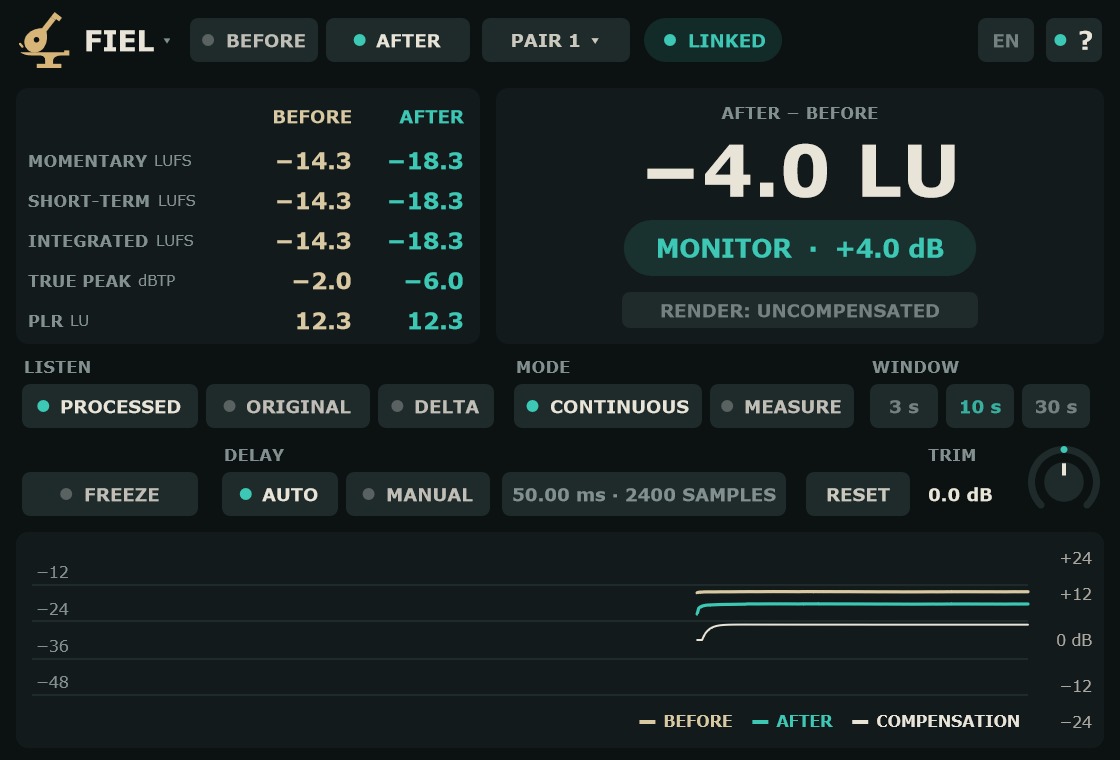
- Indicator below the difference. In PROCESSED it shows MONITOR · and the compensation you hear, in dB (turquoise). In ORIGINAL or DELTA it shows that name in sand.
El cambio entre escuchas es un fundido de 20 ms. Las dos señales van alineadas, así que no hay hueco ni clic.
Switching between them is a 20 ms crossfade. Both signals are aligned, so there is no gap and no click.
Medida y compensaciónMeasurement and compensation
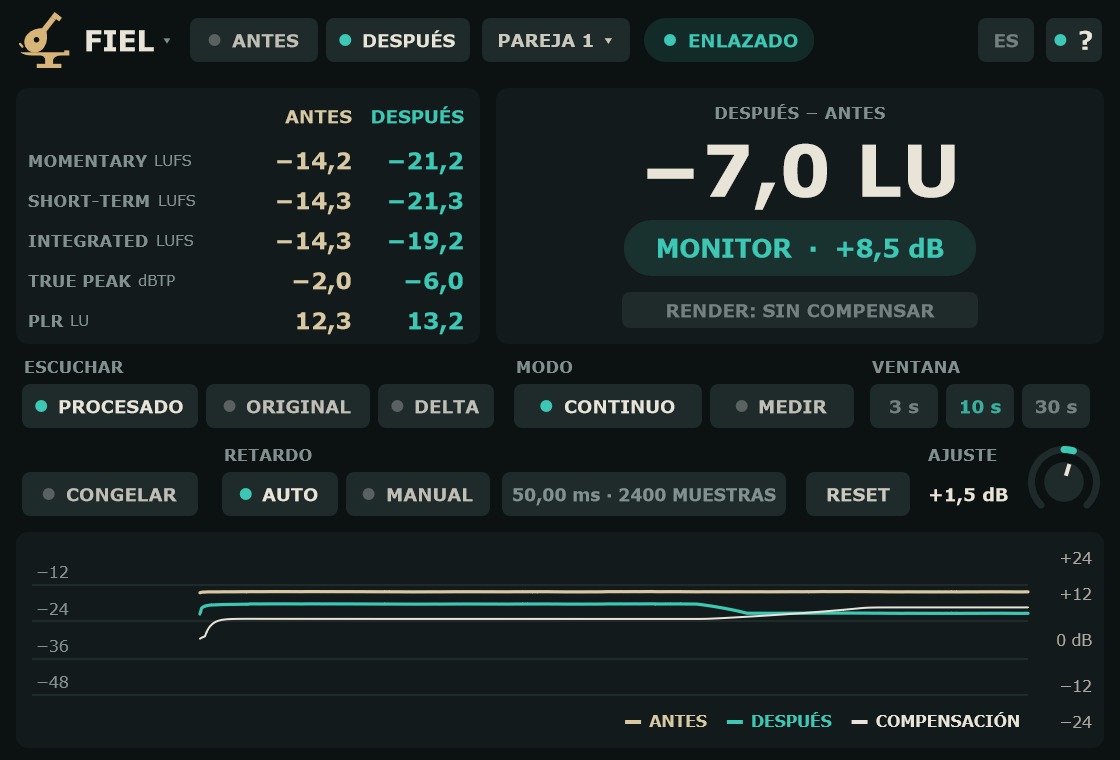
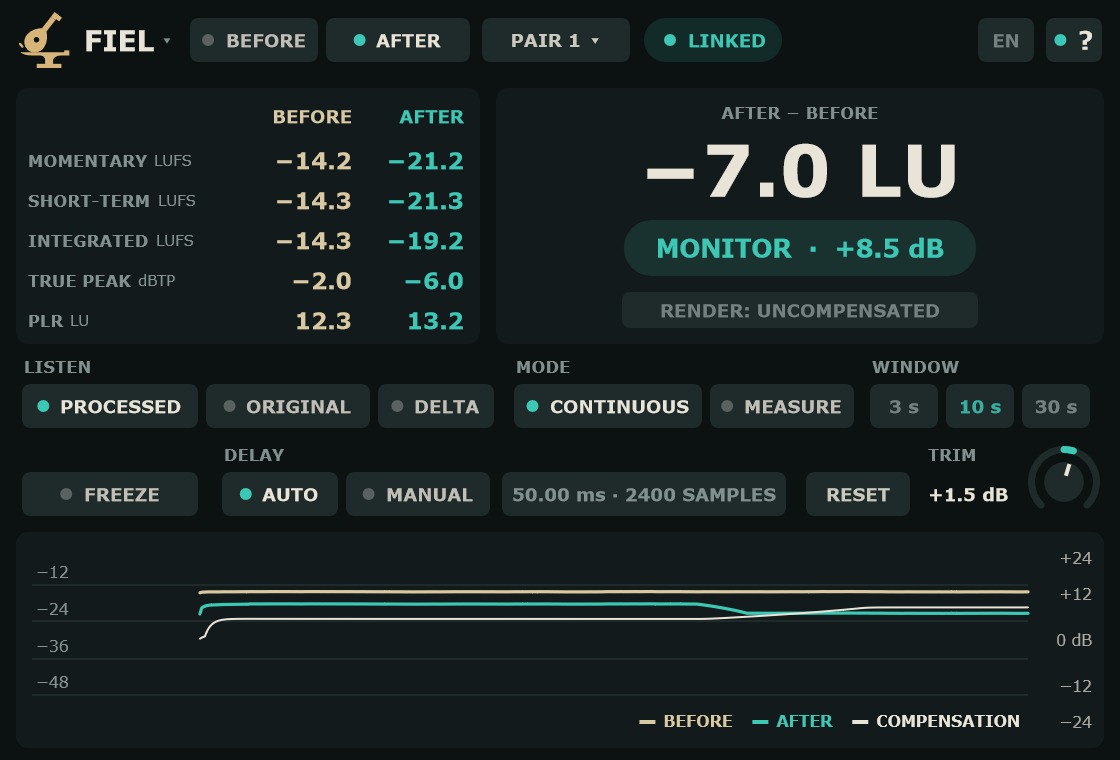
- MODO: CONTINUO
- Compensa sin parar con la ventana elegida. De serie.
- VENTANA: 3 s / 10 s / 30 s
- Ventana de la medida en CONTINUO, con las puertas BS.1770. 3 s para material corto, 10 s de serie, 30 s para material muy dinámico. La elegida se ve en turquesa.
- MODO: MEDIR / PARAR
- MEDIR mide la integrada de las dos señales desde ese momento; mientras mide, la compensación sigue la diferencia en curso y el botón pasa a PARAR. PARAR fija la compensación y enciende CONGELAR. Otro MEDIR empieza una medida nueva.
- CONGELAR
- Deja fija la compensación de ahora, en cualquier modo. Al apagarlo vuelve a seguir. La compensación fijada se guarda con el proyecto.
- AJUSTE
- Se suma a la compensación, de −12 a +12 dB en pasos de 0,1 dB. De serie 0 dB. Arrastra; Shift para ajuste fino; doble clic: 0.
- RESET
- Vacía las lecturas, las integradas y la historia. No toca la compensación fijada.
- MODE: CONTINUOUS
- Compensates continuously using the chosen window. Default.
- WINDOW: 3 s / 10 s / 30 s
- Measurement window in CONTINUOUS, with BS.1770 gating. 3 s for short material, 10 s by default, 30 s for highly dynamic material. The selected one shows in turquoise.
- MODE: MEASURE / STOP
- MEASURE measures the integrated loudness of both signals from that moment; while it runs, the compensation follows the current difference and the button turns into STOP. STOP fixes the compensation and turns FREEZE on. Another MEASURE starts a new measurement.
- FREEZE
- Holds the current compensation, in any mode. Turn it off and it follows again. A fixed compensation is saved with the project.
- TRIM
- Added to the compensation, from −12 to +12 dB in 0.1 dB steps. Default 0 dB. Drag; Shift for fine adjustment; double-click: 0.
- RESET
- Clears the readings, the integrated values and the history. Does not touch a fixed compensation.
La compensación es la sonoridad de ANTES menos la de DESPUÉS, con tope de ±24 dB, más el AJUSTE. En silencio se queda donde estaba: las pausas, los finales y una cadena muda no la mueven.
The compensation is BEFORE loudness minus AFTER loudness, limited to ±24 dB, plus TRIM. In silence it stays where it was: pauses, endings and a muted chain do not move it.
Lecturas e historiaReadings and history
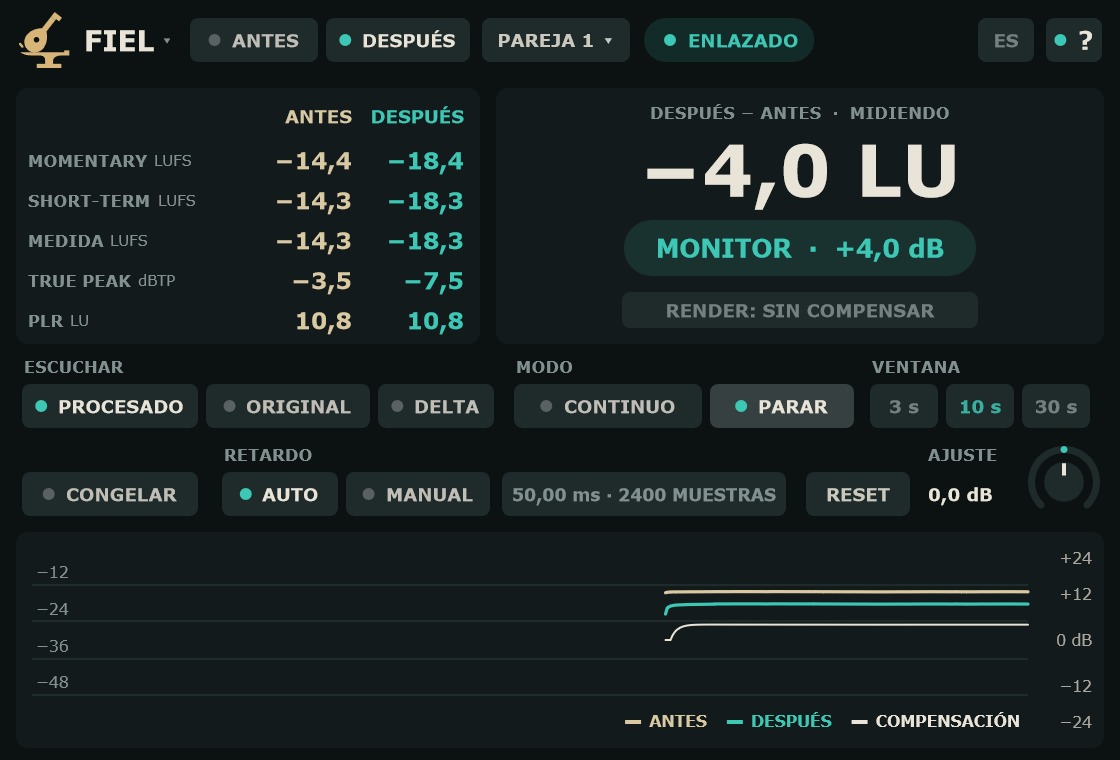
- Tabla ANTES / DESPUÉS
- Sonoridad BS.1770 de ANTES (arena) y de DESPUÉS sin compensar (turquesa): MOMENTARY, SHORT-TERM, INTEGRATED (LUFS), TRUE PEAK máximo (dBTP, en rojo sobre 0) y PLR = TRUE PEAK − INTEGRATED (LU).
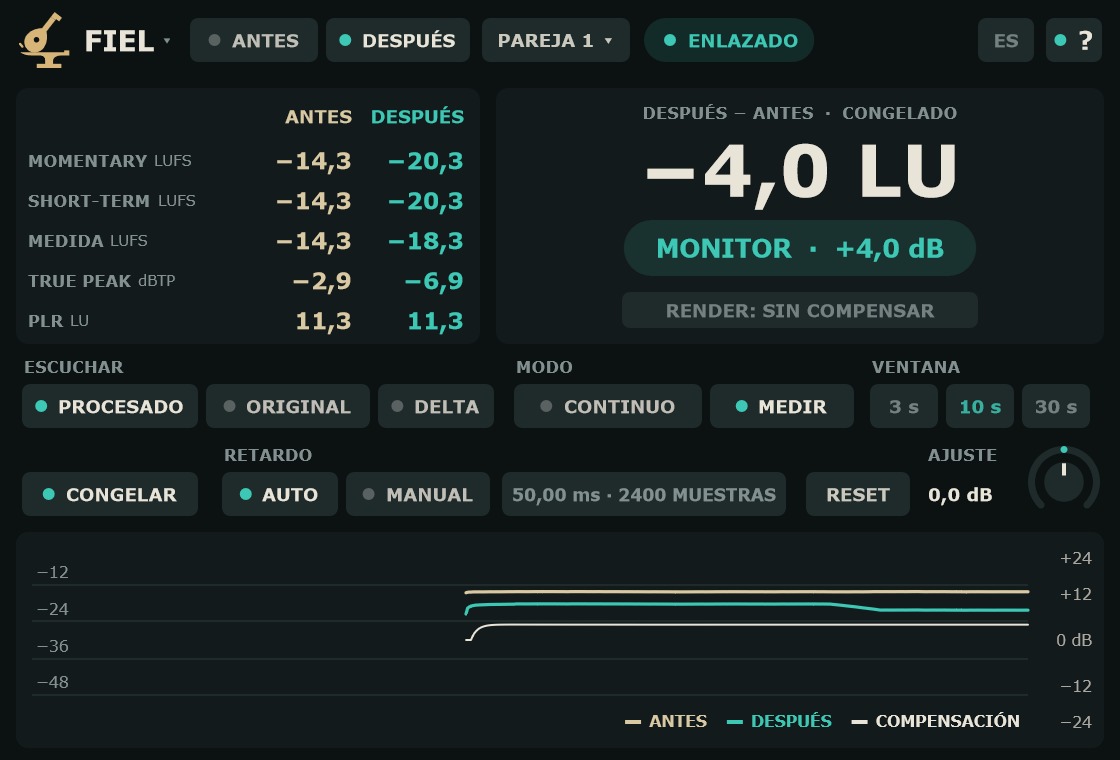
- MEDIDA
- En MEDIR, la fila INTEGRATED pasa a MEDIDA: la integrada desde que pulsaste MEDIR. TRUE PEAK y PLR también son los de la medida. Al volver a CONTINUO, vuelven los de desde RESET.
- DESPUÉS − ANTES
- La diferencia en grande, en LU. En MEDIR manda la medida; con CONGELAR, la congelada. Junto al título se lee MIDIENDO o CONGELADO. Sin medida válida se ve «—».
- Historia
- Últimos 60 s: short-term de ANTES (arena) y de DESPUÉS sin compensar (turquesa), en LUFS a la izquierda; la COMPENSACIÓN (línea fina), en dB a la derecha, en ±24 dB.
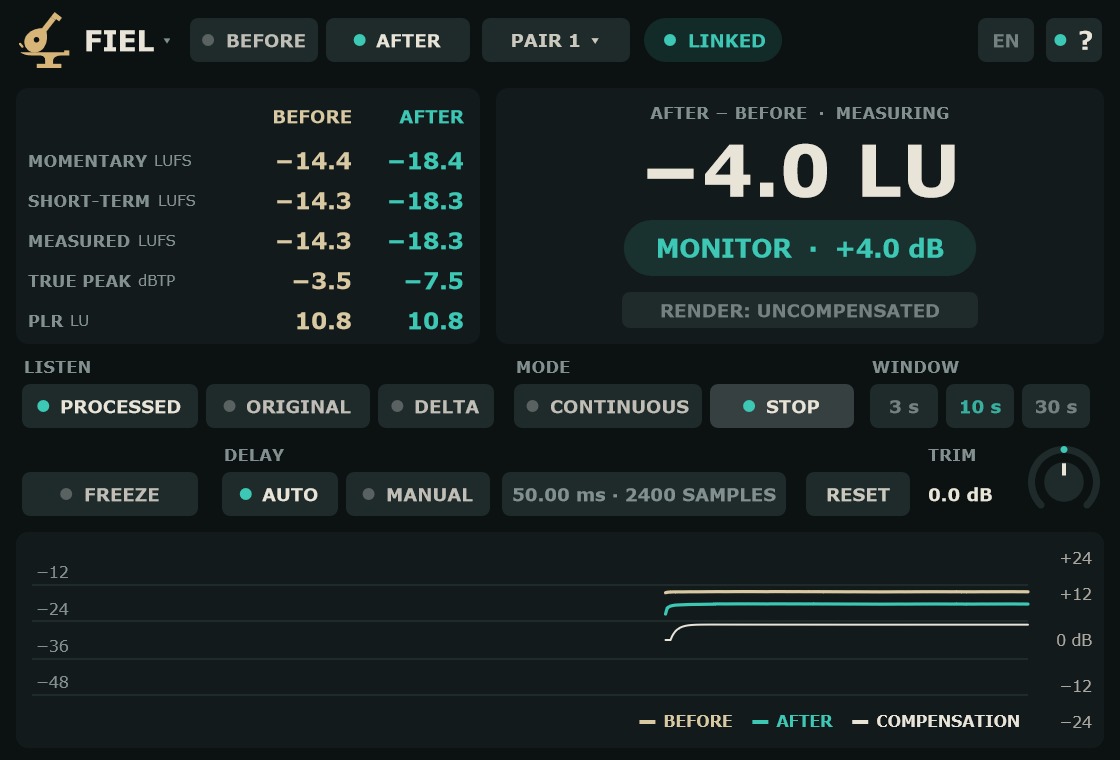
- BEFORE / AFTER table
- BS.1770 loudness of BEFORE (sand) and of AFTER without compensation (turquoise): MOMENTARY, SHORT-TERM, INTEGRATED (LUFS), maximum TRUE PEAK (dBTP, red above 0) and PLR = TRUE PEAK − INTEGRATED (LU).
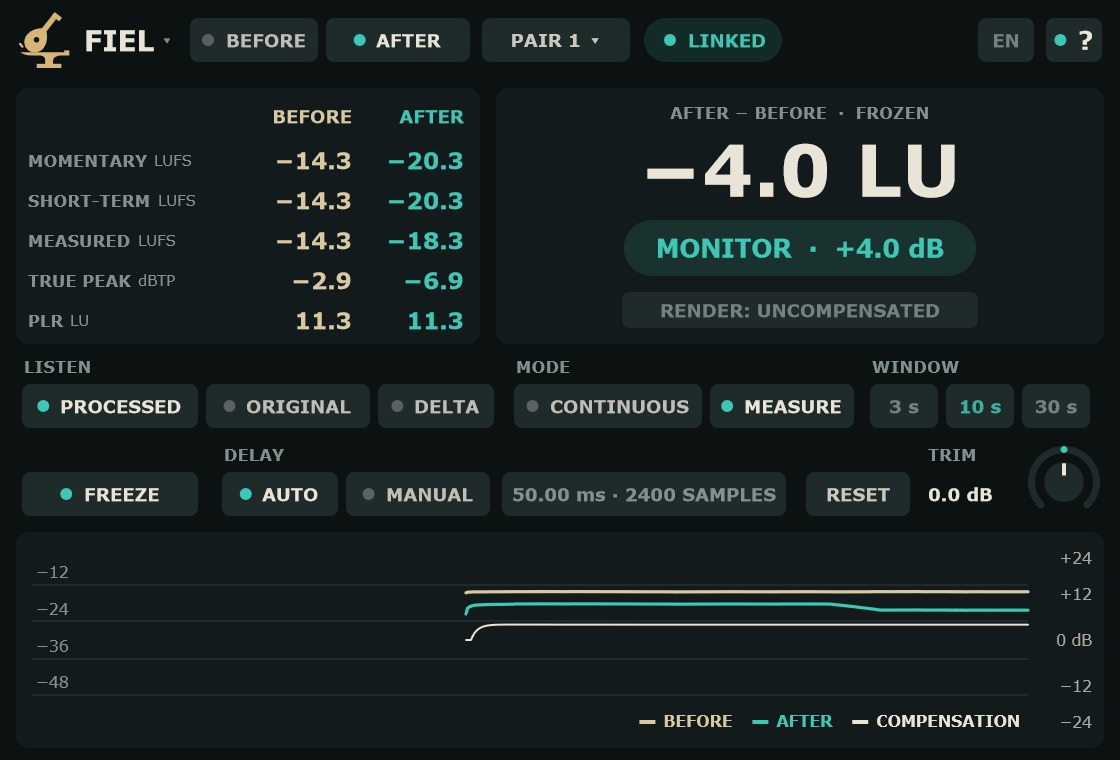
- MEASURED
- In MEASURE, the INTEGRATED row becomes MEASURED: the integrated loudness since you pressed MEASURE. TRUE PEAK and PLR follow the measurement too. Back in CONTINUOUS, the values since RESET return.
- AFTER − BEFORE
- The difference in large type, in LU. In MEASURE the measurement rules; with FREEZE, the frozen value. MEASURING or FROZEN appears next to the title. With no valid measurement it shows “—”.
- History
- Last 60 s: short-term of BEFORE (sand) and of AFTER without compensation (turquoise), in LUFS on the left; the COMPENSATION (thin line), in dB on the right, across ±24 dB.
Retardo y alineadoDelay and alignment
- RETARDO: AUTO
- El retardo de la cadena se mide solo, cada 2 s, hasta 1 s. De serie.
- RETARDO: MANUAL
- El retardo se pone a mano, de 0 a 1000 ms. Arrastra la lectura; Shift para afinar; doble clic: 0.
- Lectura del retardo
- En ms y en MUESTRAS.
- POLARIDAD INVERTIDA
- La cadena invierte la fase. FIEL usa el original con el mismo signo para ORIGINAL y DELTA. En MANUAL no se avisa.
- RETARDO INESTABLE
- Aún no hay un retardo fijo. Puede verse unos segundos al empezar.
- ORDEN: PON ANTES PRIMERO
- DESPUÉS se procesa antes que ANTES. ANTES va al principio de la cadena y DESPUÉS al final, en la misma pista o en una que se procese después.
- DELAY: AUTO
- The chain delay is measured automatically, every 2 s, up to 1 s. Default.
- DELAY: MANUAL
- The delay is set by hand, from 0 to 1000 ms. Drag the reading; Shift for fine adjustment; double-click: 0.
- Delay reading
- In ms and SAMPLES.
- INVERTED POLARITY
- The chain inverts the phase. FIEL uses the original with the same sign for ORIGINAL and DELTA. Not reported in MANUAL.
- UNSTABLE DELAY
- There is no fixed delay yet. It may show for a few seconds at the start.
- ORDER: PUT BEFORE FIRST
- AFTER is processed before BEFORE. BEFORE goes at the start of the chain and AFTER at the end, on the same track or on one that is processed later.
FIEL no añade latencia en ningún papel. Funciona con ANTES y DESPUÉS en la misma pista, o con ANTES en una pista que alimenta el bus donde está DESPUÉS.
FIEL adds no latency in either role. It works with BEFORE and AFTER on the same track, or with BEFORE on a track that feeds the bus holding AFTER.
RenderRender
- RENDER: SIN COMPENSAR / COMPENSADO
- Botón bajo MONITOR. Clic: cambia lo que sale en un render offline. SIN COMPENSAR (de serie) saca lo procesado tal cual; COMPENSADO, con la compensación. Se guarda con el proyecto.
- COMPENSAR EN EL RENDER
- La misma opción, en el menú del emblema (Acerca de), junto a la versión.
- RENDER: UNCOMPENSATED / COMPENSATED
- Button below MONITOR. Click: changes what comes out of an offline render. UNCOMPENSATED (default) outputs the processed audio as is; COMPENSATED, with the compensation. Saved with the project.
- COMPENSATE IN RENDER
- The same option, in the emblem menu (About), next to the version.
ORIGINAL y DELTA nunca salen en un render. Un render en tiempo real (online) no se distingue de la escucha: sale lo que se oye.
ORIGINAL and DELTA never come out in a render. A real-time (online) render is no different from listening: what you hear is what comes out.
Cabecera, ayudas e idiomaHeader, tips and language
- ?
- Enciende o apaga las ayudas. Pasa el ratón sobre cualquier control o zona para leer qué hace.
- ES / EN
- Idioma de la interfaz. De serie, el del sistema. En español la coma es decimal; en inglés, el punto.
- Emblema
- Abre el menú con COMPENSAR EN EL RENDER y la versión.
- ?
- Turns the tips on or off. Hover over any control or area to read what it does.
- ES / EN
- Interface language. Defaults to the system language. Spanish uses a decimal comma; English, a decimal point.
- Emblem
- Opens the menu with COMPENSATE IN RENDER and the version.
Paso a paso: ¿mejora este compresor la voz?Step by step: does this compressor improve the vocal?
- Inserta FIEL en la pista de voz, en la primera ranura. Ponle PAPEL ANTES y PAREJA 1.
- Coloca el compresor (o toda la cadena) después.
- Inserta otra FIEL en la última ranura. Déjala en DESPUÉS y PAREJA 1. El estado pasa a ENLAZADO.
- Reproduce. En RETARDO AUTO, FIEL encuentra el retardo de la cadena en unos segundos.
- Con CONTINUO y ventana de 10 s, la diferencia DESPUÉS − ANTES se compensa sola.
- Alterna PROCESADO y ORIGINAL: oyes la voz con y sin compresor, al mismo volumen.
- Pasa a DELTA para oír solo lo que quita o añade el compresor.
- Para una comparación estable de una sección, pulsa MEDIR al empezar y PARAR al terminar: la compensación queda fija.
- Antes de exportar, deja RENDER: SIN COMPENSAR para que la mezcla salga tal como la dejó la cadena.
- Insert FIEL on the vocal track, in the first slot. Set ROLE to BEFORE and PAIR to 1.
- Put the compressor (or the whole chain) after it.
- Insert another FIEL in the last slot. Leave it on AFTER and PAIR 1. The status changes to LINKED.
- Press play. With DELAY on AUTO, FIEL finds the chain delay within a few seconds.
- With CONTINUOUS and a 10 s window, the AFTER − BEFORE difference is compensated automatically.
- Switch between PROCESSED and ORIGINAL: you hear the vocal with and without the compressor, at the same loudness.
- Go to DELTA to hear only what the compressor removes or adds.
- For a stable comparison over one section, press MEASURE at its start and STOP at its end: the compensation stays fixed.
- Before exporting, leave RENDER: UNCOMPENSATED so the mix comes out exactly as the chain left it.
En mastering, el mismo esquema compara el máster con la mezcla: ANTES al principio del bus máster y DESPUÉS al final de la cadena.
In mastering, the same setup compares the master with the mix: BEFORE at the start of the master bus and AFTER at the end of the chain.
Preguntas frecuentesFAQ
¿Es gratis de verdad?Is it really free?
Sí. Sin número de serie, sin avisos y sin límite de tiempo.
Yes. No serial number, no nag screens and no time limit.
DESPUÉS dice SIN PAREJA. ¿Qué hago?AFTER says NO PAIR. What do I do?
Comprueba que hay una ANTES con el mismo número de PAREJA y que ANTES y DESPUÉS corren en el mismo proceso del DAW. Si el DAW ejecuta los plugins en procesos separados, la pareja no se encuentra: desactiva esa opción para estas dos instancias.
Check that there is a BEFORE with the same PAIR number and that BEFORE and AFTER run in the same DAW process. If the DAW runs plugins in separate processes, the pair cannot find each other: turn that option off for these two instances.
¿Cambia FIEL mi exportación?Does FIEL change my export?
En un render offline, de serie, sale lo procesado sin compensar, y ORIGINAL y DELTA nunca salen. En un render en tiempo real sale lo que se oye.
In an offline render, by default, the processed audio comes out uncompensated, and ORIGINAL and DELTA never come out. In a real-time render, what you hear is what comes out.
¿Añade latencia?Does it add latency?
No. FIEL no añade latencia en ningún papel. Mide el retardo de la cadena para alinear el original, sin retrasar lo procesado.
No. FIEL adds no latency in either role. It measures the chain delay to align the original, without delaying the processed signal.
¿Qué ventana uso?Which window should I use?
10 s para la mayoría del material. 3 s para tramos cortos o para seguir cambios rápidos. 30 s para música muy dinámica, donde una ventana corta haría bailar la compensación. Para una sección concreta, MEDIR y PARAR.
10 s for most material. 3 s for short passages or to follow quick changes. 30 s for highly dynamic music, where a short window would make the compensation wander. For a specific section, use MEASURE and STOP.
¿Cuánta CPU usa?How much CPU does it use?
El consumo de CPU es muy bajo.
CPU use is very low.