 Martillolaud
InstalaciónInstallation
- Descarga el zip de tu sistema y descomprímelo.
- En macOS, abre
GUARDIA.pkgy sigue los pasos: instala Guardia en AU, VST3 y AAX. - En Windows y Linux, copia
GUARDIA.vst3en la carpeta de plugins VST3:
WindowsC:\Program Files\Common Files\VST3· Linux~/.vst3 - Abre tu DAW y vuelve a buscar plugins si no aparece. Está bajo el fabricante Martillolaud.
- Download the zip for your system and unzip it.
- On macOS, open
GUARDIA.pkgand follow the steps: it installs Guardia as AU, VST3 and AAX. - On Windows and Linux, copy
GUARDIA.vst3to your VST3 plugin folder:
WindowsC:\Program Files\Common Files\VST3· Linux~/.vst3 - Open your DAW and rescan plugins if it does not show up. It is listed under the manufacturer Martillolaud.
Qué es GUARDIAWhat GUARDIA is
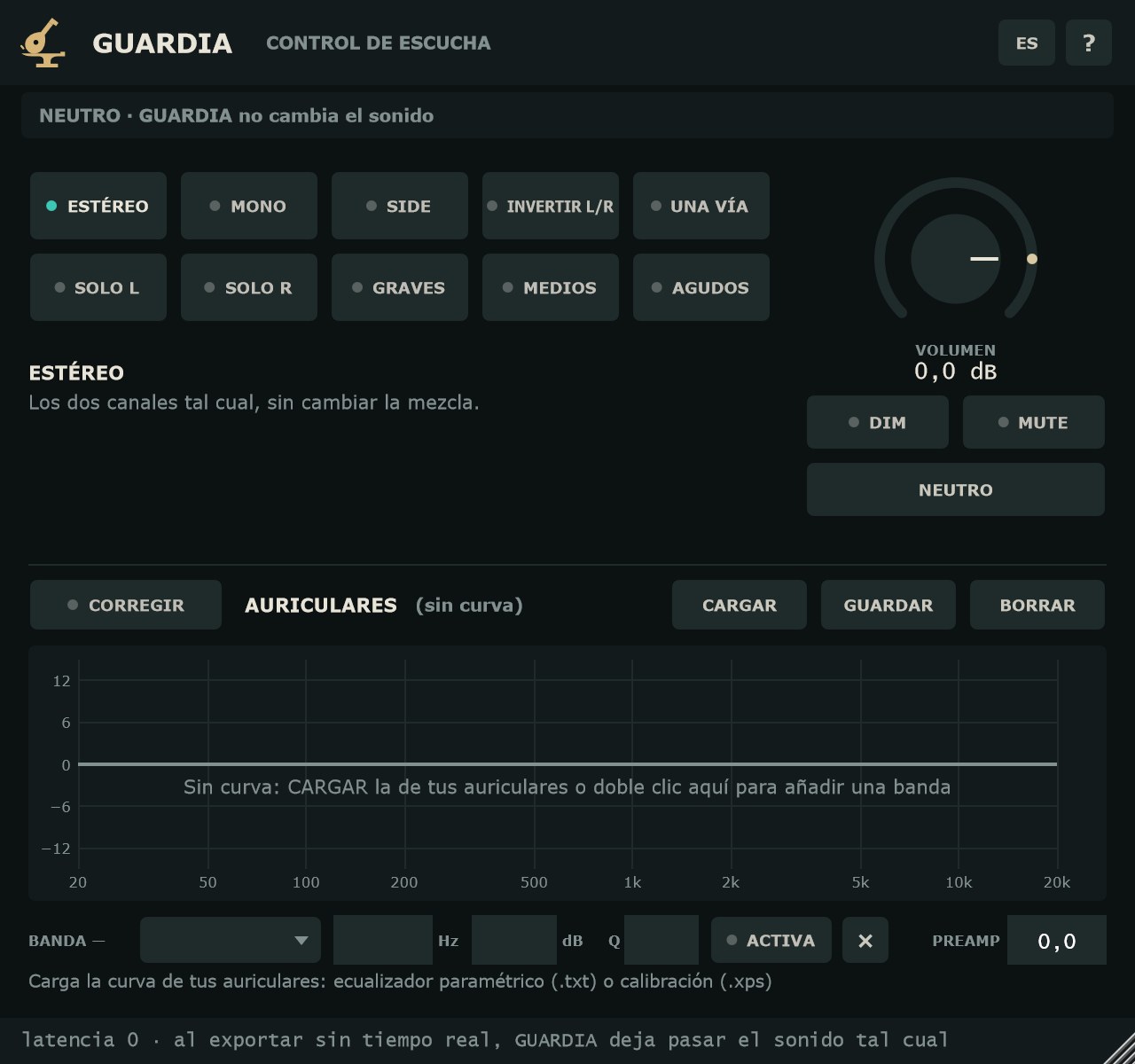
GUARDIA es un controlador de monitores dentro del DAW. Va en el último inserto del bus master y cambia cómo escuchas la mezcla, no la mezcla: en mono, solo la diferencia entre canales, con los canales cambiados, solo los graves, solo los medios, solo los agudos o como en un altavoz pequeño.
Está pensado para quien no tiene un controlador físico: estudiantes, estudios caseros, quien mezcla con auriculares. Sirve en mezcla y en mastering para revisar fase, balance, graves y presencia de la voz sin salir de la sesión.
Mientras algo no está neutro, la cabecera lo avisa. Y en una exportación sin tiempo real GUARDIA deja pasar el sonido tal cual, sea cual sea el modo.
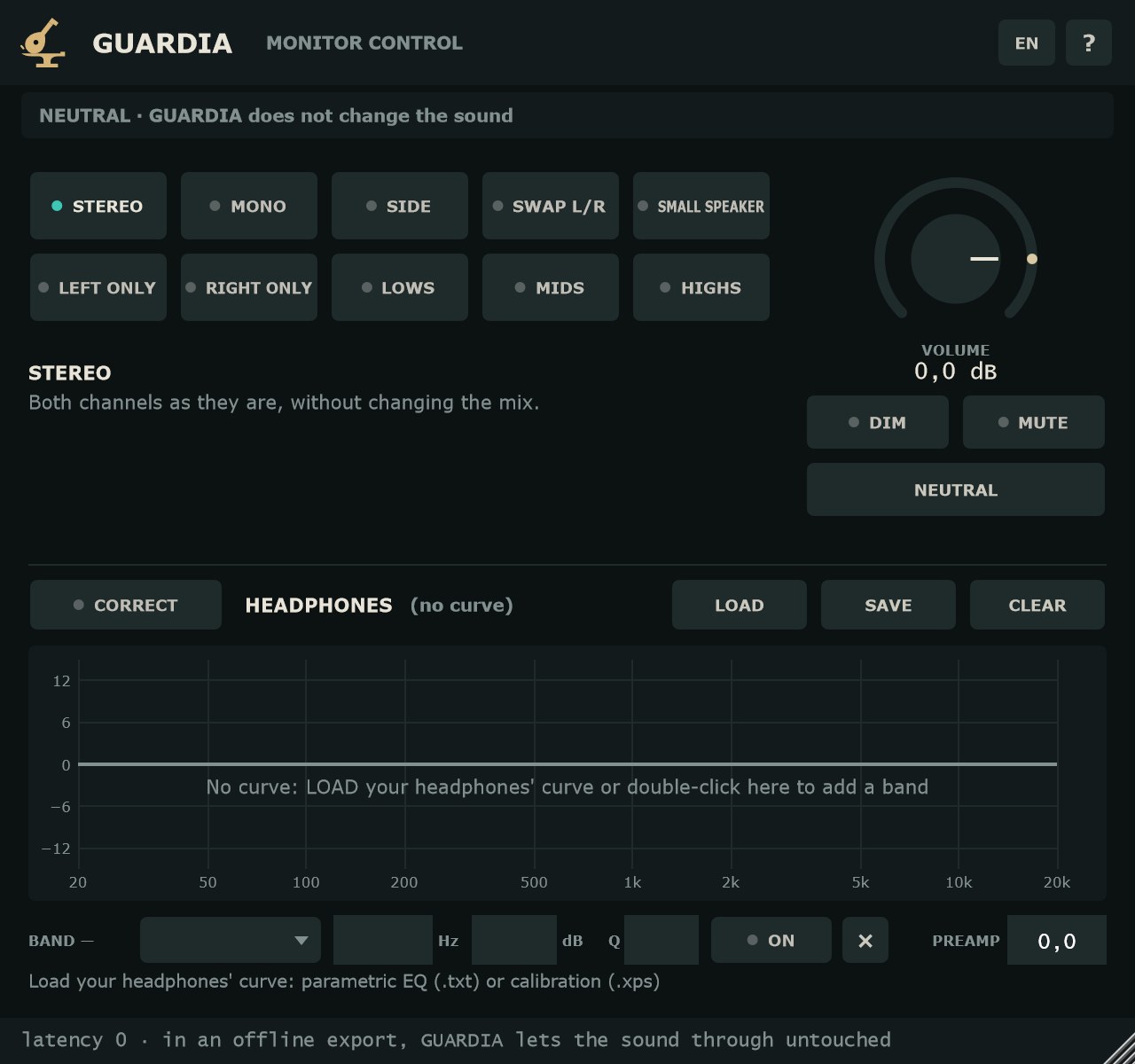
GUARDIA is a monitor controller inside your DAW. It sits on the last insert of the master bus and changes how you hear the mix, not the mix itself: in mono, only the difference between channels, with the channels swapped, only the lows, only the mids, only the highs or as on a small speaker.
It is built for people without a hardware monitor controller: students, home studios, anyone mixing on headphones. Use it while mixing or mastering to check phase, balance, low end and vocal presence without leaving the session.
Whenever something is not neutral, the header tells you. And in an offline export GUARDIA lets the sound through untouched, whatever the mode.
- Diez modos de escucha
- ESTÉREO, MONO, SIDE, INVERTIR L/R, SOLO L, SOLO R, GRAVES, MEDIOS, AGUDOS y UNA VÍA. Uno a la vez, con un fundido de 20 ms entre ellos: sin chasquidos.
- Neutro exacto
- En ESTÉREO, sin DIM ni MUTE, a 0 dB y sin corrección, la salida es la entrada bit a bit. Latencia cero.
- Protección al exportar
- Aviso permanente en la cabecera y paso directo en la exportación sin tiempo real.
- Corrección de auriculares
- Carga la curva de tus auriculares (ecualizador paramétrico en texto .txt o calibración .xps) o edítala a mano: hasta 12 filtros y preamp.
- Ten listening modes
- STEREO, MONO, SIDE, SWAP L/R, LEFT ONLY, RIGHT ONLY, LOWS, MIDS, HIGHS and SMALL SPEAKER. One at a time, with a 20 ms crossfade between them: no clicks.
- Exact neutral
- In STEREO, with no DIM or MUTE, at 0 dB and no correction, the output is the input, bit for bit. Zero latency.
- Export protection
- A permanent warning in the header, and a straight pass-through in offline exports.
- Headphone correction
- Load your headphones' curve (parametric EQ as .txt text or a .xps calibration file) or edit it by hand: up to 12 filters plus preamp.
Modos de escuchaListening modes
Los modos están en una rejilla de botones; se elige uno y los demás se apagan. Al pasar el ratón por encima, cada botón explica qué hace. Todos salen por los dos lados (L y R).
The modes sit in a grid of buttons; pick one and the others turn off. Hover over a button to see what it does. Every mode plays on both sides (L and R).
- ESTÉREO
- Los dos canales tal cual. Es el modo de serie.
- MONO
- (L + R) / 2 en los dos lados, como en un celular o un altavoz de bar. Si algo desaparece o suena hueco, hay un problema de fase. Es también el MID: por eso no hay un modo MID aparte.
- SIDE
- (L − R) / 2 en los dos lados: lo que se pierde en mono. La voz y el bajo centrados desaparecen.
- INVERTIR L/R
- Canales cambiados. Si la mezcla sigue tirando al mismo lado, la culpa es de la sala o de los altavoces.
- SOLO L / SOLO R
- Ese canal por los dos lados, centrado. Sirve igual con auriculares.
- GRAVES
- El mono por un paso bajo Linkwitz-Riley de 4.º orden a 120 Hz: el bajo y el bombo, sin nada más.
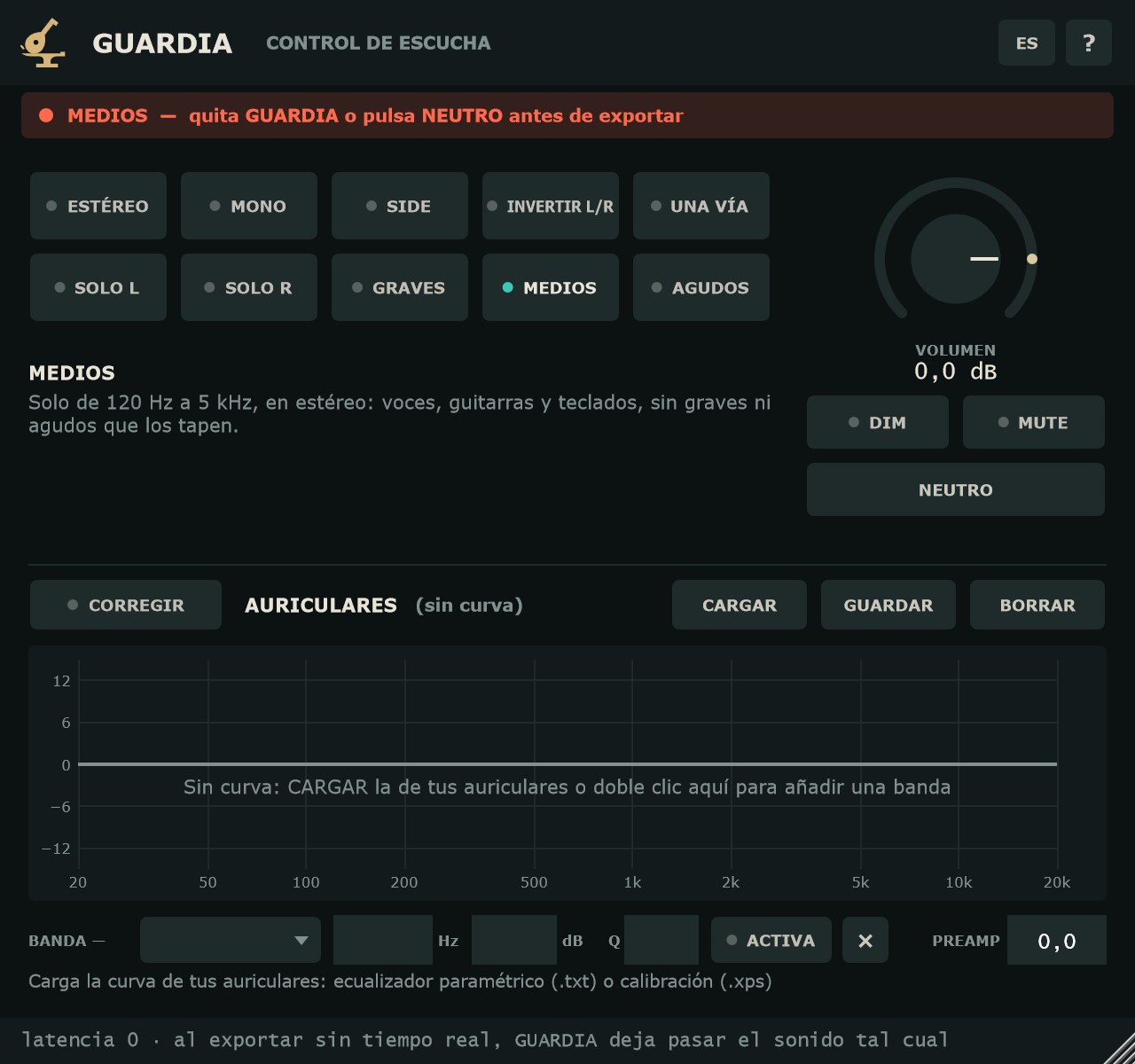
- MEDIOS
- Cada canal de 120 Hz a 5 kHz (mismos cortes de 4.º orden), en estéreo: voces, guitarras y teclados, sin graves ni agudos que los tapen.
- AGUDOS
- Cada canal por encima de 5 kHz, en estéreo: platos, eses, brillo y ruido que se esconden en la mezcla.
- UNA VÍA
- Mono de 200 Hz (paso alto de 4.º orden) a 5 kHz (paso bajo de 2.º orden), como un altavoz pequeño: ¿se entiende la voz?, ¿se sigue oyendo el bajo?
- STEREO
- Both channels as they are. The default mode.
- MONO
- (L + R) / 2 on both sides, like a phone or a bar speaker. If something disappears or sounds hollow, there is a phase problem. This is also MID, which is why there is no separate MID mode.
- SIDE
- (L − R) / 2 on both sides: what mono loses. A centred vocal and bass disappear.
- SWAP L/R
- Channels swapped. If the mix still leans to the same side, the room or the speakers are to blame.
- LEFT ONLY / RIGHT ONLY
- That channel on both sides, centred. Works the same on headphones.
- LOWS
- The mono sum through a 4th-order Linkwitz-Riley low-pass at 120 Hz: bass and kick, nothing else.
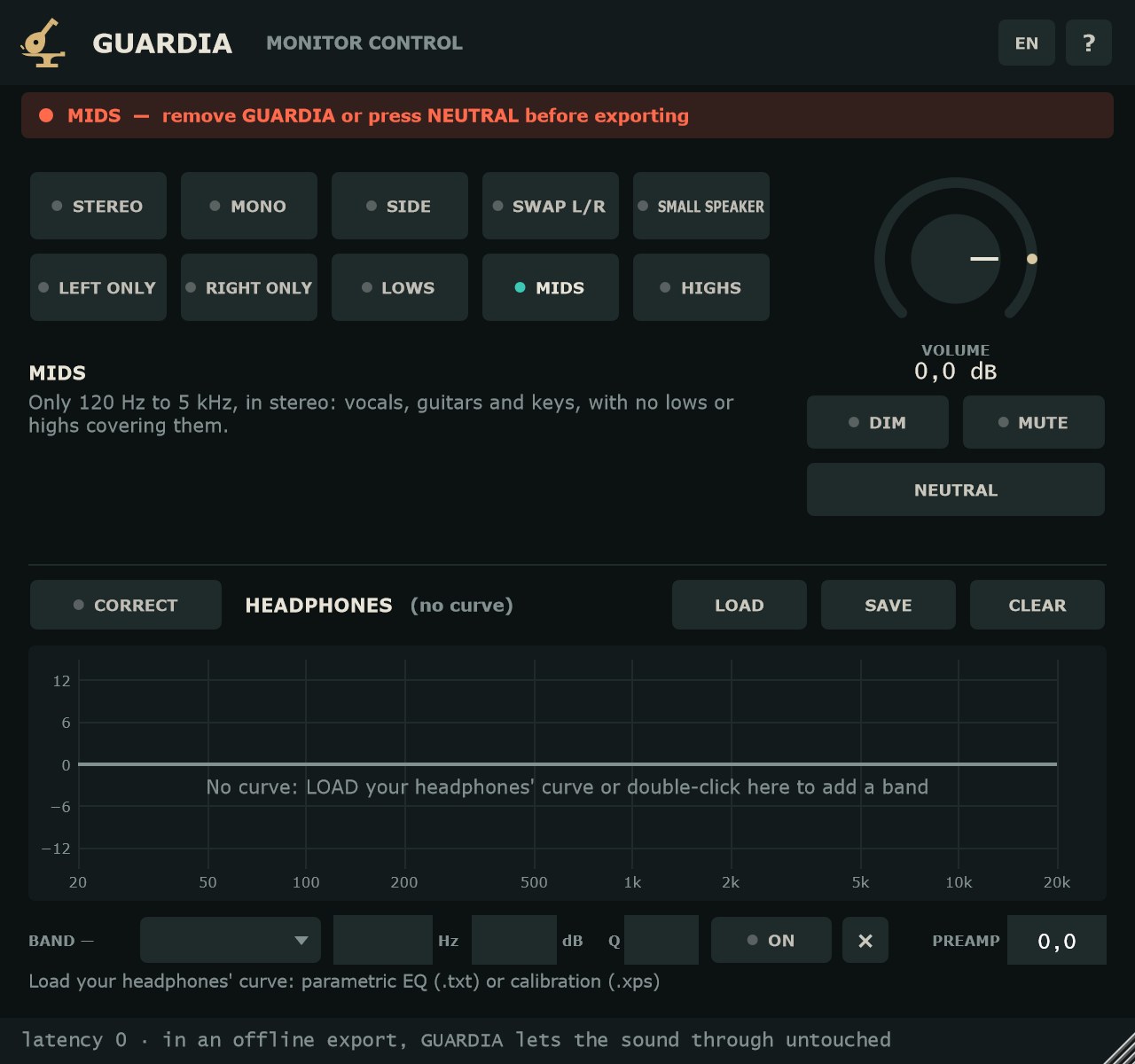
- MIDS
- Each channel from 120 Hz to 5 kHz (same 4th-order crossovers), in stereo: vocals, guitars and keys, with no lows or highs covering them.
- HIGHS
- Each channel above 5 kHz, in stereo: cymbals, sibilance, air and noise hiding in the mix.
- SMALL SPEAKER
- Mono from 200 Hz (4th-order high-pass) to 5 kHz (2nd-order low-pass), like a small speaker: is the vocal clear? Can you still hear the bass?
Volumen, DIM, MUTE y NEUTROVolume, DIM, MUTE and NEUTRAL
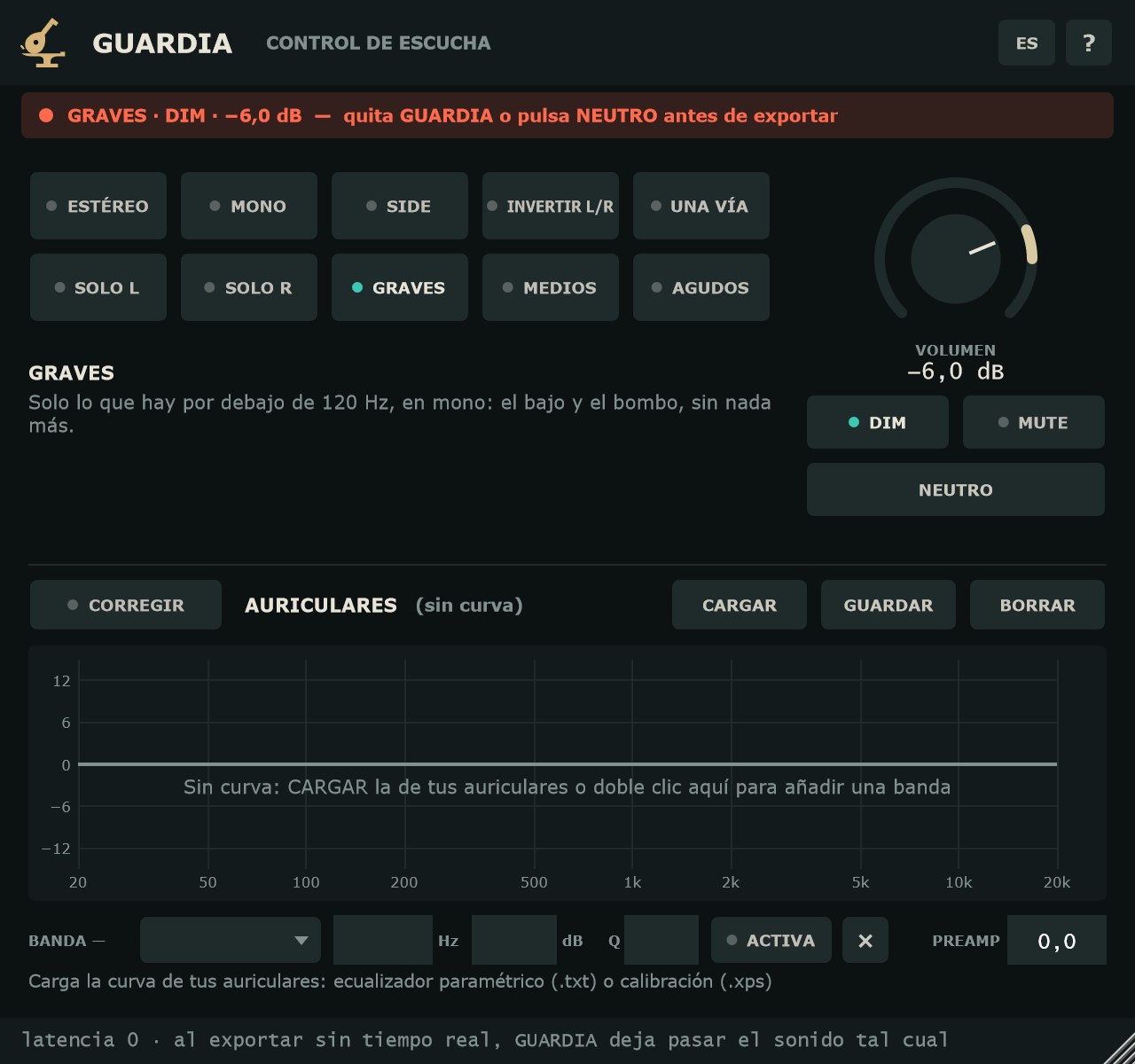
- VOLUMEN
- Volumen de escucha, de −60 a +12 dB; de serie, 0 dB. Arrastrar para moverlo, Shift + arrastrar para el ajuste fino, doble clic para volver a 0 dB.
- DIM
- Baja 20 dB, para hablar o descansar sin perder dónde estaba el volumen. Se apaga con otro clic.
- MUTE
- Silencio.
- NEUTRO
- Lo pone todo de serie de un clic: ESTÉREO, sin DIM ni MUTE, 0 dB y la corrección de auriculares apagada (la curva se queda cargada). GUARDIA deja de cambiar el sonido.
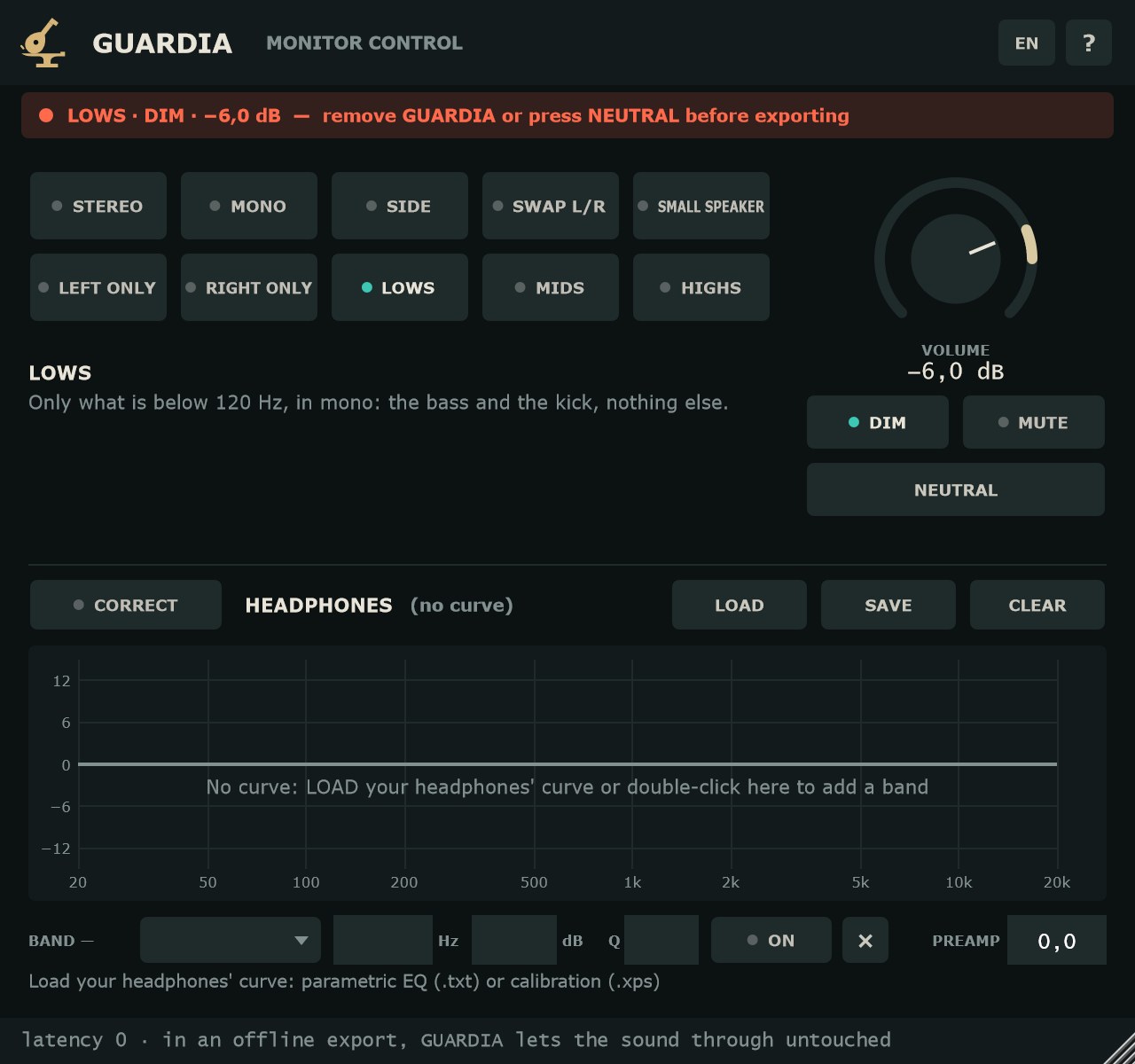
- VOLUME
- Listening volume, from −60 to +12 dB; default 0 dB. Drag to move it, Shift + drag for fine control, double-click to return to 0 dB.
- DIM
- Lowers 20 dB, to talk or rest without losing your volume setting. Click again to turn it off.
- MUTE
- Silence.
- NEUTRAL
- Resets everything in one click: STEREO, no DIM or MUTE, 0 dB and headphone correction off (the curve stays loaded). GUARDIA stops changing the sound.
El volumen también cuenta para el aviso: en el master, cualquier valor distinto de 0 dB acabaría en la exportación.
Volume counts for the warning too: on the master, any value other than 0 dB would end up in the export.
El aviso de exportaciónThe export warning
En neutro, la cabecera dice en gris «NEUTRO · GUARDIA no cambia el sonido». En cuanto algo cambia (un modo, DIM, MUTE, la corrección o el volumen), se enciende un punto de aviso con lo que está activo, por ejemplo «GRAVES · DIM · −6.0 dB — quita GUARDIA o pulsa NEUTRO antes de exportar».
En una exportación sin tiempo real, GUARDIA deja pasar el sonido tal cual, sea cual sea el modo. Las exportaciones en tiempo real no se pueden detectar: por eso el aviso está siempre a la vista. La regla es sencilla: antes de exportar, quita GUARDIA o pulsa NEUTRO.
When neutral, the header reads in grey “NEUTRAL · GUARDIA does not change the sound”. As soon as something changes (a mode, DIM, MUTE, correction or volume), a warning dot lights up with what is active, for example “LOWS · DIM · −6.0 dB — remove GUARDIA or press NEUTRAL before exporting”.
In an offline export, GUARDIA lets the sound through untouched, whatever the mode. Real-time exports cannot be detected, which is why the warning is always on screen. The rule is simple: before exporting, remove GUARDIA or press NEUTRAL.
Corrección de auricularesHeadphone correction
El panel AURICULARES aplica una curva de corrección a tus auriculares: hasta 12 filtros iguales en los dos canales, más un preamp. Va al final de la cadena, después del modo y del volumen, con latencia cero. GUARDIA no incluye curvas de modelos: cada uno carga la suya.
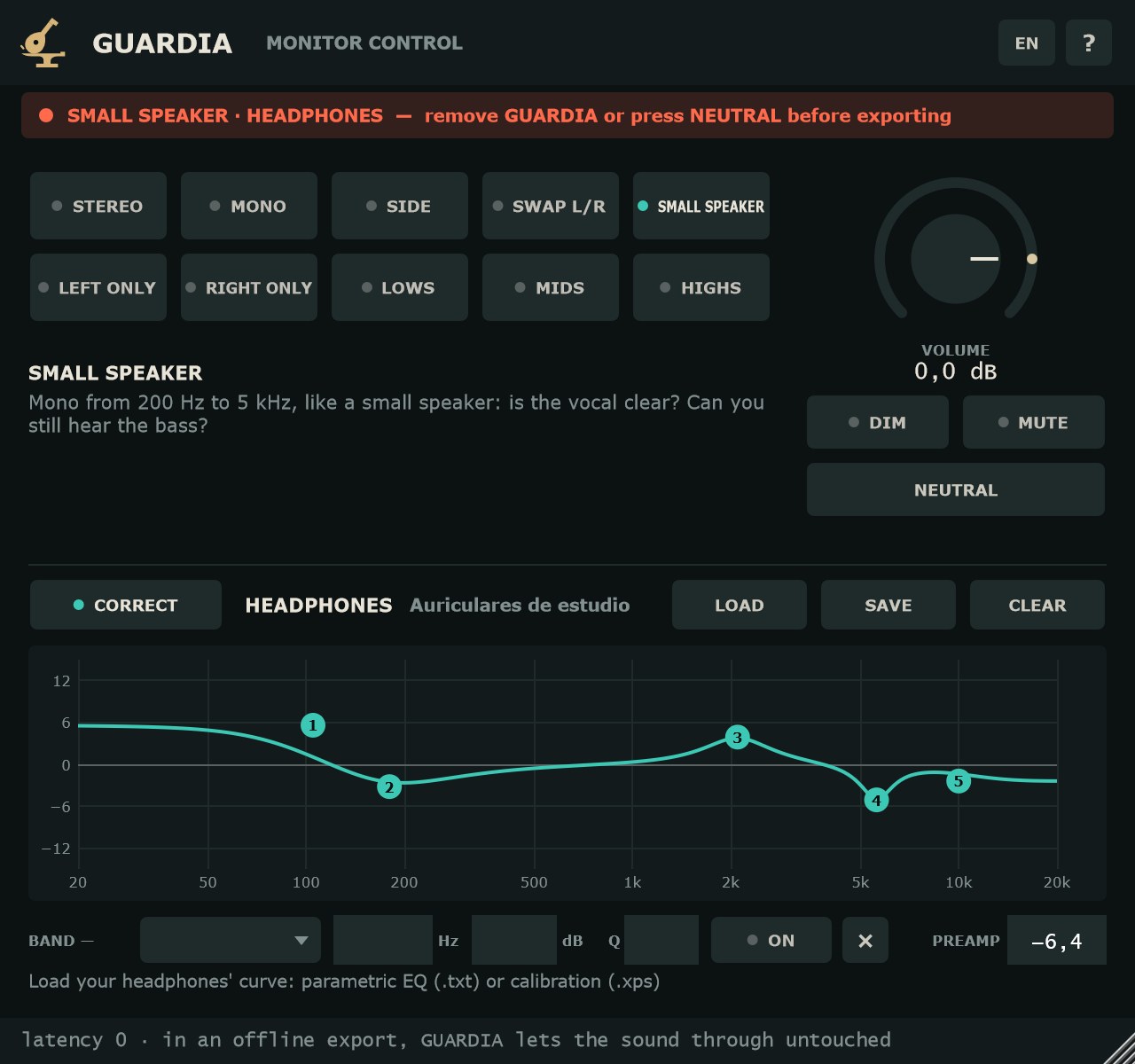
The HEADPHONES panel applies a correction curve to your headphones: up to 12 filters, the same on both channels, plus a preamp. It sits at the end of the chain, after the mode and volume, with zero latency. GUARDIA does not ship model curves: you load your own.
- CORREGIR
- Enciende y apaga la curva, con un fundido de 20 ms. Es solo para escuchar: también enciende el aviso de exportar, y NEUTRO la apaga.
- CARGAR
- Abre la curva de tus auriculares: ecualizador paramétrico en texto (.txt, el formato de AutoEQ y Equalizer APO) o archivo de calibración (.xps). Del .txt se leen las líneas
Preamp:yFilter N: ON PK Fc … Hz Gain … dB Q …; los filtros en OFF, la coma decimal y los saltos de línea de Windows también valen. Si una línea no sirve, se dice cuál y por qué. Del .xps se descartan las bandas a 0 dB y el preamp se calcula para no pasar de 0 dB. - GUARDAR
- Guarda la curva como ecualizador paramétrico en texto.
- BORRAR
- Quita la curva.
- Gráfica
- De 20 Hz a 20 kHz y ±15 dB. Arrastrar un punto = frecuencia y ganancia; rueda = Q; doble clic = banda nueva (campana); clic derecho = tipo (Campana PK, Shelf de graves LSC, Shelf de agudos HSC), Activa o Borrar. La gráfica dibuja los filtros sin el preamp.
- BANDA n
- La fila de la banda elegida: tipo, Hz (acepta «k», p. ej. 2.5k), dB, Q, ACTIVA y × para borrarla.
- PREAMP
- Ganancia general de la curva. Si la curva con el preamp pasa de 0 dB, la gráfica avisa «sube hasta +x dB · baja el PREAMP».
- CORRECT
- Turns the curve on and off, with a 20 ms crossfade. It is for listening only: it also lights the export warning, and NEUTRAL turns it off.
- LOAD
- Opens your headphones' curve: parametric EQ as text (.txt, the AutoEQ and Equalizer APO format) or a calibration file (.xps). From a .txt it reads the
Preamp:andFilter N: ON PK Fc … Hz Gain … dB Q …lines; OFF filters, decimal commas and Windows line endings are fine. If a line can't be used, it tells you which one and why. From a .xps, 0 dB bands are skipped and the preamp is set so the curve stays at or below 0 dB. - SAVE
- Saves the curve as parametric EQ text.
- CLEAR
- Removes the curve.
- Graph
- 20 Hz to 20 kHz, ±15 dB. Drag a point = frequency and gain; wheel = Q; double-click = new band (bell); right-click = type (Bell PK, Low shelf LSC, High shelf HSC), On or Delete. The graph draws the filters without the preamp.
- BAND n
- The selected band's row: type, Hz (takes “k”, e.g. 2.5k), dB, Q, ON and × to delete it.
- PREAMP
- Overall gain of the curve. If the curve plus preamp goes above 0 dB, the graph warns “peaks at +x dB · lower the PREAMP”.
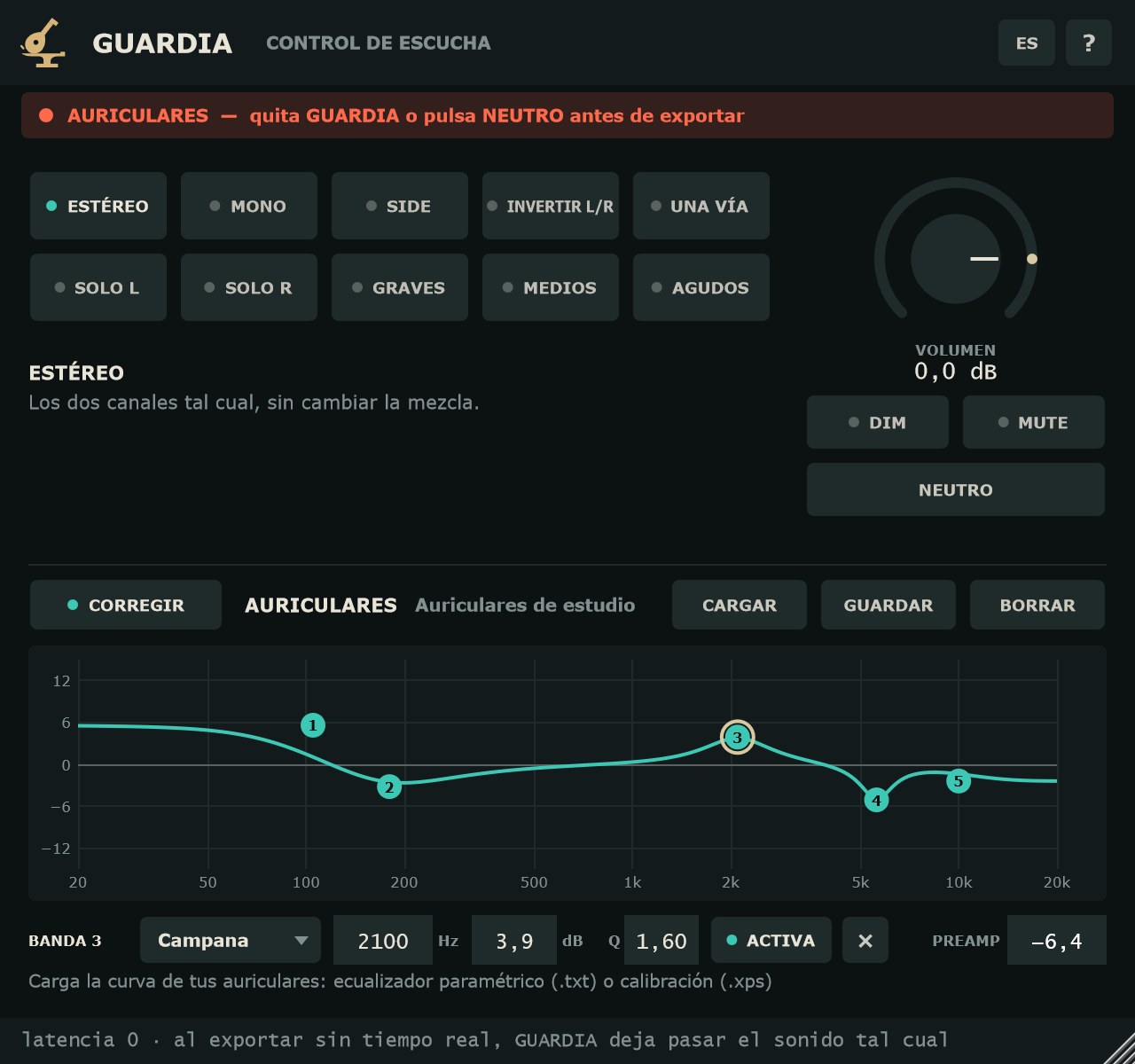
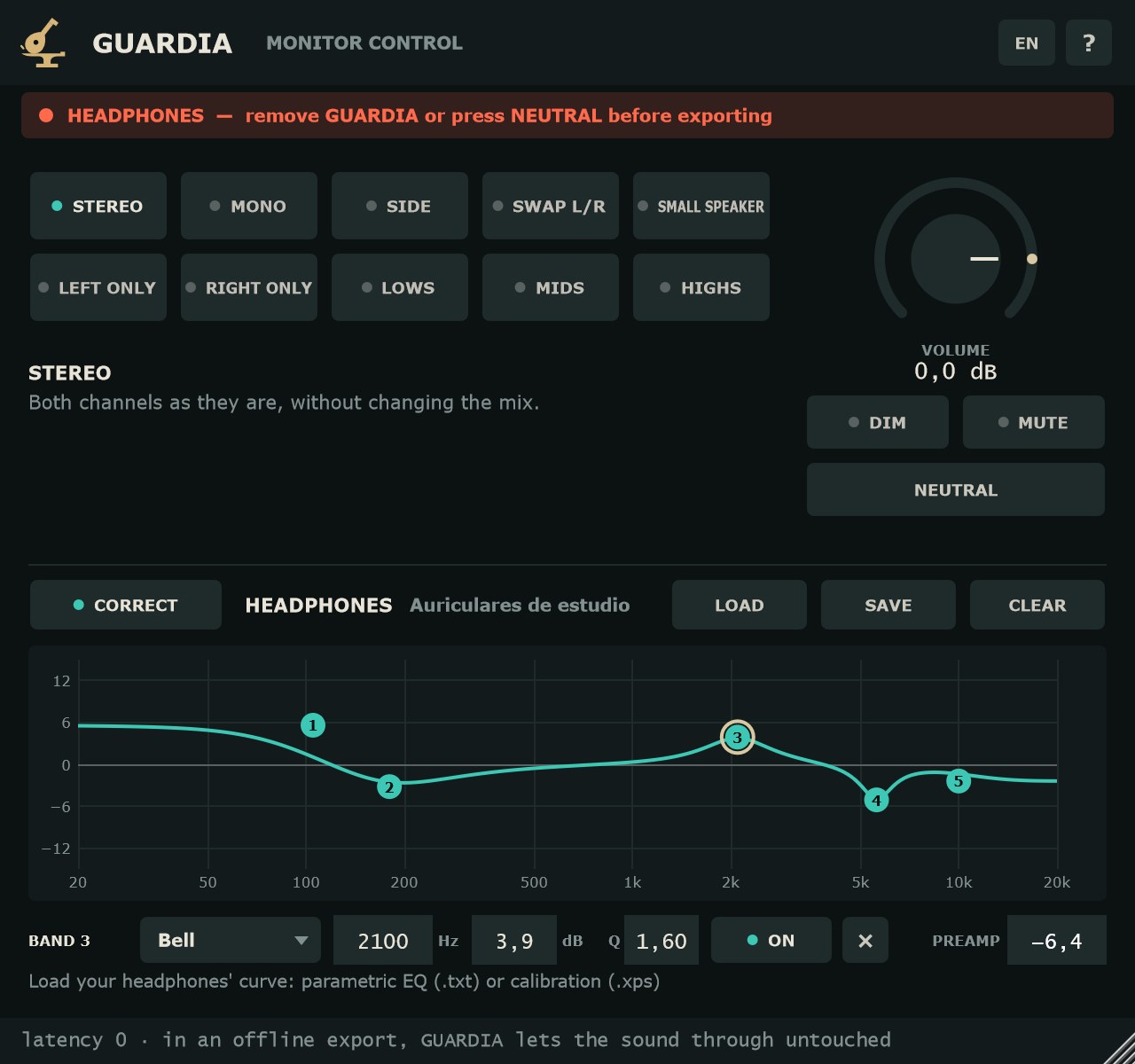
Rangos de la fila: frecuencia de 10 Hz a 24 kHz, ganancia de −30 a +30 dB, Q de 0.1 a 20, PREAMP de −30 a +30 dB. La curva y su nombre se guardan con la sesión.
Row ranges: frequency 10 Hz to 24 kHz, gain −30 to +30 dB, Q 0.1 to 20, PREAMP −30 to +30 dB. The curve and its name are saved with the session.
Idioma y ayudaLanguage and help
El botón ES / EN de la cabecera cambia el idioma al momento; de serie, GUARDIA usa el del sistema y recuerda tu elección. Los nombres de los parámetros que ve el DAW salen en el idioma del plugin al cargarlo. El botón ? abre una ayuda breve.
The ES / EN button in the header switches language instantly; by default GUARDIA follows the system language and remembers your choice. Parameter names shown to the DAW use the plugin's language at load time. The ? button opens a short help note.
Paso a paso: revisar una mezclaStep by step: checking a mix
- Pon GUARDIA en el último inserto del bus master, detrás de todo lo demás.
- Pulsa MONO. Si la voz o un sintetizador pierden cuerpo o desaparecen, revisa la fase o los efectos estéreo de esa pista.
- Pulsa SIDE para oír solo lo ancho: reverbs, dobles, paneos. Comprueba que no haya graves ahí.
- Pulsa GRAVES y compara el bajo con el bombo, sin nada más encima. Después MEDIOS y AGUDOS para revisar voces y eses.
- Pulsa UNA VÍA: si la voz se entiende y el bajo se intuye, la mezcla aguantará en un altavoz pequeño.
- Usa DIM cuando hables con alguien en el estudio; vuelve con otro clic.
- Antes de exportar, pulsa NEUTRO o quita GUARDIA. La cabecera debe decir «NEUTRO · GUARDIA no cambia el sonido».
- Put GUARDIA on the last insert of the master bus, after everything else.
- Press MONO. If the vocal or a synth loses body or disappears, check that track's phase or stereo effects.
- Press SIDE to hear only the width: reverbs, doubles, panning. Make sure there is no low end in there.
- Press LOWS and compare bass and kick with nothing on top. Then MIDS and HIGHS to check vocals and sibilance.
- Press SMALL SPEAKER: if the vocal is clear and the bass still comes through, the mix will hold up on a small speaker.
- Use DIM when you talk to someone in the room; click again to come back.
- Before exporting, press NEUTRAL or remove GUARDIA. The header should read “NEUTRAL · GUARDIA does not change the sound”.
FormatosFormats
VST3 en Windows, macOS y Linux; AU y AAX en macOS. Entrada y salida estéreo (también mono a mono). Latencia cero.
VST3 on Windows, macOS and Linux; AU and AAX on macOS. Stereo in and out (mono to mono also works). Zero latency.
Preguntas frecuentesFAQ
¿Es gratis de verdad?Is it really free?
Sí. Sin serie, sin aviso y sin límite de tiempo.
Yes. No serial, no nag screen and no time limit.
¿Dónde lo pongo?Where do I put it?
En el último inserto del bus master, para que lo que oyes sea la mezcla completa, con todo el procesado.
On the last insert of the master bus, so what you hear is the full mix with all its processing.
¿Y si exporto con un modo puesto?What if I export with a mode on?
En una exportación sin tiempo real, GUARDIA deja pasar el sonido tal cual. En una exportación en tiempo real no puede saberlo: por eso el aviso de la cabecera está siempre a la vista. Pulsa NEUTRO o quita GUARDIA antes de exportar.
In an offline export, GUARDIA lets the sound through untouched. In a real-time export it has no way to know, which is why the header warning is always visible. Press NEUTRAL or remove GUARDIA before exporting.
¿En neutro cambia algo el sonido?Does it change the sound when neutral?
No. En neutro la salida es la entrada bit a bit, sin latencia.
No. When neutral, the output is the input bit for bit, with no latency.
¿De dónde saco la curva de mis auriculares?Where do I get my headphones' curve?
Sirve cualquier curva de ecualizador paramétrico en texto con filtros PK, LSC y HSC, como las que publica AutoEQ para muchos modelos, o un archivo de calibración .xps. Las curvas de ecualizador gráfico no valen: usa la versión paramétrica.
Any parametric EQ curve in text form with PK, LSC and HSC filters works, such as the ones AutoEQ publishes for many models, or a .xps calibration file. Graphic EQ curves won't work: use the parametric version.
¿Cuánta CPU usa?How much CPU does it use?
El consumo de CPU es muy bajo.
CPU use is very low.