 Martillolaud
InstalaciónInstallation
- Descarga el zip de tu sistema y descomprímelo.
- En macOS, abre
Aldaba.pkgy sigue los pasos: instala Aldaba en AU, VST3 y AAX. - En Windows y Linux, copia
Aldaba.vst3en la carpeta de plugins VST3:
WindowsC:\Program Files\Common Files\VST3· Linux~/.vst3
Para Pro Tools en Windows, copiaAldaba.aaxpluginenC:\Program Files\Common Files\Avid\Audio\Plug-Ins - Abre tu DAW y vuelve a buscar plugins si no aparece. Aldaba está bajo el fabricante Martillolaud.
- Download the zip for your system and unzip it.
- On macOS, open
Aldaba.pkgand follow the steps: it installs Aldaba as AU, VST3 and AAX. - On Windows and Linux, copy
Aldaba.vst3to your VST3 plugin folder:
WindowsC:\Program Files\Common Files\VST3· Linux~/.vst3
For Pro Tools on Windows, copyAldaba.aaxplugintoC:\Program Files\Common Files\Avid\Audio\Plug-Ins - Open your DAW and rescan plugins if it does not show up. Aldaba is listed under the manufacturer Martillolaud.
Activar la licenciaActivating your license
Sin licencia, Aldaba funciona completa y el audio no se corta. Al abrir la ventana sale un aviso que se puede cerrar a los pocos segundos, una vez por instancia. Para quitarlo haz clic en DEMO y escribe el correo de la compra y la serie que te llegó. No hace falta internet.
Without a license Aldaba is fully working and the audio is never interrupted. Opening its window shows a notice you can close after a few seconds, once per instance. To remove it click DEMO and enter your purchase email and the serial you received. No internet needed.
El visorThe display
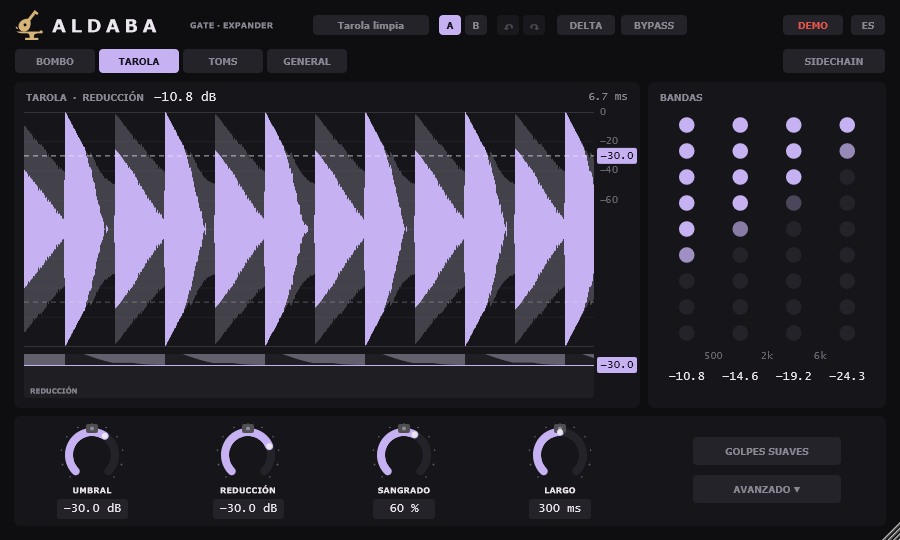
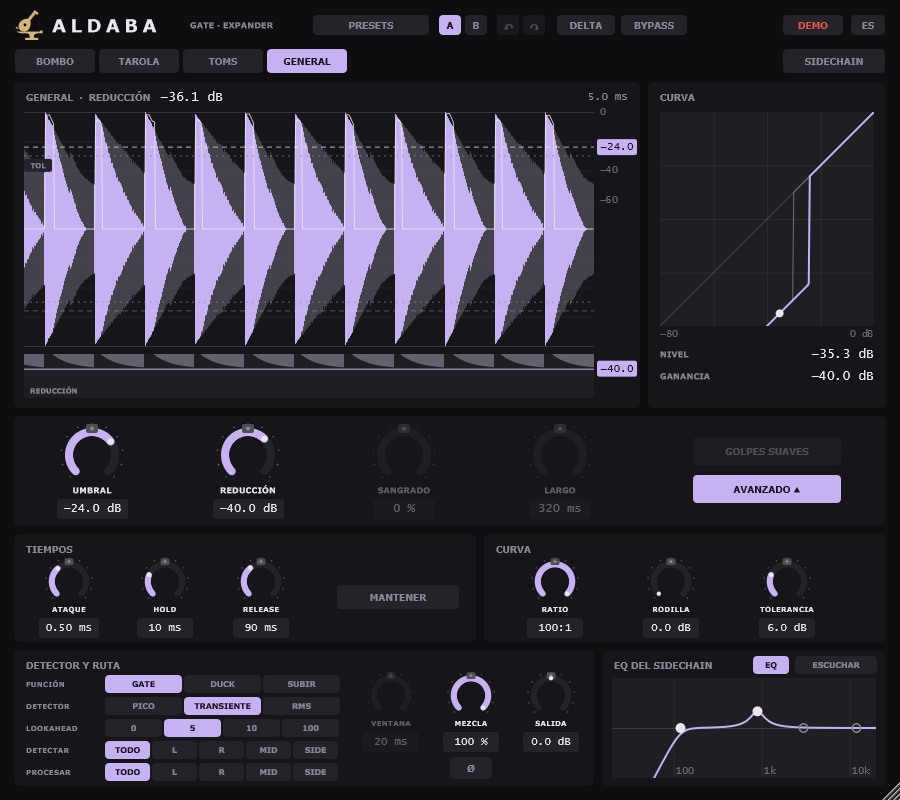
En gris lo que entra y en lila lo que sale. Con sidechain o su EQ, una línea fina enseña lo que oye el detector. Arrastra la línea de UMBRAL para mover el nivel de apertura y la etiqueta TOL para separar la TOLERANCIA. Abajo ves cuánto se baja en cada instante; arrastra esa línea para cambiar la REDUCCIÓN. Arriba, el modo, la reducción de ahora y la latencia.
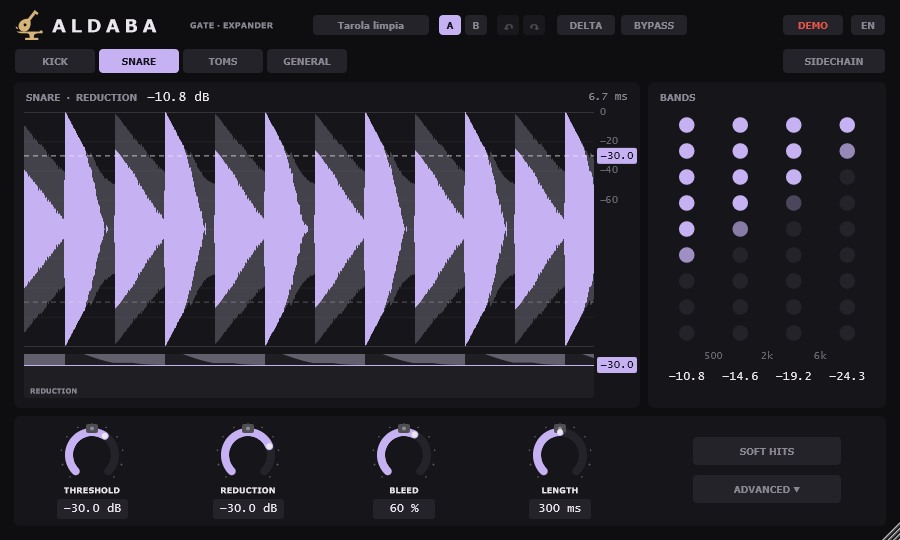
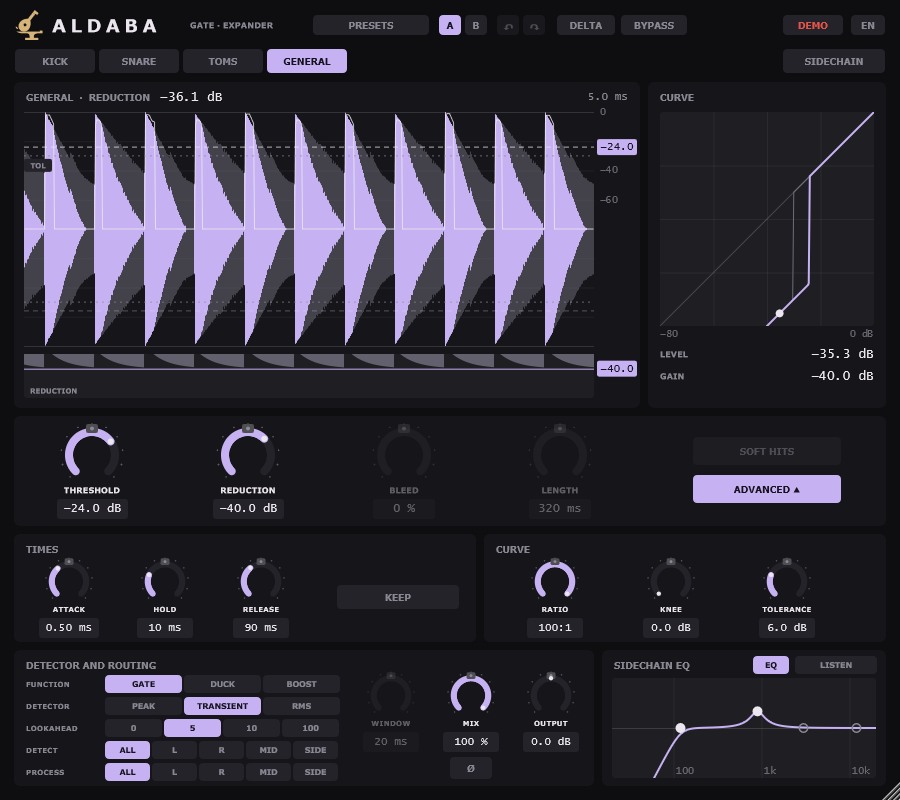
Grey is what comes in and lilac is what comes out. With sidechain or its EQ, a thin line shows what the detector hears. Drag the THRESHOLD line to move the opening level and the TOL tag to pull TOLERANCE apart. Below you see how much is lowered at each moment; drag that line to change the REDUCTION. At the top, the mode, the current reduction and the latency.
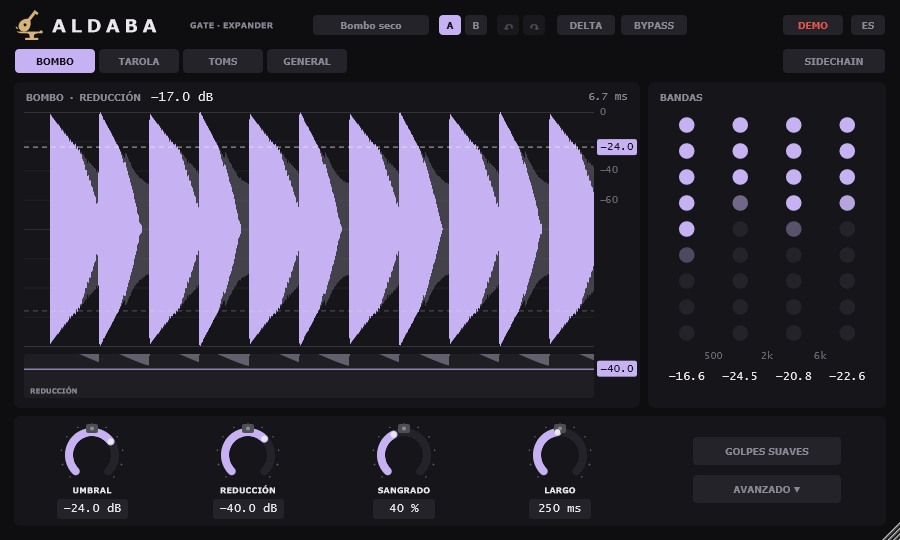
A la derecha, en GENERAL, CURVA dibuja la curva de la función: abajo lo que entra, a la izquierda lo que sale, y el punto es el nivel de ahora. En los modos de batería ese lugar lo ocupa BANDAS: una columna de puntos por banda, de graves a agudos, que se apagan de abajo hacia arriba conforme la banda cierra. Debajo, los dB de cada banda.
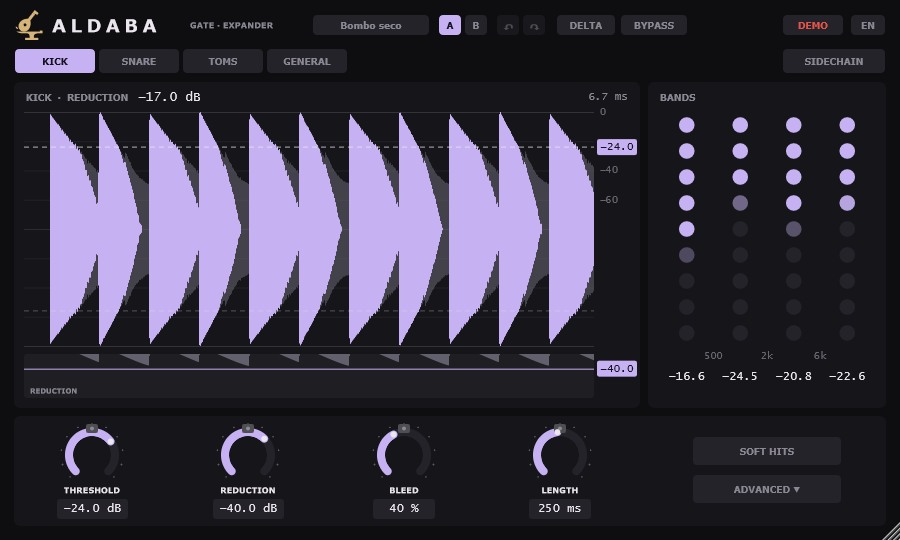
On the right, in GENERAL, CURVE draws the function's curve: what comes in along the bottom, what comes out on the left, and the dot is the level now. In the drum modes BANDS takes its place: one column of dots per band, from lows to highs, going out from the bottom up as the band closes. Below, the dB of each band.
ModosModes
- Bombo
- Abre con sus golpes y cierra por bandas.
- Tarola
- Abre con sus golpes, deja fuera el bombo sangrado y cierra por bandas.
- Toms
- Abre con sus golpes y cierra por bandas.
- General
- Para otras fuentes: función, tiempos y curva a mano.
- Kick
- Its hits open it and it closes band by band.
- Snare
- Its hits open it, kick bleed stays out, and it closes band by band.
- Toms
- Their hits open it and it closes band by band.
- General
- For other sources: function, times and curve by hand.
En los modos de batería manda el detector de cada modo: lo que no actúa sale apagado en AVANZADO y conserva sus valores. En GENERAL salen apagados SANGRADO, LARGO y GOLPES SUAVES.
In the drum modes each mode's detector is in charge: whatever does not act is greyed out in ADVANCED and keeps its values. In GENERAL, BLEED, LENGTH and SOFT HITS are greyed out.
MandosControls
- Umbral
- De −80 a 0 dBFS. Donde actúa. GATE baja lo que queda por debajo; DUCK baja lo que pasa por encima; SUBIR sube lo que pasa por encima.
- Reducción
- De 0 a −120 dB. Lo más que baja la señal en GATE y en DUCK. Al mínimo es silencio real. En SUBIR, su lugar lo ocupa SUBIDA, de 0 a 24 dB: lo más que sube la señal sobre el umbral.
- Sangrado
- De 0 a 100 %. Cuánto antes cierran los agudos que los graves en la caída. Solo en los modos de batería.
- Largo
- De 10 a 4000 ms. Duración de la caída tras cada golpe. Solo en los modos de batería, donde sustituye a RELEASE.
- Golpes suaves
- Deja pasar los golpes flojos del propio instrumento. Solo en los modos de batería.
- Sidechain
- Apagado: escucha la propia señal. Encendido: escucha la entrada de sidechain. Sin nada conectado, avisa en rojo y usa la propia señal. Conectada pero muda 2 s con la pista sonando, avisa en rojo y sigue escuchando ese silencio.
- Delta
- Escuchar solo lo que Aldaba quita.
- Bypass
- Deja pasar la señal sin tocarla, con la misma latencia.
- Threshold
- From −80 to 0 dBFS. Where it acts. GATE lowers what stays below it; DUCK lowers what goes over it; BOOST raises what goes over it.
- Reduction
- From 0 to −120 dB. The most the signal goes down in GATE and DUCK. At the bottom it is true silence. In the BOOST function, the BOOST knob takes its place, from 0 to 24 dB: the most the signal rises above the threshold.
- Bleed
- From 0 to 100 %. How much sooner the highs close than the lows during the decay. Drum modes only.
- Length
- From 10 to 4000 ms. Length of the decay after each hit. Drum modes only, where it replaces RELEASE.
- Soft hits
- Lets the instrument's own soft hits through. Drum modes only.
- Sidechain
- Off: it listens to its own signal. On: it listens to the sidechain input. With nothing connected, it warns in red and uses its own signal. Connected but silent for 2 s while the track plays, it warns in red and keeps listening to that silence.
- Delta
- Listen only to what Aldaba takes away.
- Bypass
- Lets the signal through untouched, with the same latency.
Arrastra los mandos; con Shift, más fino. La rueda mueve un paso y el doble clic deja escribir el valor.
Drag the knobs; hold Shift for finer moves. The wheel moves one step and a double-click lets you type the value.
AvanzadoAdvanced
AVANZADO abre los tiempos, la curva, el detector y el EQ del sidechain debajo de la vista rápida. Tiempos, curva, función, detector y LOOKAHEAD son para GENERAL: en los modos de batería no actúan.
ADVANCED opens the times, the curve, the detector and the sidechain EQ below the quick view. Times, curve, function, detector and LOOKAHEAD are for GENERAL: they do not act in the drum modes.
TiemposTimes
- Ataque
- De 0.02 a 100 ms. Lo que tarda en abrir.
- Hold
- De 0 a 1000 ms. Tiempo mínimo abierto, contado desde la apertura.
- Release
- De 5 a 4000 ms. Lo que tarda en cerrar.
- Mantener
- El hold cuenta tras la caída: vuelve a empezar mientras la señal siga sobre el umbral.
- Attack
- From 0.02 to 100 ms. How long it takes to open.
- Hold
- From 0 to 1000 ms. Minimum time open, counted from the opening.
- Release
- From 5 to 4000 ms. How long it takes to close.
- Keep
- The hold counts after the fall: it starts again for as long as the signal stays above the threshold.
CurvaCurve
- Ratio
- De 1:1 a 100:1. Cuánto baja por cada dB que la señal pasa del umbral. Alto: gate. Bajo: expander. En SUBIR va de 1:1 a 10:1: cuánto sube por cada dB sobre el umbral.
- Rodilla
- De 0 a 24 dB. Suaviza la entrada en el umbral.
- Tolerancia
- De 0 a 24 dB. Ya abierto, deja bajar la señal estos dB antes de cerrar. Solo en GATE.
- Ratio
- From 1:1 to 100:1. How much it lowers for each dB past the threshold. High: gate. Low: expander. In BOOST it goes from 1:1 to 10:1: how much it rises for each dB above the threshold.
- Knee
- From 0 to 24 dB. Softens the way into the threshold.
- Tolerance
- From 0 to 24 dB. Once open, lets the signal fall this many dB before closing. GATE only.
Detector y rutaDetector and routing
- Función
- GATE baja bajo el umbral. DUCK baja sobre el umbral. SUBIR sube sobre el umbral.
- Detector
- Cómo se mide el nivel: PICO, el pico; TRANSIENTE, solo los ataques; RMS, la media, con su VENTANA de 1 a 100 ms.
- Lookahead
- 0, 5, 10 o 100 ms. Lo que se adelanta para no comerse el ataque. Es latencia.
- Detectar
- Qué parte del estéreo escucha el detector: TODO, L, R, MID o SIDE.
- Procesar
- Qué parte del estéreo se procesa: TODO, L, R, MID o SIDE.
- Mezcla
- De 0 a 100 %. Mezcla de la señal procesada con la original.
- Ø
- Invierte la fase de lo procesado.
- Salida
- De −24 a +24 dB. Ganancia final.
- Function
- GATE lowers below the threshold. DUCK lowers above it. BOOST raises above it.
- Detector
- How the level is measured: PEAK, the peak; TRANSIENT, only the attacks; RMS, the average, with its WINDOW from 1 to 100 ms.
- Lookahead
- 0, 5, 10 or 100 ms. How far it looks ahead so the attack is not lost. It adds latency.
- Detect
- Which part of the stereo image the detector listens to: ALL, L, R, MID or SIDE.
- Process
- Which part of the stereo image is processed: ALL, L, R, MID or SIDE.
- Mix
- From 0 to 100 %. Blend of the processed signal with the original.
- Ø
- Inverts the phase of the processed signal.
- Output
- From −24 to +24 dB. Final gain.
EQ del sidechainSidechain EQ
Lo que escucha el detector, no lo que suena. Tiene corte de graves, dos campanas y corte de agudos. EQ lo enciende. Haz clic en un nodo para encenderlo y arrástralo; doble clic lo apaga. En las campanas, la rueda cambia el ancho. ESCUCHAR deja oír lo que oye el detector, después del EQ.
What the detector hears, not what you hear. It has a low cut, two bells and a high cut. EQ turns it on. Click a node to turn it on and drag it; double-click turns it off. On the bells, the wheel changes the width. LISTEN lets you hear what the detector hears, after the EQ.
Presets y A/BPresets and A/B
PRESETS trae ocho de fábrica (Voz, expander suave, Guitarra ruidosa, Ducking por sidechain, Dar pegada, Bombo seco, Tarola limpia, Tarola con golpes suaves y Toms), Init, los tuyos, guardar y abrir la carpeta. Cargar un preset no toca el bypass ni DELTA. A / B guarda dos ajustes para comparar (B empieza como A) y las flechas deshacen y rehacen (Ctrl + Z, Ctrl + Y). ES / EN cambia el idioma.
PRESETS has eight factory ones (Vocal, soft expander, Noisy guitar, Sidechain ducking, Add punch, Dry kick, Clean snare, Snare with soft hits and Toms), Init, yours, save and open the folder. Loading a preset does not touch bypass or DELTA. A / B keeps two settings to compare (B starts as A) and the arrows undo and redo (Ctrl + Z, Ctrl + Y). ES / EN switches the language.
PreguntasQuestions
¿Sirve solo para batería?Is it only for drums?
No. La batería es lo primero, pero en GENERAL también es un gate y expander para otras fuentes, con presets para voz, guitarra y ducking.
No. Drums come first, but in GENERAL it is also a gate and expander for other sources, with presets for vocals, guitar and ducking.
¿Puede dispararlo otra pista?Can another track trigger it?
Sí. Manda esa pista a la entrada de sidechain de Aldaba en tu DAW y enciende SIDECHAIN.
Yes. Send that track to Aldaba's sidechain input in your DAW and turn SIDECHAIN on.
¿Tiene latencia?Does it add latency?
En GENERAL es la que marques en LOOKAHEAD, y con 0 no tiene. Los modos de batería llevan unos pocos milisegundos fijos. Aldaba se la dice al DAW y el DAW la compensa. Arriba a la derecha del visor ves cuánta es.
In GENERAL it is whatever you set in LOOKAHEAD, and at 0 there is none. The drum modes have a fixed few milliseconds. Aldaba reports it to the DAW and the DAW compensates. You can see how much at the top right of the display.
¿Funciona en Pro Tools?Does it work in Pro Tools?
Sí, en formato AAX en Windows y macOS. En Linux, Aldaba es VST3.
Yes, as AAX on Windows and macOS. On Linux, Aldaba is VST3.
Perdí mi serieI lost my serial
Escríbeme a [email protected] con el correo de la compra.
Write to [email protected] with the email you bought with.