 Martillolaud
InstalaciónInstallation
- Descarga el zip de tu sistema y descomprímelo.
- En macOS, abre
Filo.pkgy sigue los pasos: instala Filo en AU, VST3 y AAX. - En Windows y Linux, copia
Filo.vst3en la carpeta de plugins VST3:
WindowsC:\Program Files\Common Files\VST3· Linux~/.vst3
Para Pro Tools en Windows, copiaFilo.aaxpluginenC:\Program Files\Common Files\Avid\Audio\Plug-Ins - Abre tu DAW y vuelve a buscar plugins si no aparece. Filo está bajo el fabricante Martillolaud.
- Download the zip for your system and unzip it.
- On macOS, open
Filo.pkgand follow the steps: it installs Filo as AU, VST3 and AAX. - On Windows and Linux, copy
Filo.vst3to your VST3 plugin folder:
WindowsC:\Program Files\Common Files\VST3· Linux~/.vst3
For Pro Tools on Windows, copyFilo.aaxplugintoC:\Program Files\Common Files\Avid\Audio\Plug-Ins - Open your DAW and rescan plugins if it does not show up. Filo is listed under the manufacturer Martillolaud.
Activar la licenciaActivating your license
Sin licencia, Filo funciona completo y el audio no se corta. Al abrir la ventana sale un aviso que se puede cerrar a los pocos segundos, una vez por instancia. Para quitarlo pulsa DEMO y escribe el correo de la compra y la serie que te llegó. No hace falta internet.
Without a license Filo is fully working and the audio is never interrupted. Opening its window shows a notice you can close after a few seconds, once per instance. To remove it click DEMO and enter your purchase email and the serial you received. No internet needed.
El visorThe display
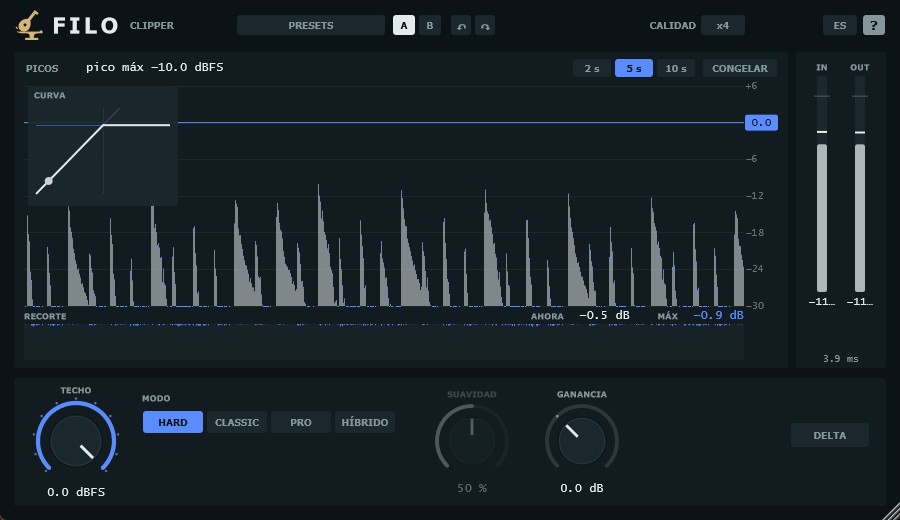
PICOS enseña el pico de cada instante, de −30 a +6 dBFS: en gris lo que sale, en azul lo que se ha cortado. Arriba, el pico máximo de la entrada. La línea del techo se puede arrastrar ahí mismo. 2 s / 5 s / 10 s cambia cuánto tiempo se ve y CONGELAR para la imagen (el audio sigue).
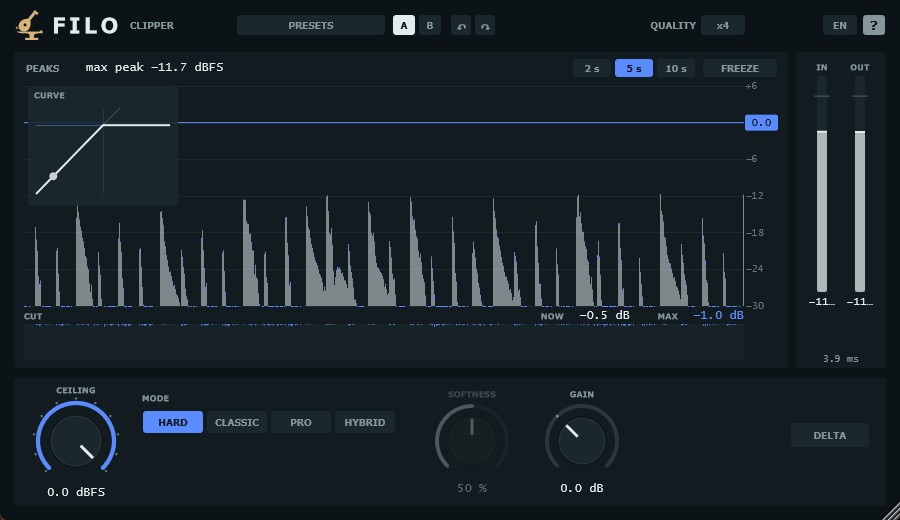
PEAKS shows the peak of each moment, from −30 to +6 dBFS: grey is what comes out, blue is what was cut. At the top, the maximum input peak. You can drag the ceiling line right there. 2 s / 5 s / 10 s sets how much time you see and FREEZE stops the picture (audio keeps going).
Debajo, RECORTE: cuántos dB se cortan ahora y el máximo. Dentro del visor, CURVA dibuja la curva del modo con un punto en el pico de entrada. A la derecha, el true peak de entrada y de salida.
Below, CUT: how many dB are being cut now and the maximum. Inside the display, CURVE draws the mode's curve with a dot on the input peak. On the right, input and output true peak.
MandosControls
- Techo
- De −24 a 0 dBFS. Lo que pasa de aquí se corta. Bajarlo solo baja el techo: no sube el volumen.
- Modo
- HARD: corte en seco. CLASSIC: un polinomio que sube el nivel y redondea hasta el techo. PRO: rodilla suave en dB, no toca lo de abajo. HÍBRIDO: rodilla suave cortada por la pared, punta firme.
- Suavidad
- Cuánto se redondea la llegada al techo, de 0 a 100 %. En HARD no actúa.
- Ganancia
- De −12 a +24 dB, después del corte, para compensar a mano.
- Delta
- Escuchar solo lo que Filo corta. La música que no llega al techo no suena.
- Ceiling
- From −24 to 0 dBFS. Anything above is cut. Lowering it only lowers the ceiling: it does not raise the level.
- Mode
- HARD: dead cut. CLASSIC: a polynomial that raises the level and rounds off up to the ceiling. PRO: soft knee in dB, leaves the rest untouched. HYBRID: soft knee cut by the wall, firm tip.
- Softness
- How much the approach to the ceiling is rounded, from 0 to 100 %. No effect in HARD.
- Gain
- From −12 to +24 dB, after the clipper, to make up level by hand.
- Delta
- Listen only to what Filo cuts. Music below the ceiling is silent.
Arrastra los mandos; con Shift, más fino. La rueda mueve un paso y el doble clic deja escribir el valor.
Drag the knobs; hold Shift for finer moves. The wheel moves one step and a double-click lets you type the value.
CalidadQuality
CALIDAD es el sobremuestreo: x1, x2, x4 (de serie), x8, x16, x32, x64, x128 y x256. Más = menos aliasing y más CPU. x1 gasta casi nada, para muchas pistas; x8 o más, para el bus o el máster. En su menú están también:
QUALITY is the oversampling: x1, x2, x4 (default), x8, x16, x32, x64, x128 and x256. Higher = less aliasing and more CPU. x1 costs almost nothing, for many tracks; x8 or more, for the bus or the master. Its menu also has:
- Render
- Otra calidad solo para exportar. IGUAL usa la misma que al tocar.
- Fase
- Filtros de sobremuestreo de fase LINEAL (de serie) o MÍNIMA (menos latencia).
- Render
- A different quality just for exporting. SAME uses the playback one.
- Phase
- LINEAR (default) or MINIMUM phase oversampling filters (less latency).
Presets y A/BPresets and A/B
PRESETS trae tres de fábrica (Pistas, Antes del limitador y Después del limitador), Init, los tuyos, guardar y abrir la carpeta. Cargar un preset no toca el bypass ni DELTA. A / B guarda dos ajustes para comparar (B empieza como A) y las flechas deshacen y rehacen. ES / EN cambia el idioma y ? enciende o apaga las ayudas.
PRESETS has three factory ones (Tracks, Before the limiter and After the limiter), Init, yours, save and open the folder. Loading a preset does not touch bypass or DELTA. A / B keeps two settings to compare (B starts as A) and the arrows undo and redo. ES / EN switches the language and ? turns the hints on or off.
PreguntasQuestions
¿Puede pasar del techo?Can it go over the ceiling?
No. El limitador de true peak del final va siempre encendido: ni entre muestras sale nada por encima del techo.
No. The true peak limiter at the end is always on: nothing comes out above the ceiling, not even between samples.
¿Tiene latencia?Does it add latency?
Unos pocos milisegundos, también en x1, por ese limitador de true peak; más con sobremuestreo de fase lineal. Filo se la dice al DAW y el DAW la compensa. Abajo a la derecha ves cuánta es.
A few milliseconds, also at x1, because of that true peak limiter; more with linear phase oversampling. Filo reports it to the DAW and the DAW compensates. You can see how much at the bottom right.
¿Qué calidad uso?Which quality should I use?
En pistas sueltas, x1 o x2. En el bus o el máster, x8 o más; si el ordenador no llega, deja x4 para tocar y pon una calidad mayor en RENDER.
On single tracks, x1 or x2. On the bus or the master, x8 or more; if your computer can't keep up, play at x4 and set a higher RENDER quality.
¿Funciona en Pro Tools?Does it work in Pro Tools?
Sí, en formato AAX en Windows y macOS. En Linux, Filo es VST3.
Yes, as AAX on Windows and macOS. On Linux, Filo is VST3.
Perdí mi serieI lost my serial
Escríbeme a [email protected] con el correo de la compra.
Write to [email protected] with the email you bought with.