 Martillolaud

InstalaciónInstallation
Tamiz Plus se instala con el mismo Tamiz de siempre: descárgalo, instálalo y actívalo desde el propio plugin.
Tamiz Plus installs with the same Tamiz as always: download it, install it and activate it from inside the plugin.
- Descarga el zip de tu sistema y descomprímelo.
- En macOS, abre
Tamiz.pkgy sigue los pasos: instala Tamiz en AU, VST3 y AAX. - En Windows y Linux, copia
Tamiz.vst3en la carpeta de plugins VST3:
WindowsC:\Program Files\Common Files\VST3· Linux~/.vst3 - Abre tu DAW, inserta Tamiz y haz clic en el emblema para activar Plus o empezar la demo.
- Download the zip for your system and unzip it.
- On macOS, open
Tamiz.pkgand follow the steps: it installs Tamiz as AU, VST3 and AAX. - On Windows and Linux, copy
Tamiz.vst3to your VST3 plugin folder:
WindowsC:\Program Files\Common Files\VST3· Linux~/.vst3 - Open your DAW, insert Tamiz and click the emblem to activate Plus or start the demo.
Activar y demoActivation and demo
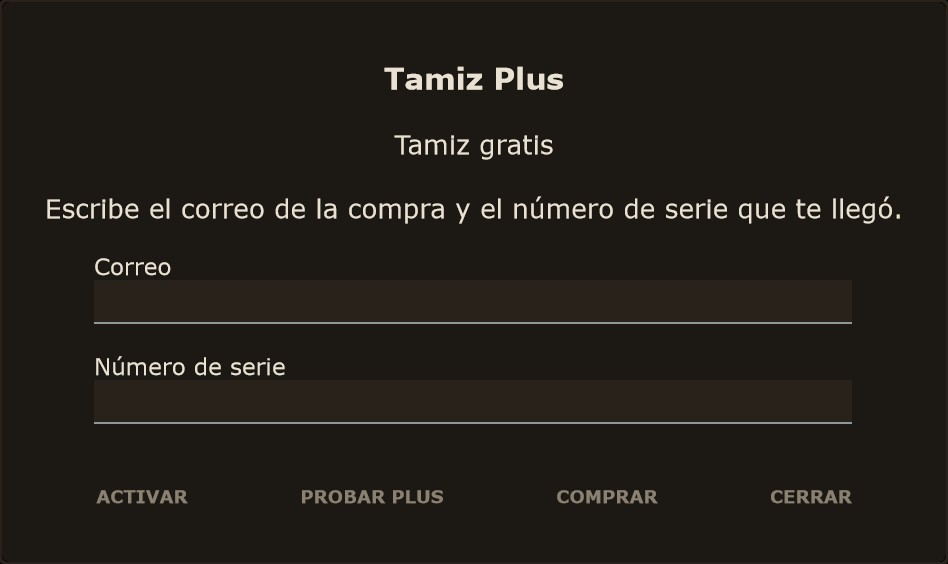
Tamiz Plus no es otro plugin: es el mismo Tamiz con todo desbloqueado. Para activarlo, haz clic en el emblema de la cabecera. Se abre la ventana de Tamiz Plus: escribe el Correo de la compra y el Número de serie que te llegó, y pulsa ACTIVAR. La cabecera pasa a decir TAMIZ+. La activación se hace en la propia computadora, sin internet y sin iLok.
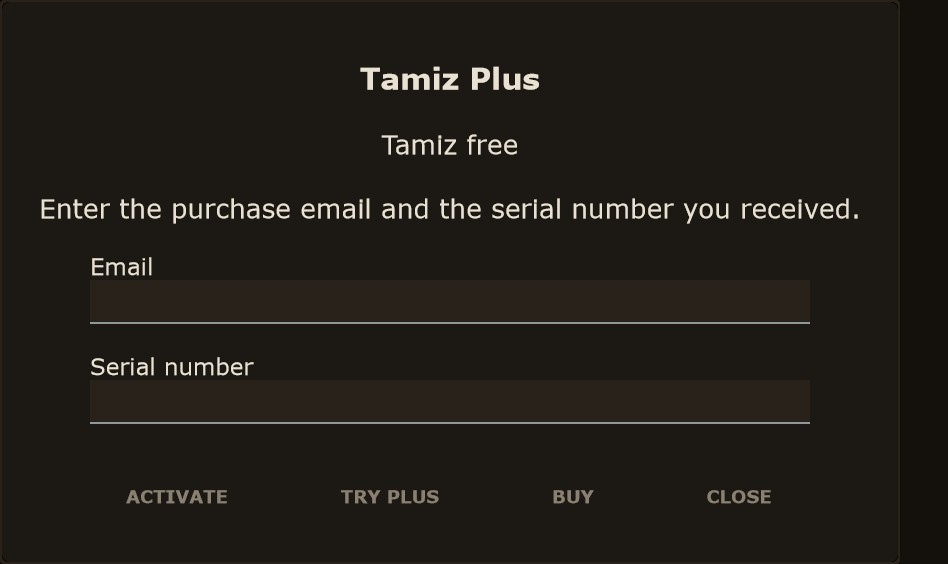
Tamiz Plus is not a separate plugin: it is the same Tamiz with everything unlocked. To activate it, click the emblem in the header. The Tamiz Plus window opens: enter the purchase Email and the Serial number you received, then press ACTIVATE. The header now reads TAMIZ+. Activation happens on your computer, with no internet connection and no iLok.
Si quieres probarlo antes, pulsa PROBAR PLUS en la misma ventana. Tienes 14 días con todo: el día 1 quedan 14 y el día 15 vuelve a ser el Tamiz gratis. La demo se ofrece una sola vez y no pide correo. Al acabar no se pierde nada: las huellas, las secciones y la ★ siguen guardadas en la sesión y vuelven en cuanto actives una licencia.
To try it first, press TRY PLUS in the same window. You get 14 days with everything: on day 1 there are 14 left, and on day 15 it goes back to free Tamiz. The demo is offered once and does not ask for an email. When it ends, nothing is lost: traces, sections and the ★ stay in the session and come back as soon as you activate a license.
Para pasar la licencia a otra computadora, abre la misma ventana y pulsa QUITAR LICENCIA. Tamiz vuelve a ser el gratis, lo guardado se conserva y puedes activarlo otra vez con el mismo correo y número de serie. Un clic en el título TAMIZ muestra el estado: gratis, activado o los días de demo que quedan.
To move the license to another computer, open the same window and press REMOVE LICENSE. Tamiz goes back to the free version, your saved work is kept, and you can activate it again with the same email and serial number. Clicking the TAMIZ title shows the status: free, activated, or the demo days left.
- Emblema
- Abre la ventana de Tamiz Plus.
- ACTIVAR
- Comprueba el correo y el número de serie y desbloquea Plus.
- PROBAR PLUS
- Demo de 14 días. Solo aparece si no hay licencia y no se ha usado antes.
- COMPRAR
- Abre la tienda en el navegador.
- QUITAR LICENCIA
- Solo con licencia. Pide confirmación.
- Emblem
- Opens the Tamiz Plus window.
- ACTIVATE
- Checks the email and serial number and unlocks Plus.
- TRY PLUS
- 14-day demo. Only shown with no license and if it has not been used before.
- BUY
- Opens the store in your browser.
- REMOVE LICENSE
- Only with a license. Asks for confirmation.
El espectro y sus gestosThe spectrum and its gestures
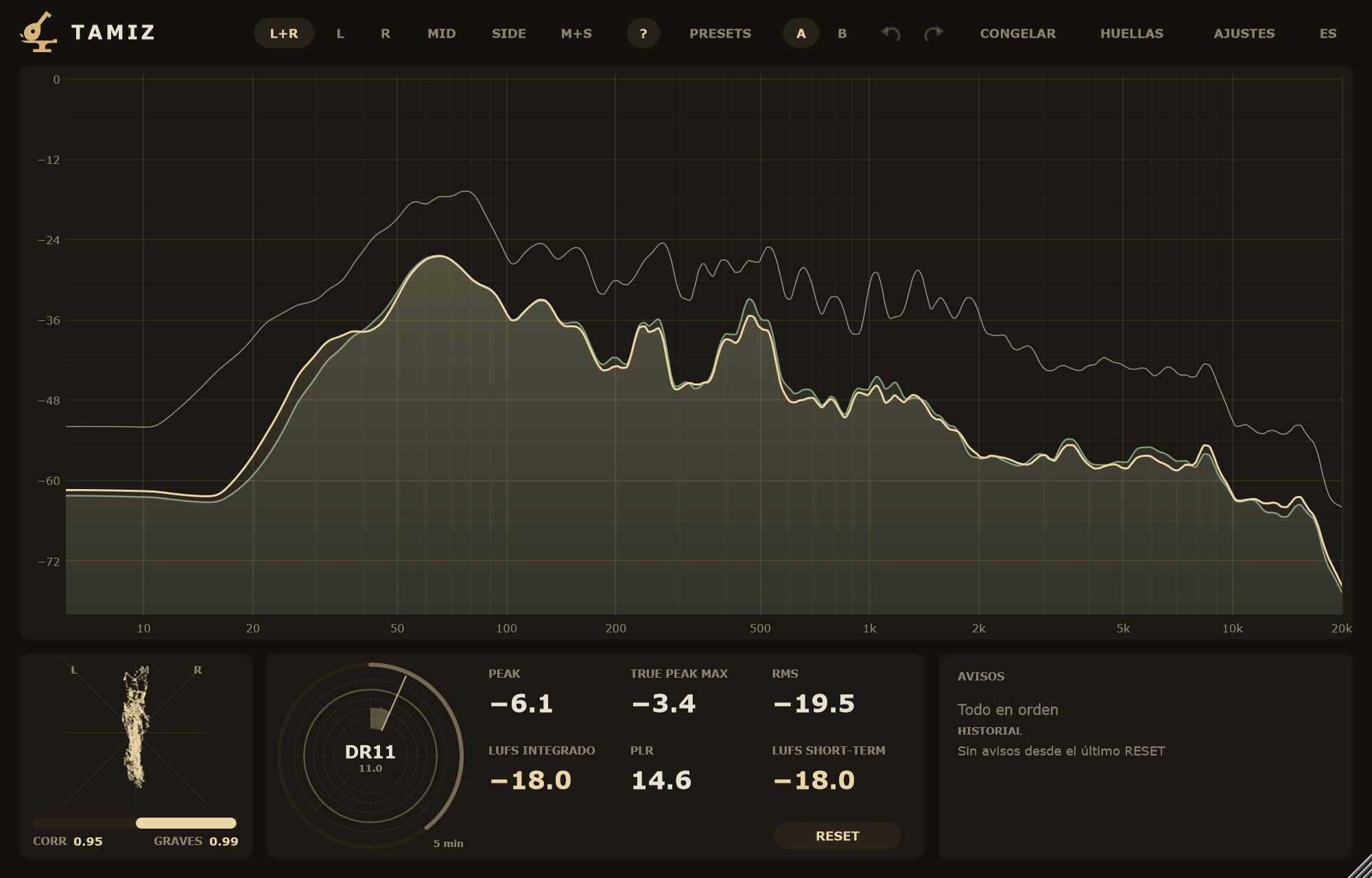
Arriba eliges la fuente (ver Cabecera). De serie, la curva rellena es la media en tiempo real y la línea fina, el máximo. Con L+R salen dos curvas: L como línea principal y R como segunda línea, en otro color. Con M+S, MID y SIDE.
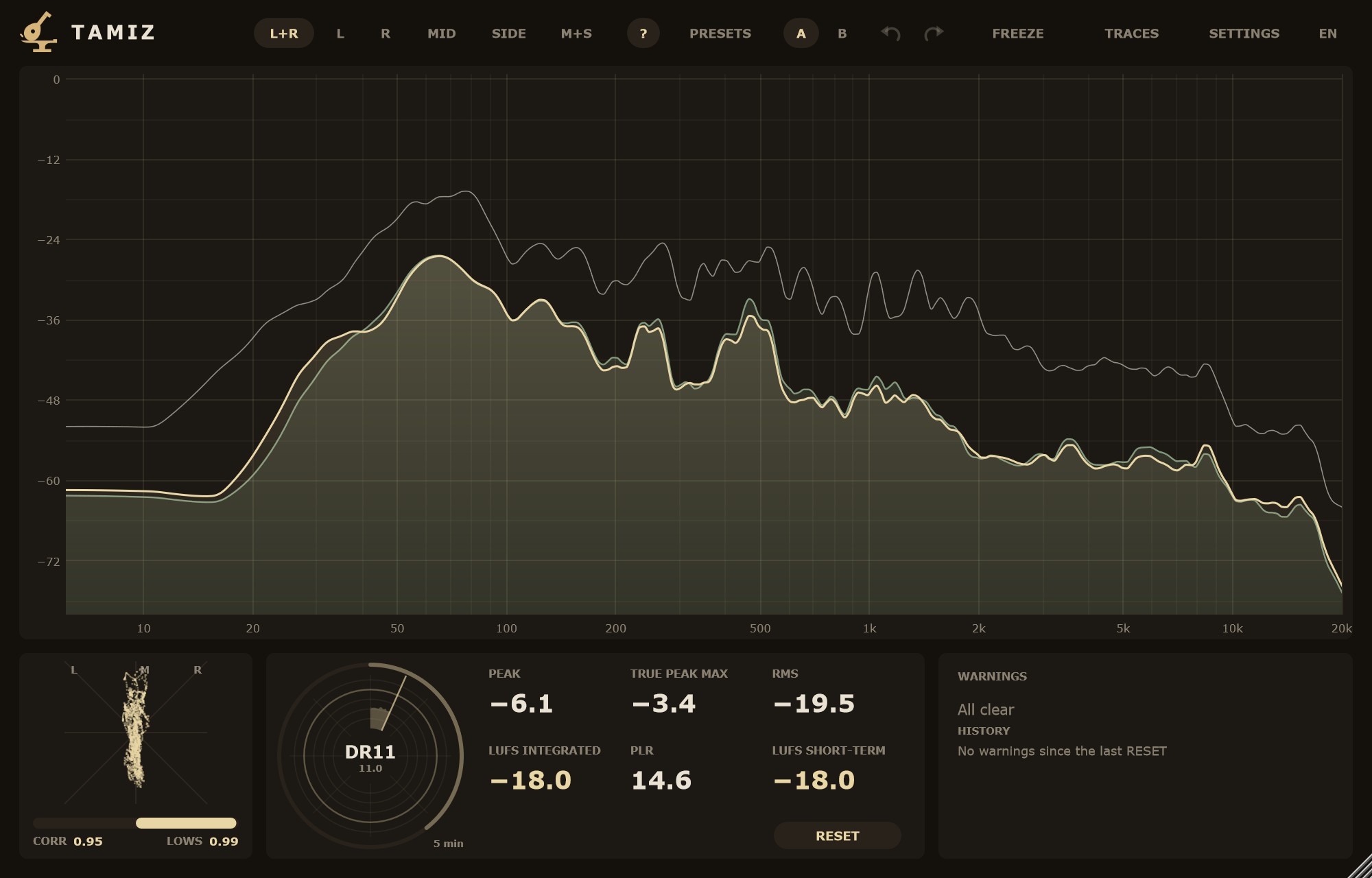
At the top you pick the source (see Header). By default the filled curve is the real-time average and the thin line, the maximum. With L+R you get two curves: L as the main line and R as the second line, in another colour. With M+S, MID and SIDE.
Al pasar el puntero, Tamiz escribe la frecuencia, la nota más cercana y el nivel de la curva en ese punto.
As you move the pointer, Tamiz shows the frequency, the nearest note and the curve level at that point.
- Clic
- Las curvas vuelven a empezar (máximo, media, retención). No toca los LUFS ni los avisos.
- Shift + clic
- Escuchas la resonancia más cercana: se ajusta al pico (a ±1/6 de octava) y se queda sonando. Mientras suena, un clic salta a otra resonancia. Shift + clic otra vez o Esc la para. La rueda cambia la Q (de 5 a 60; de serie, 30) y se recuerda.
- Rueda
- Zoom en frecuencia, centrado en el puntero.
- Ctrl + rueda (Cmd en macOS)
- Zoom en nivel.
- Botón central arrastrando
- Zoom en los dos ejes alrededor del punto donde pulsaste.
- Botón derecho arrastrando
- Desplaza la vista con zoom.
- Doble clic · ZOOM ✕
- Vuelve a la vista de AJUSTES.
- Click
- The curves start over (maximum, average, hold). It does not touch LUFS or warnings.
- Shift + click
- Listen to the nearest resonance: it snaps to the peak (within ±1/6 octave) and keeps sounding. While it plays, a click jumps to another resonance. Shift + click again or Esc stops it. The wheel changes the Q (5 to 60; default 30) and is remembered.
- Wheel
- Frequency zoom, centred on the pointer.
- Ctrl + wheel (Cmd on macOS)
- Level zoom.
- Middle-button drag
- Zooms both axes around the point you clicked.
- Right-button drag
- Pans the zoomed view.
- Double-click · ZOOM ✕
- Back to the SETTINGS view.
El zoom es solo para mirar: no cambia AJUSTES ni se guarda. No sale de las frecuencias y el rango de AJUSTES y llega como mucho a 1/3 de octava y 12 dB. Alejar del todo lo apaga y cambiar AJUSTES lo quita. Mientras escuchas una resonancia, la rueda cambia la Q, no el zoom.
Zoom is for looking only: it does not change SETTINGS and is not saved. It stays within the SETTINGS frequency and range, down to 1/3 octave and 12 dB. Zooming fully out turns it off, and changing SETTINGS clears it. While you listen to a resonance, the wheel changes the Q, not the zoom.
La escucha es lo único que toca el audio: un paso banda estrecho con fundido de 10 ms. Al pararla, la pista vuelve bit a bit.
Listening is the only thing that touches the audio: a narrow band-pass with a 10 ms fade. When you stop it, the track comes back bit for bit.
En el gratis tienes una huella, la primera, con CAPTURAR, TOMAR, ★ y ⋯, y su leyenda sobre el espectro; las demás huellas, las secciones y la franja DELTA son de Tamiz Plus.
The free version gives you one trace, the first, with CAPTURE, TAKE, ★ and ⋯, plus its legend on the spectrum; more traces, sections and the DELTA band are part of Tamiz Plus.
Ratón y teclado: todos los gestosMouse and keyboard: every gesture
Casi todo en Tamiz se hace con el ratón directamente sobre el espectro y su leyenda, sin abrir menús. Esta es la lista completa.
Almost everything in Tamiz is done with the mouse right on the spectrum and its legend, without opening menus. This is the full list.
En el espectroOn the spectrum
- Clic
- Las curvas vuelven a empezar (media, máximo y retención). No toca LUFS, radar ni avisos.
- Shift + clic
- Escucha la resonancia más cercana: Tamiz se ajusta al pico a ±1/6 de octava y lo deja sonando con un filtro estrecho.
- Clic mientras suena
- Salta a otra resonancia, también ajustada a su pico.
- Shift + clic otra vez, o Esc
- Deja de escuchar; la pista vuelve a sonar bit a bit.
- Rueda mientras suena
- Cambia la Q del filtro de escucha, de 5 a 60 (de serie 30); se recuerda.
- Pasar el puntero
- Lectura bajo el puntero: frecuencia, nota y nivel.
- Click
- The curves start over (average, maximum and hold). It does not touch LUFS, radar or warnings.
- Shift + click
- Listens to the nearest resonance: Tamiz snaps to the peak within ±1/6 octave and keeps it playing through a narrow filter.
- Click while listening
- Jumps to another resonance, also snapped to its peak.
- Shift + click again, or Esc
- Stops listening; the track plays bit for bit again.
- Wheel while listening
- Changes the listening filter's Q, from 5 to 60 (30 by default); it is remembered.
- Hover
- Readout under the pointer: frequency, note and level.
ZoomZoom
- Rueda
- Acerca o aleja la frecuencia, centrado en el puntero (×1,25 por muesca).
- Ctrl + rueda (Cmd en macOS)
- Acerca o aleja el nivel (el eje de dB).
- Botón central arrastrando
- Zoom libre alrededor del punto: a la derecha acerca la frecuencia, hacia arriba acerca el nivel.
- Botón derecho arrastrando
- Desplaza la vista con zoom, en frecuencia y en nivel.
- Doble clic (fuera de la leyenda) o «ZOOM ✕»
- Vuelve a la vista completa.
- Wheel
- Zooms frequency in or out, centred on the pointer (×1.25 per notch).
- Ctrl + wheel (Cmd on macOS)
- Zooms level (the dB axis) in or out.
- Middle-button drag
- Free zoom around the point: to the right zooms frequency in, upwards zooms level in.
- Right-button drag
- Pans the zoomed view, in frequency and level.
- Double-click (outside the legend) or "ZOOM ✕"
- Back to the full view.
El zoom nunca sale de los límites de AJUSTES (frecuencias y rango), llega como mucho a 1/3 de octava y 12 dB, y no se guarda: al cambiar AJUSTES o alejar del todo, se quita. Funciona igual en Tamiz gratis y en Plus.
Zoom never goes beyond the SETTINGS limits (frequencies and range), goes down to 1/3 octave and 12 dB at most, and is not saved: changing SETTINGS or zooming all the way out removes it. It works the same in free Tamiz and in Plus.
En la leyenda (los nombres de las huellas)On the legend (trace names)
La leyenda, arriba a la derecha del espectro, tiene una línea por huella y por sección visible. Sobre cada nombre:
The legend, top right of the spectrum, has one line per visible trace and section. On each name:
- Clic
- Oculta o muestra esa curva. No reinicia el espectro.
- Arrastrar hacia arriba o abajo
- Sube o baja la curva en dB (hasta ±24 dB); el valor sale junto al nombre mientras arrastras. Con Shift, diez veces más fino.
- Arrastrar a los lados
- Opacidad, del 15 al 100 %: a la derecha, más opaca. Sale «OPACIDAD n %» junto al nombre. Con Shift, más fino.
- Doble clic
- La devuelve a 0 dB.
- «+N más»
- Hay más curvas de las que caben (12): un clic abre la ventana HUELLAS.
- Muestra de color de una fuente (MULTI)
- Un clic abre la paleta de 8 colores o «Color del tema».
- Click
- Hides or shows that curve. It does not reset the spectrum.
- Drag up or down
- Raises or lowers the curve in dB (up to ±24 dB); the value shows next to the name while you drag. With Shift, ten times finer.
- Drag sideways
- Opacity, 15 to 100 %: to the right, more opaque. "OPACITY n %" shows next to the name. With Shift, finer.
- Double-click
- Back to 0 dB.
- "+N more"
- More curves than fit (12): a click opens the TRACES window.
- Source colour swatch (MULTI)
- A click opens the 8-colour palette or "Theme colour".
La dirección se decide a los 4 píxeles: si empiezas en vertical, desplaza; si empiezas de lado, cambia la opacidad, hasta soltar. En la ★ referencia no se desplaza ni vuelve a 0 dB (se iguala sola), pero sí cambia la opacidad. En Tamiz gratis todo esto vale para su única huella.
The direction is decided after 4 pixels: start vertically and it offsets; start sideways and it changes opacity, until you let go. The ★ reference cannot be offset or reset to 0 dB (it is matched automatically), but its opacity can change. In free Tamiz all of this applies to its single trace.
PerillasKnobs
- Arrastrar
- Cambia el valor.
- Shift + arrastrar
- Ajuste fino (diez veces más lento).
- Rueda
- Un paso por muesca.
- Doble clic
- Escribes el valor: «1,2», «538 ms», «6,1 Hz».
- Drag
- Changes the value.
- Shift + drag
- Fine adjustment (ten times slower).
- Wheel
- One step per notch.
- Double-click
- Type the value: "1.2", "538 ms", "6.1 Hz".
Ventanas y tecladoWindows and keyboard
- Esquina de abajo a la derecha
- Agranda o achica Tamiz con proporción libre; también la ventana HUELLAS, que recuerda su tamaño.
- A ▾ / B ▾ (franja DELTA)
- Un clic abre la lista de curvas que se pueden comparar.
- Botón «?»
- Enciende o apaga todas las ayudas que salen al pasar el ratón.
- Esc
- Deja de escuchar una resonancia y cierra los diálogos.
- Enter
- En la ventana de Tamiz Plus, ACTIVAR.
- Bottom-right corner
- Resizes Tamiz with a free aspect ratio; also the TRACES window, which remembers its size.
- A ▾ / B ▾ (DELTA band)
- A click opens the list of curves you can compare.
- "?" button
- Turns all hover tooltips on or off.
- Esc
- Stops listening to a resonance and closes dialogs.
- Enter
- In the Tamiz Plus window, ACTIVATE.
Ajustes de vistaView settings
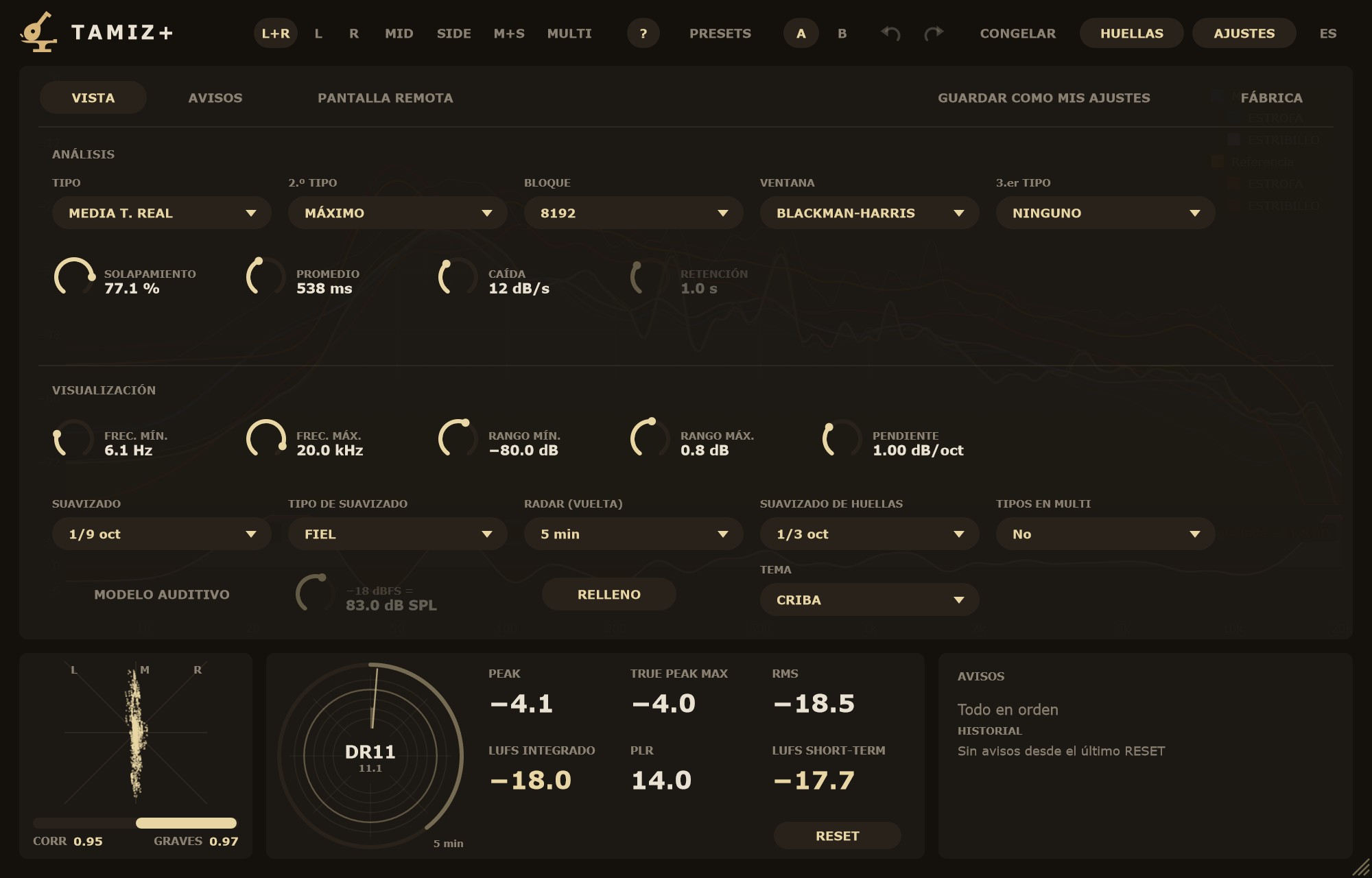
AJUSTES › VISTA tiene dos bloques, ANÁLISIS y VISUALIZACIÓN. Las perillas: arrastrar, Shift + arrastrar para afinar, rueda = un paso, doble clic para escribir el valor ("1,2", "538 ms", "6,1 Hz"). Todo lo de la vista entra en presets, A/B y deshacer, salvo el TEMA.
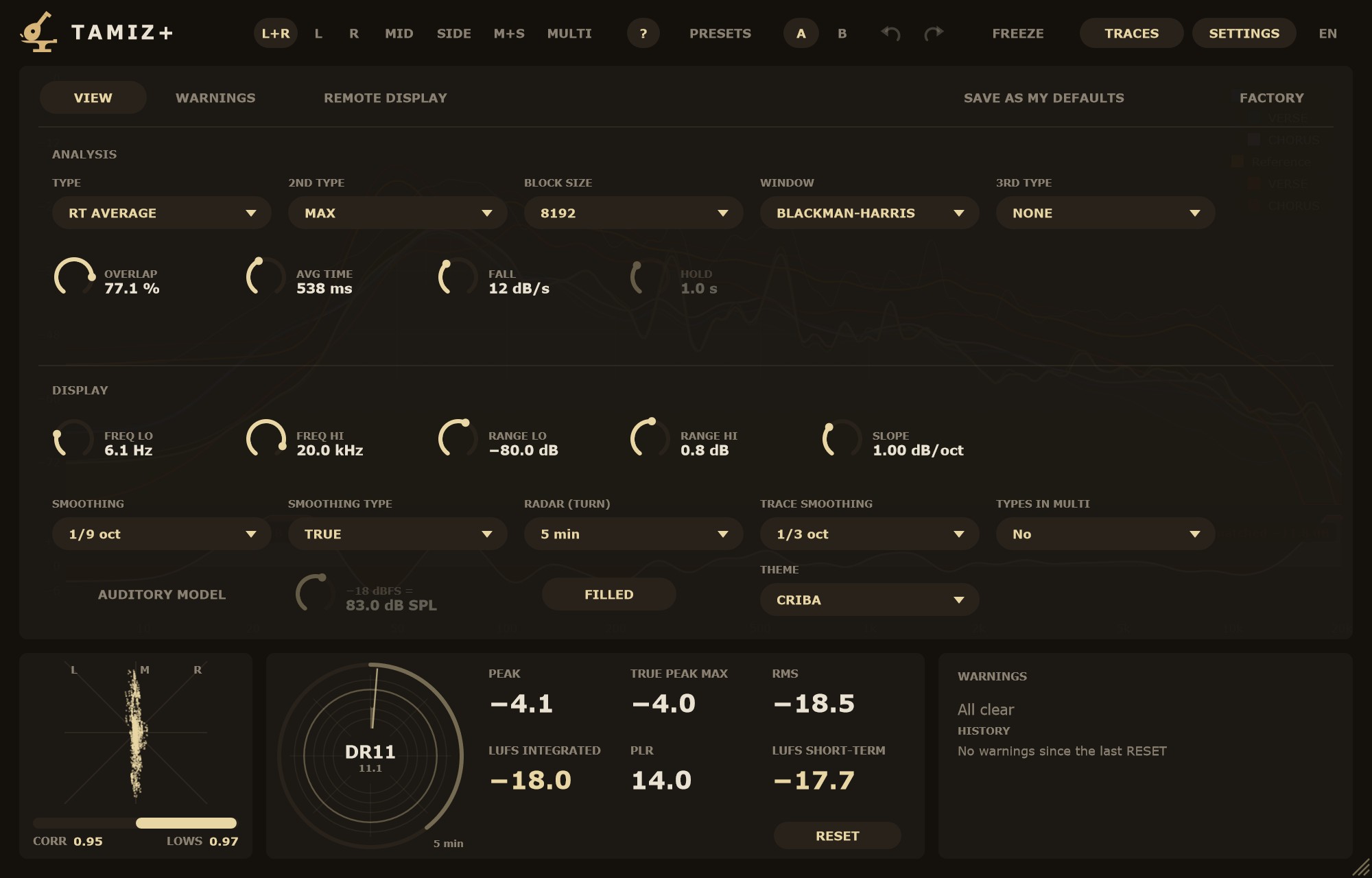
SETTINGS › VIEW has two blocks, ANALYSIS and DISPLAY. Knobs: drag, Shift + drag to fine-tune, wheel = one step, double-click to type a value ("1.2", "538 ms", "6.1 Hz"). Everything in the view goes into presets, A/B and undo, except THEME.
AnálisisAnalysis
- TIPO
- La curva principal. TIEMPO REAL: sube al instante y baja a la velocidad de CAÍDA. MEDIA T. REAL (de serie): media que sigue a la música, con el tiempo de PROMEDIO. MÁXIMO: lo más alto desde el último clic o RESET. MEDIA: la media de todo desde el último clic o RESET.
- 2.º TIPO
- Una línea fina sobre la principal. NINGUNO, MÁX. T. REAL (retiene cada pico el tiempo de RETENCIÓN y luego sigue a la curva), MÁXIMO (de serie) o MEDIA. Con L+R es una sola línea, la mayor de L y R.
- 3.er TIPO
- Otra línea fina, en su propio color, con las mismas opciones que el 2.º: NINGUNO (de serie), MÁX. T. REAL, MÁXIMO o MEDIA. Por ejemplo, MÁXIMO en el 2.º y MEDIA en el 3.º. Con NINGUNO no se calcula.
- BLOQUE
- Tamaño del análisis: 1024, 2048, 4096, 8192 (de serie), 16384 o 32768. Más grande = más detalle en graves y respuesta más lenta.
- VENTANA
- BLACKMAN-HARRIS (de serie), FLAT TOP, HANN, KAISER 4, KAISER 8, KAISER 12 y SUAVE.
- SUAVE
- Kaiser β = 5. Más detalle en graves que Blackman-Harris y faldas más limpias que Hann: un buen punto medio para mirar una mezcla. Con tonos lee igual que Blackman-Harris; con ruido lee entre 1,5 y 2 dB menos, porque su ventana es más estrecha en ruido (menor ENBW). Tenlo en cuenta si comparas niveles de ruido entre ventanas.
- SOLAPAMIENTO
- De 0 a 95 % (de serie, 77,1 %). Más solapamiento = más análisis por segundo y una curva más fluida.
- PROMEDIO
- Tiempo de la MEDIA T. REAL, de 10 ms a 10 s (de serie, 538 ms).
- CAÍDA
- Velocidad a la que baja el TIEMPO REAL, de 3 a 120 dB/s (de serie, 12 dB/s).
- RETENCIÓN
- Cuánto se queda quieto cada pico de MÁX. T. REAL, de 0,5 a 10 s (de serie, 1 s). Se atenúa si ni el 2.º ni el 3.er tipo son MÁX. T. REAL, porque entonces no hace nada.
- TYPE
- The main curve. REAL TIME: rises instantly and falls at the FALL rate. RT AVERAGE (default): an average that follows the music, with the AVG TIME constant. MAX: the highest value since the last click or RESET. AVERAGE: the average of everything since the last click or RESET.
- 2ND TYPE
- A thin line over the main curve. NONE, RT MAX (holds each peak for the HOLD time, then follows the curve), MAX (default) or AVERAGE. With L+R it is a single line, the higher of L and R.
- 3RD TYPE
- Another thin line, in its own colour, with the same options as the 2nd: NONE (default), RT MAX, MAX or AVERAGE. For example, MAX on the 2nd and AVERAGE on the 3rd. With NONE it is not computed.
- BLOCK SIZE
- Analysis size: 1024, 2048, 4096, 8192 (default), 16384 or 32768. Larger = more low-end detail and a slower response.
- WINDOW
- BLACKMAN-HARRIS (default), FLAT TOP, HANN, KAISER 4, KAISER 8, KAISER 12 and SMOOTH.
- SMOOTH
- Kaiser β = 5. More low-end detail than Blackman-Harris and cleaner skirts than Hann: a good middle ground for looking at a mix. On tones it reads the same as Blackman-Harris; on noise it reads 1.5 to 2 dB lower, because its noise bandwidth is narrower (lower ENBW). Keep that in mind when comparing noise levels across windows.
- OVERLAP
- 0 to 95 % (default 77.1 %). More overlap = more analyses per second and a smoother-moving curve.
- AVG TIME
- Time constant of RT AVERAGE, 10 ms to 10 s (default 538 ms).
- FALL
- How fast REAL TIME falls, 3 to 120 dB/s (default 12 dB/s).
- HOLD
- How long each RT MAX peak stays put, 0.5 to 10 s (default 1 s). It is dimmed when neither the 2nd nor the 3rd type is RT MAX, because it has no effect then.
VisualizaciónDisplay
- FREC. MÍN. · FREC. MÁX.
- Lo que abarca el eje horizontal: de 5 a 1000 Hz y de 1 a 24 kHz (de serie, 6,1 Hz–20 kHz).
- RANGO MÍN. · RANGO MÁX.
- El eje vertical: de −150 a −30 dB y de −24 a +24 dB (de serie, −80…+0,8 dB). Un seno de 0 dBFS lee 0 dB.
- PENDIENTE
- Inclina la curva de −3 a +9 dB/oct alrededor de 1 kHz (de serie, 1,00 dB/oct). Solo cambia el dibujo.
- SUAVIZADO
- APAGADO, 1/12, 1/9 (de serie), 1/6 o 1/3 de octava. Vale para la curva en vivo y sus líneas; el modelo auditivo y Shift + clic usan la misma curva.
- TIPO DE SUAVIZADO
- FIEL (de serie): las resonancias salen a su altura real. CALMADO: picos más tranquilos, más cerca del aspecto clásico. Las dos son curvas lisas, sin esquinas; la medida no cambia.
- RADAR (VUELTA)
- Una vuelta del radar de sonoridad: 1, 5 (de serie), 15 o 60 min. Cambiarla vacía el radar.
- SUAVIZADO DE HUELLAS
- Solo el dibujo de las huellas, de la captura en marcha y de la ★: 1/3 (de serie), 1/6, 1/12 de octava o COMO LA VISTA (el SUAVIZADO de arriba). En una media larga cada nota que más sonó deja un bulto; 1/3 de octava da una curva limpia para comparar. La medida no cambia.
- TIPOS EN MULTI
- Solo con Plus. Con MULTI, cada fuente dibuja también su 2.º tipo (a rayas) y su 3.er tipo (a puntos). Con No (de serie), solo la curva principal de cada fuente.
- TEMA
- Colores de Tamiz: CRIBA (de serie), NOCHE (azulado, para salas oscuras), CARBÓN (gris neutro, para juzgar los colores de las huellas), ALTO CONTRASTE (negro puro, trazos más gruesos) y CLARO (para estudios con mucha luz). Vale para todos los Tamiz y se recuerda; no va en la sesión ni en los presets.
- RELLENO
- Rellena bajo la curva principal (encendido de serie).
- FREQ LO · FREQ HI
- Horizontal axis span: 5 to 1000 Hz and 1 to 24 kHz (default 6.1 Hz–20 kHz).
- RANGE LO · RANGE HI
- Vertical axis: −150 to −30 dB and −24 to +24 dB (default −80…+0.8 dB). A 0 dBFS sine reads 0 dB.
- SLOPE
- Tilts the curve from −3 to +9 dB/oct around 1 kHz (default 1.00 dB/oct). It only changes the display.
- SMOOTHING
- OFF, 1/12, 1/9 (default), 1/6 or 1/3 octave. It applies to the live curve and its lines; the auditory model and Shift + click use the same curve.
- SMOOTHING TYPE
- TRUE (default): resonances show at their real height. CALM: quieter peaks, closer to the classic look. Both are smooth curves without corners; the measurement does not change.
- RADAR (TURN)
- One revolution of the loudness radar: 1, 5 (default), 15 or 60 min. Changing it clears the radar.
- TRACE SMOOTHING
- Only the drawing of traces, a capture in progress and the ★: 1/3 (default), 1/6, 1/12 octave or AS VIEW (the SMOOTHING above). In a long average every note that rang most leaves a bump; 1/3 octave gives a clean curve to compare. The measurement does not change.
- TYPES IN MULTI
- Plus only. In MULTI, each source also draws its 2nd type (dashed) and its 3rd type (dotted). With No (default), only each source's main curve.
- THEME
- Tamiz colours: CRIBA (default), NIGHT (bluish, for dark rooms), CHARCOAL (neutral grey, to judge trace colours), HIGH CONTRAST (pure black, thicker lines) and LIGHT (for bright studios). It applies to every Tamiz and is remembered; it is not stored in the session or in presets.
- FILLED
- Fills under the main curve (on by default).
Modelo auditivoAuditory model Beta
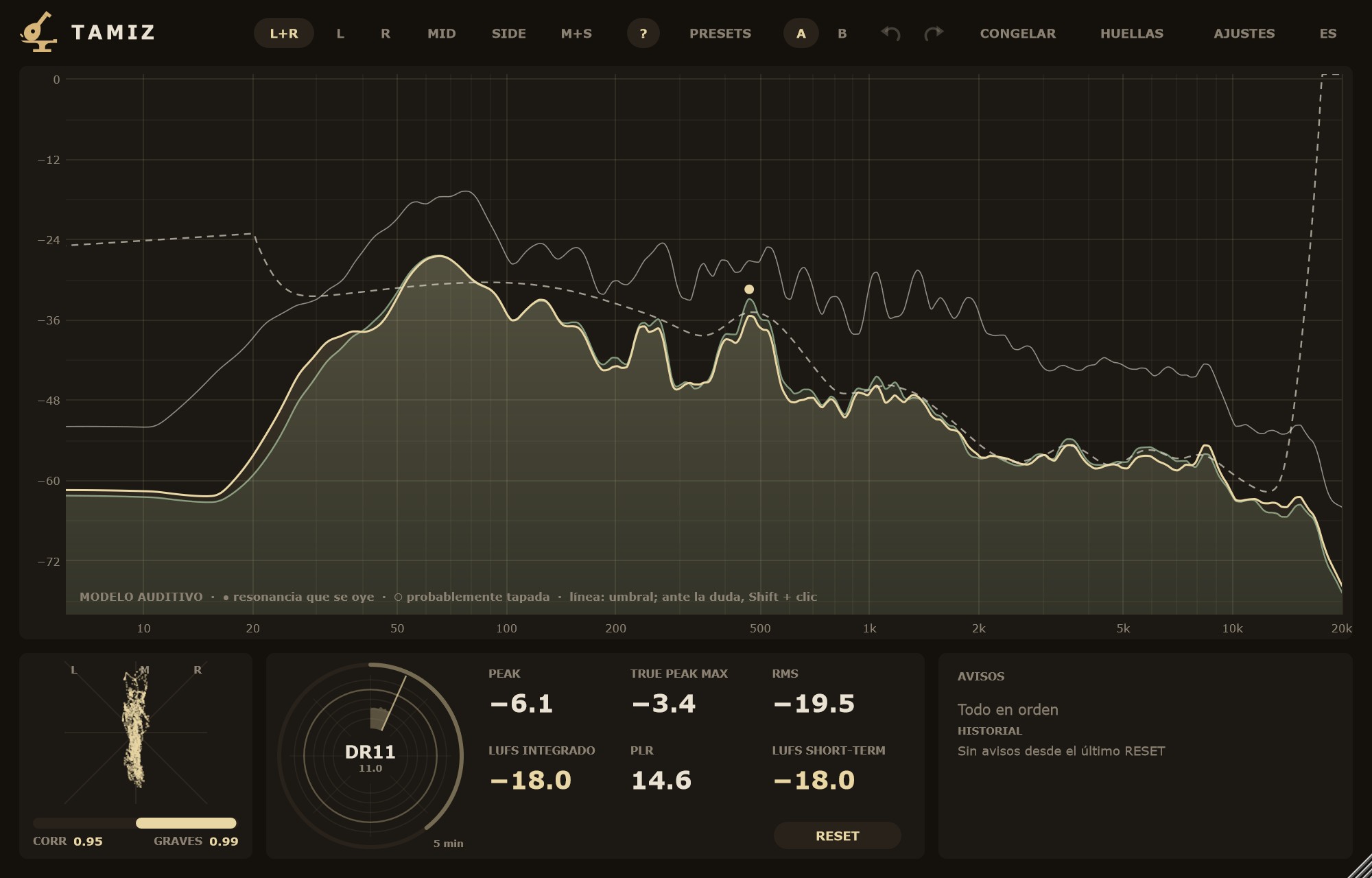
MODELO AUDITIVO (apagado de serie) marca las resonancias, es decir, los picos que destacan sobre lo que los rodea. Un punto relleno indica que se oye. Un círculo hueco indica que probablemente queda tapada por lo que suena cerca o que está por debajo del umbral de audición. La línea discontinua es el umbral de enmascaramiento: un detalle débil por debajo de ella probablemente no se percibe, pero eso no quiere decir que esa zona del espectro no suene. Tamiz mide si cada sonido es tono o ruido, porque un tono tapa bastante menos que un ruido.
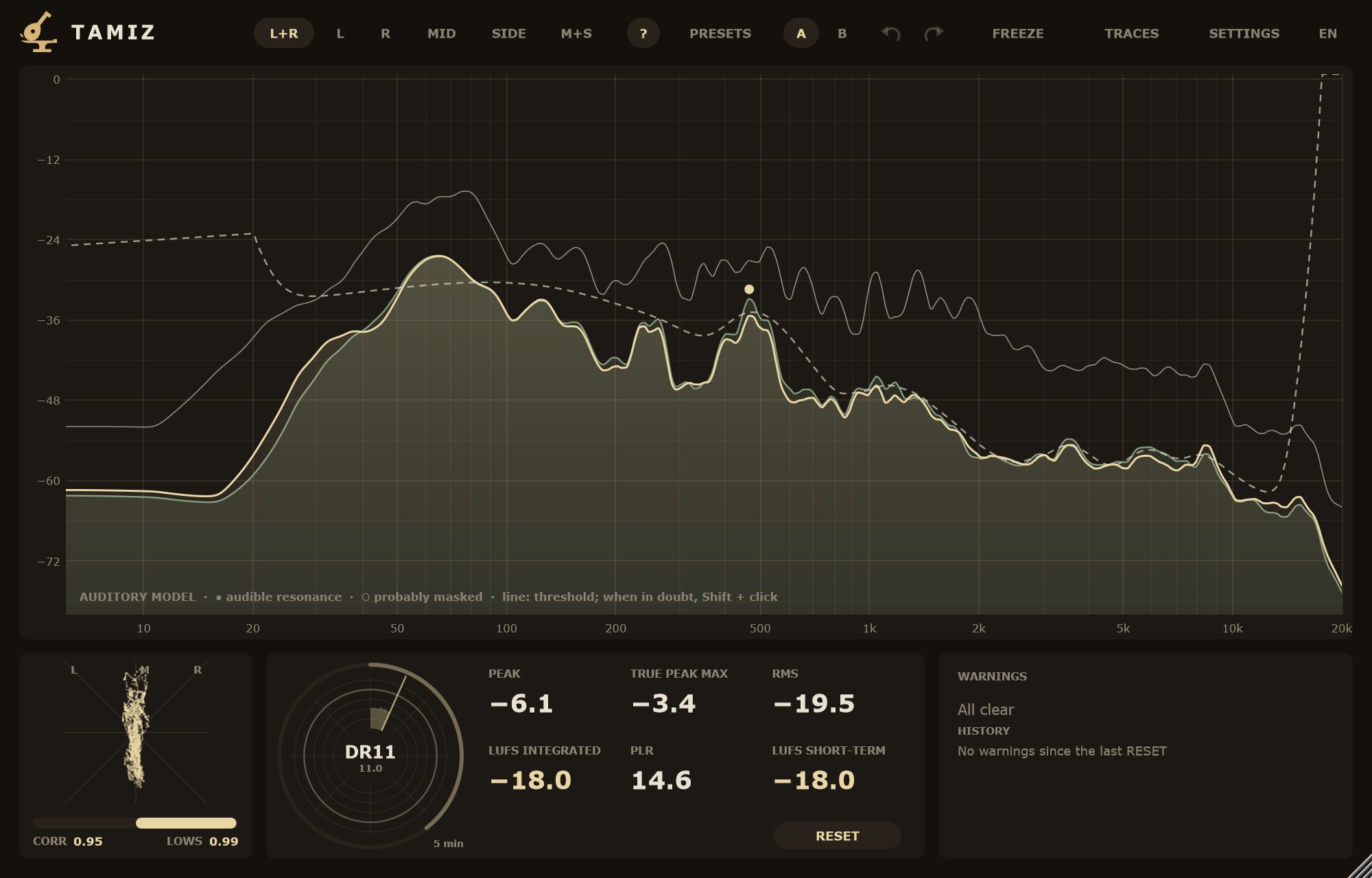
AUDITORY MODEL (off by default) marks resonances, meaning peaks that stand out from what surrounds them. A filled dot means it is audible. A hollow circle means it is probably masked by nearby sound or sits below the threshold of hearing. The dashed line is the masking threshold: a faint detail below it is probably not perceived, but that does not mean that part of the spectrum is silent. Tamiz measures whether each sound is tonal or noise-like, because a tone masks much less than noise.
- −18 dBFS =
- La calibración de escucha, de 60 a 100 dB SPL (de serie, 83 dB SPL). El modelo depende del volumen al que escuchas. Se atenúa con el modelo apagado.
- −18 dBFS =
- Listening calibration, 60 to 100 dB SPL (default 83 dB SPL). The model depends on your listening level. It is dimmed while the model is off.
Es una estimación: ante la duda, escucha la resonancia con Shift + clic y confía en tus oídos.
It is an estimate: when in doubt, listen to the resonance with Shift + click and trust your ears.
Guardar y volver a lo de serieSaving and factory settings
- GUARDAR COMO MIS AJUSTES
- Guarda la vista y los avisos: cada Tamiz nuevo arrancará así. Una instancia que ya está en un proyecto carga lo suyo.
- FÁBRICA
- Vuelve a los ajustes de serie ("El favorito de Luparia Mastering") y borra los tuyos guardados.
- SAVE AS MY DEFAULTS
- Saves view and warnings: every new Tamiz will start like this. An instance already in a project loads its own settings.
- FACTORY
- Back to factory settings ("Luparia Mastering's favorite") and clears your saved defaults.
Ajustes de avisosWarning settings
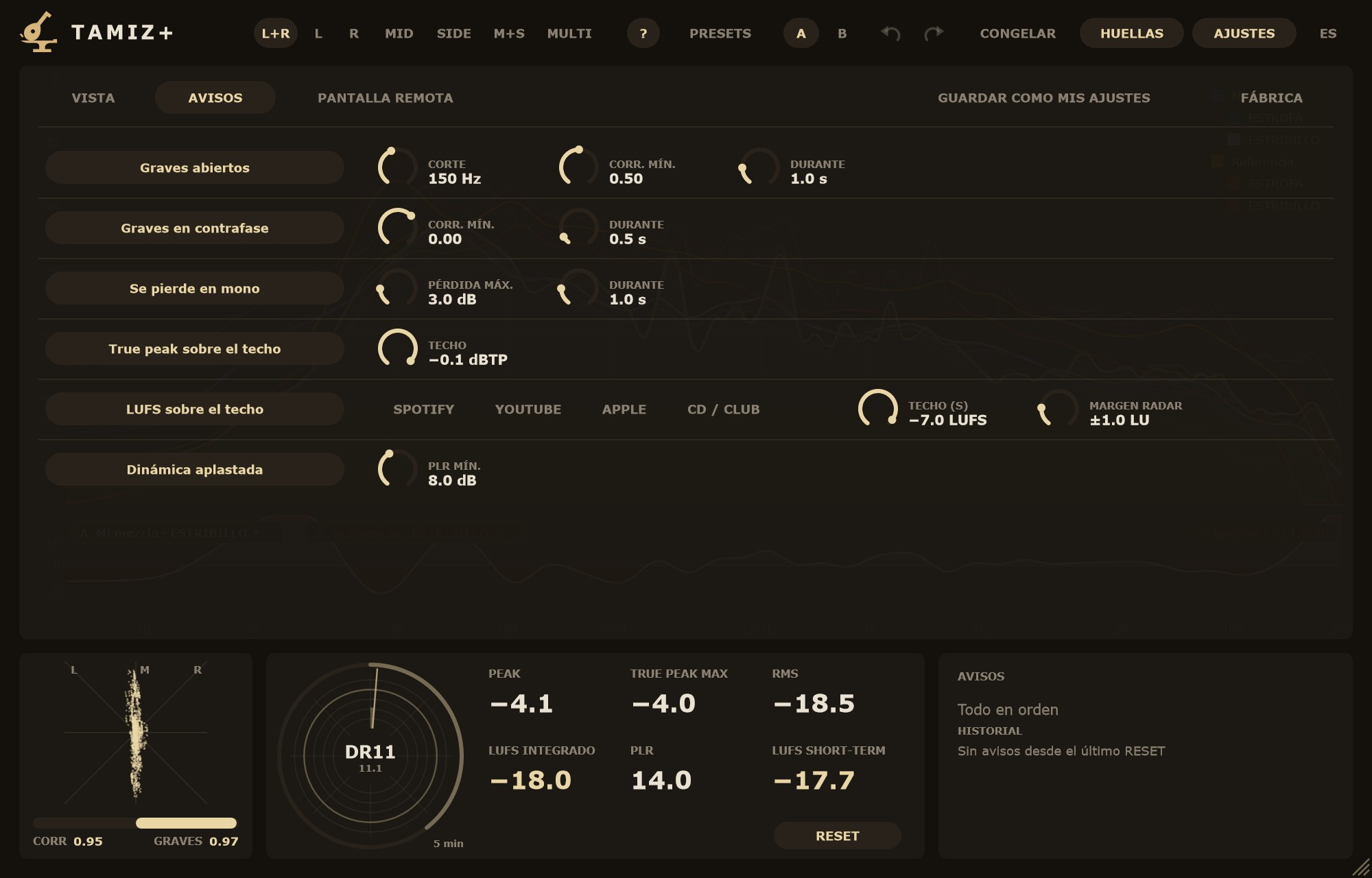
En AJUSTES › AVISOS cada aviso tiene un botón para encenderlo o apagarlo (todos encendidos de serie) y sus umbrales. Los avisos de duración necesitan que la condición se cumpla ese tiempo para encenderse y se apagan cuando lleva el mismo tiempo sin cumplirse: no parpadean con cada golpe.
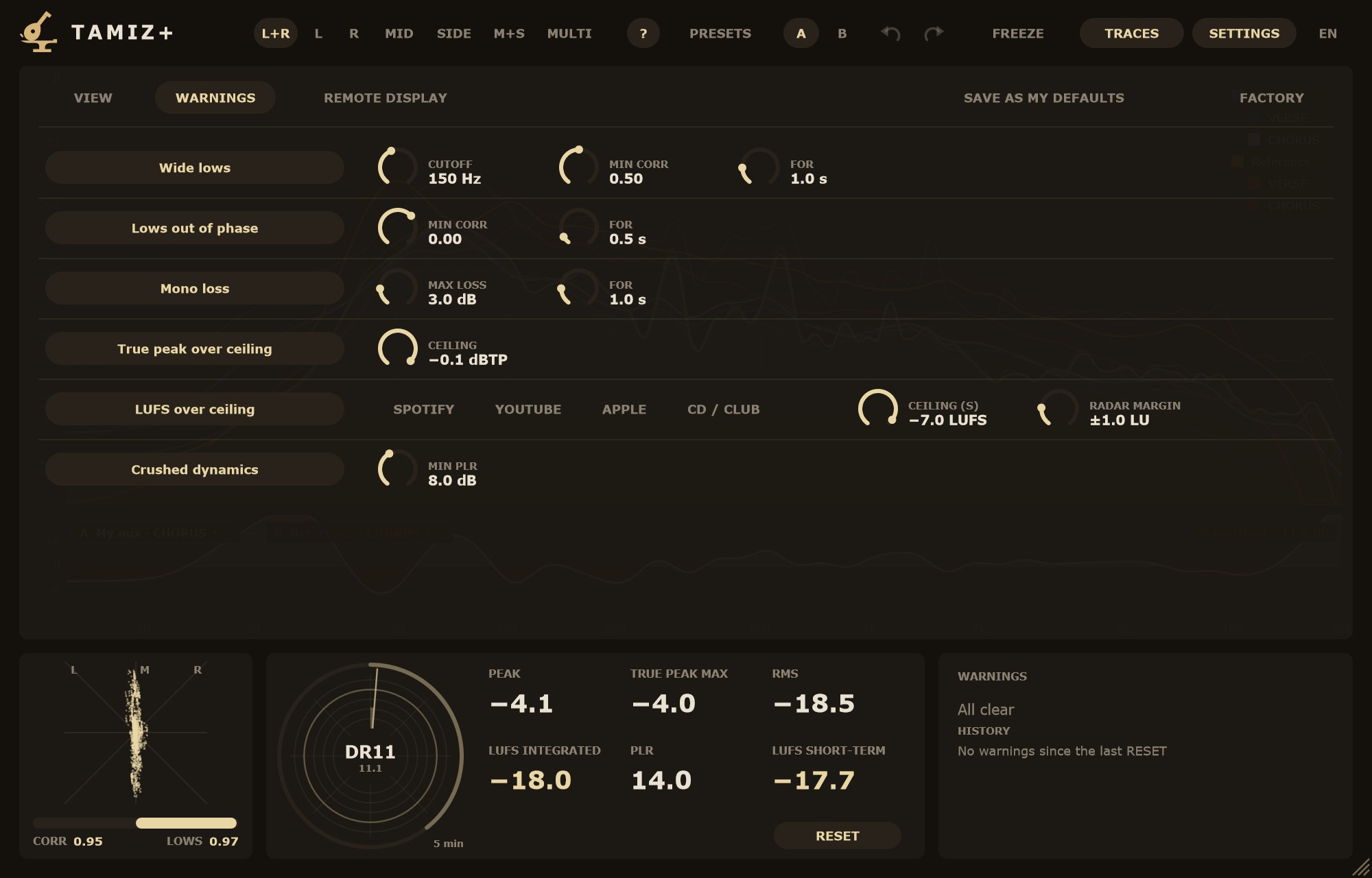
In SETTINGS › WARNINGS each warning has a button to turn it on or off (all on by default) and its thresholds. Warnings with a duration need the condition to hold for that long to switch on, and switch off once it has been gone for the same time: they do not flicker on every hit.
- Graves abiertos
- CORTE: el corte de graves, de 40 a 300 Hz (de serie, 150 Hz). También fija la banda de graves de la correlación GRAVES, del aviso de contrafase y de la pérdida en mono. CORR. MÍN.: salta si la correlación de graves baja de este valor, de 0 a 1 (de serie, 0,50). DURANTE: de 0,1 a 5 s (de serie, 1,0 s).
- Graves en contrafase
- CORR. MÍN.: de −1 a 0,5 (de serie, 0,00). DURANTE: de 0,1 a 5 s (de serie, 0,5 s).
- Se pierde en mono
- PÉRDIDA MÁX.: lo que puede perder una banda al sumar a mono, de 1 a 12 dB (de serie, 3 dB). Mira tres bandas: graves (hasta el CORTE), medios (hasta 5 kHz) y agudos. DURANTE: de 0,1 a 5 s (de serie, 1,0 s).
- True peak sobre el techo
- TECHO: de −3 a 0 dBTP (de serie, −0,1 dBTP). Salta en cuanto un pico pasa del techo y se apaga tras 2 s sin pasarse.
- LUFS sobre el techo
- Atajos SPOTIFY (−14), YOUTUBE (−14), APPLE (−16) y CD / CLUB (−9). TECHO (S): el techo del LUFS short-term, de −24 a −6 LUFS (de serie, −7 LUFS, sin atajo marcado: un valor propio). Mover la perilla quita la marca del atajo. Salta cuando el short-term pasa del techo y se apaga a los 2 s de volver por debajo. MARGEN RADAR: de ±0,5 a ±3 LU (de serie, ±1 LU); solo colorea el radar.
- Dinámica aplastada
- PLR MÍN.: de 4 a 14 dB (de serie, 8 dB). Salta cuando el PLR (true peak máximo menos LUFS integrado) baja de este valor, en cuanto hay integrado medido.
- Wide lows
- CUTOFF: the low-end split, 40 to 300 Hz (default 150 Hz). It also sets the low band for the LOWS correlation, the out-of-phase warning and mono loss. MIN CORR: fires when low-end correlation drops below this value, 0 to 1 (default 0.50). FOR: 0.1 to 5 s (default 1.0 s).
- Lows out of phase
- MIN CORR: −1 to 0.5 (default 0.00). FOR: 0.1 to 5 s (default 0.5 s).
- Mono loss
- MAX LOSS: how much a band may lose when summed to mono, 1 to 12 dB (default 3 dB). It checks three bands: lows (up to the CUTOFF), mids (up to 5 kHz) and highs. FOR: 0.1 to 5 s (default 1.0 s).
- True peak over ceiling
- CEILING: −3 to 0 dBTP (default −0.1 dBTP). It fires as soon as a peak goes over the ceiling and clears after 2 s without going over.
- LUFS over ceiling
- Shortcuts SPOTIFY (−14), YOUTUBE (−14), APPLE (−16) and CD / CLUB (−9). CEILING (S): the short-term LUFS ceiling, −24 to −6 LUFS (default −7 LUFS, no shortcut marked: a custom value). Moving the knob unmarks the shortcut. It fires when short-term goes over the ceiling and clears 2 s after dropping below. RADAR MARGIN: ±0.5 to ±3 LU (default ±1 LU); it only colours the radar.
- Crushed dynamics
- MIN PLR: 4 to 14 dB (default 8 dB). It fires when PLR (max true peak minus integrated LUFS) drops below this value, as soon as there is an integrated reading.
Los avisos de correlación y de mono no cuentan en silencio (por debajo de −60 LUFS momentáneo), ni en bandas casi vacías, ni con una pista mono.
The correlation and mono warnings do not count in silence (below −60 LUFS momentary), in nearly empty bands or on a mono track.
Estéreo y medidoresStereo and meters
- Vectorscopio
- La imagen estéreo: M arriba, L y R a los lados.
- CORR · GRAVES
- Debajo del vectorscopio: la correlación global y la de los graves (hasta el CORTE de AVISOS). +1 = mono, 0 = sin relación, negativo = contrafase.
- PEAK · TRUE PEAK MAX · RMS
- Pico de muestra, el true peak más alto desde RESET (en rojo si pasa del techo de AVISOS) y el RMS.
- LUFS INTEGRADO · PLR · LUFS SHORT-TERM
- Integrado desde RESET y short-term (3 s), según EBU R128. El PLR es el true peak máximo menos el integrado: cuánta dinámica queda. El momentáneo se ve en el radar.
- RESET
- Reinicia el LUFS integrado, el true peak máximo, el radar, el DR, las curvas del espectro y el historial de avisos.
- Vectorscope
- The stereo image: M up, L and R to the sides.
- CORR · LOWS
- Below the vectorscope: overall correlation and low-end correlation (up to the WARNINGS CUTOFF). +1 = mono, 0 = unrelated, negative = out of phase.
- PEAK · TRUE PEAK MAX · RMS
- Sample peak, the highest true peak since RESET (red when over the WARNINGS ceiling) and RMS.
- LUFS INTEGRATED · PLR · LUFS SHORT-TERM
- Integrated since RESET and short-term (3 s), per EBU R128. PLR is max true peak minus integrated: how much dynamics are left. Momentary shows on the radar.
- RESET
- Resets integrated LUFS, max true peak, the radar, DR, the spectrum curves and the warning history.
Radar de sonoridadLoudness radar
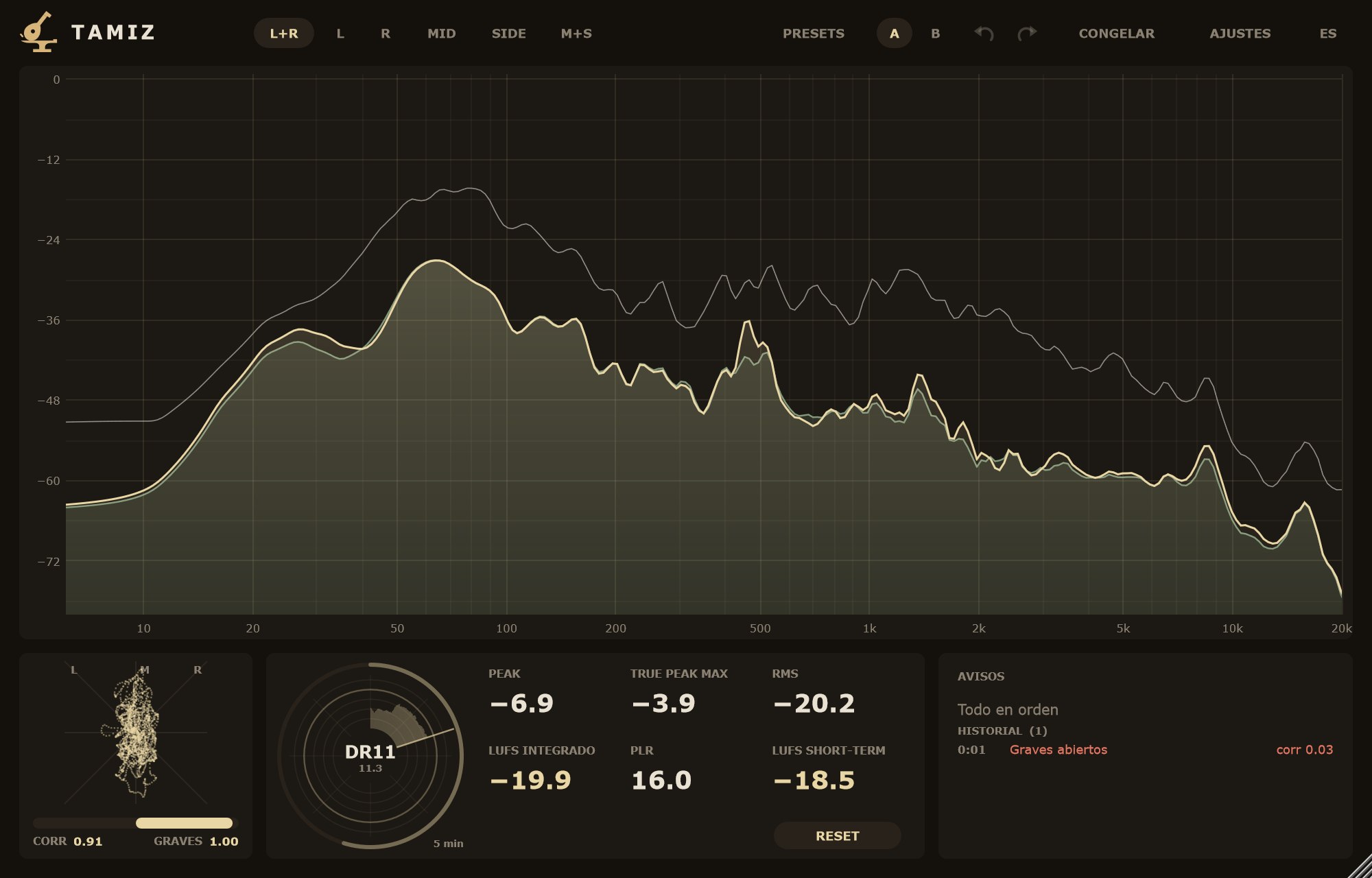
La historia del LUFS short-term en una vuelta de 1, 5 (de serie), 15 o 60 minutos (AJUSTES › VISTA › RADAR (VUELTA)). El radio va en LU respecto al TECHO (S) de AVISOS, de −24 a +9 LU, con un anillo cada 6 LU; el anillo marcado es el techo. Trigo = dentro del MARGEN RADAR, ladrillo = por encima, trigo apagado = por debajo.
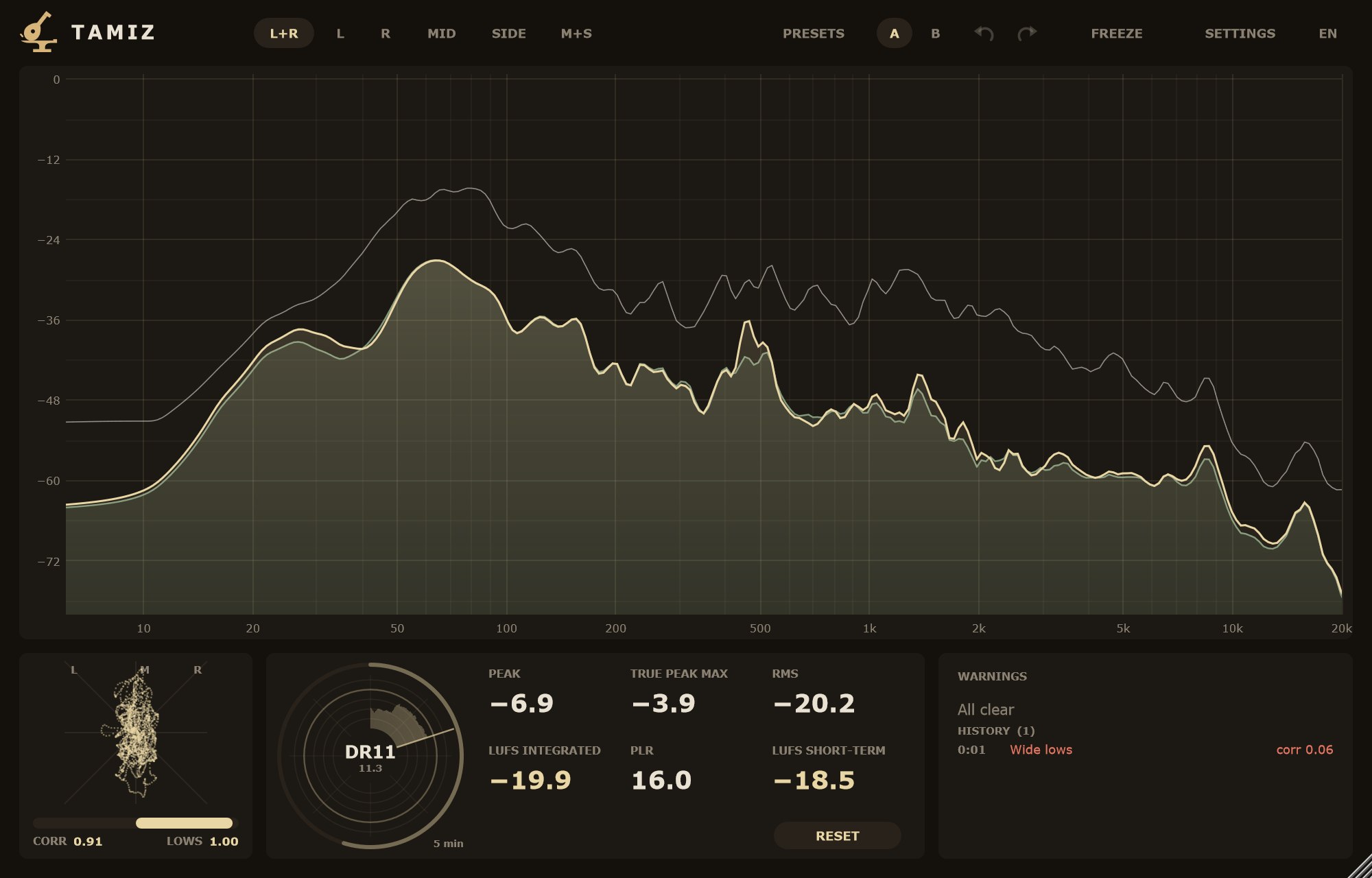
The short-term LUFS history over a 1, 5 (default), 15 or 60 minute turn (SETTINGS › VIEW › RADAR (TURN)). The radius is in LU relative to the WARNINGS CEILING (S), from −24 to +9 LU, with a ring every 6 LU; the marked ring is the ceiling. Wheat = within the RADAR MARGIN, brick = above, dim wheat = below.
- Arco exterior
- El LUFS integrado.
- Centro
- El rango dinámico (DR), en bloques de 3 s: "DR12" redondeado y un decimal debajo.
- Outer arc
- Integrated LUFS.
- Centre
- Dynamic range (DR), in 3 s blocks: "DR12" rounded with a decimal below.
RESET y cambiar la vuelta vacían el radar.
RESET and changing the turn clear the radar.
AvisosWarnings
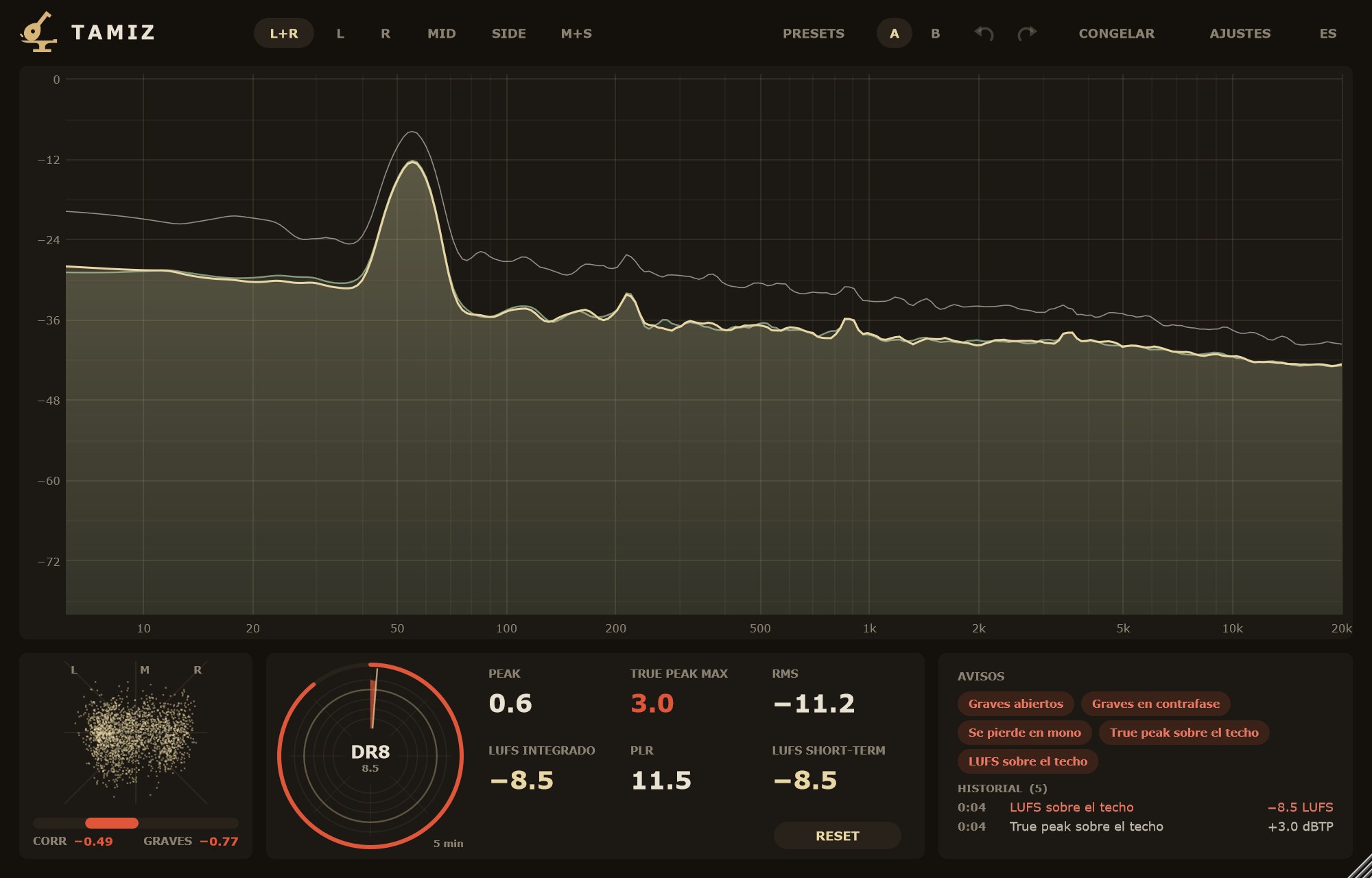
Tamiz solo avisa de lo que se puede medir: graves abiertos, graves en contrafase, pérdida en mono, true peak sobre el techo, LUFS sobre el techo y dinámica aplastada. Cuentan el tiempo del audio analizado, así que también valen en un render. Con el transporte parado se comportan como en silencio. Sin avisos, el cuadro dice "Todo en orden".
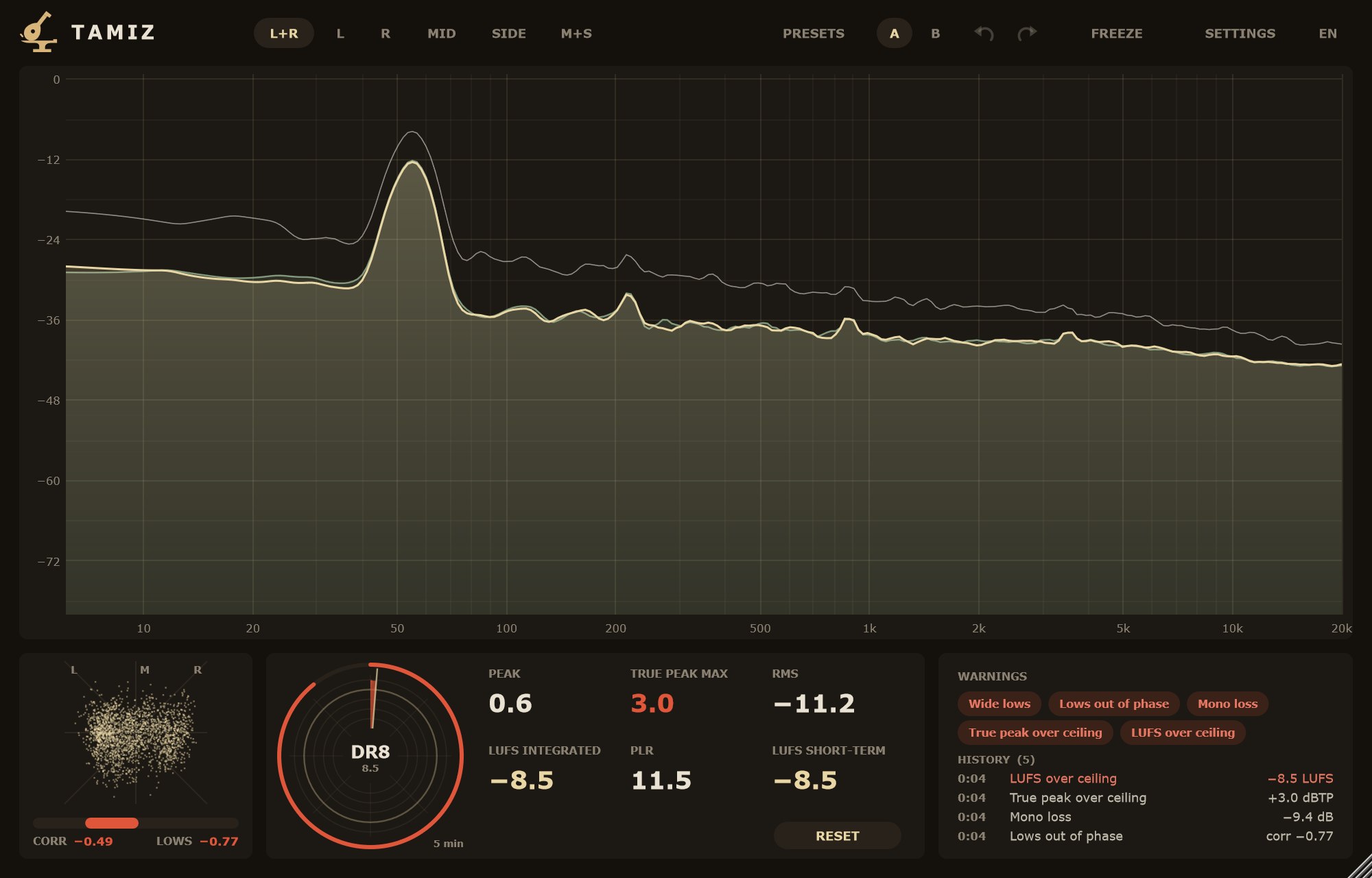
Tamiz only warns about what can be measured: wide lows, lows out of phase, mono loss, true peak over ceiling, LUFS over ceiling and crushed dynamics. They count the time of the analysed audio, so they also work in a render. With the transport stopped they behave as in silence. With no warnings, the box says "All clear".
- Clic en un aviso
- Muestra qué pasa y qué revisar, y marca en el espectro la zona afectada (graves o la banda que más pierde en mono). Otro clic lo quita.
- HISTORIAL
- Cada aviso que salta, con su momento (tiempo de audio desde RESET, en m:ss) y el valor que lo causó. Lo más nuevo arriba, hasta 100. RESET lo borra.
- Click a warning
- Shows what is happening and what to check, and marks the affected zone on the spectrum (the lows, or the band that loses most in mono). Another click clears it.
- HISTORY
- Every warning that fires, with its moment (audio time since RESET, in m:ss) and the value that caused it. Newest first, up to 100. RESET clears it.
Los umbrales están en Ajustes de avisos.
Thresholds are in Warning settings.
CabeceraHeader
- Título
- Clic = acerca de: versión, qué hace Tamiz y su estado (gratis, demo con los días que quedan, o Tamiz Plus activado). Con Plus la cabecera dice TAMIZ+.
- Emblema
- Abre la ventana de Tamiz Plus: correo y número de serie, ACTIVAR, PROBAR PLUS (14 días, una vez), COMPRAR y, con licencia, QUITAR LICENCIA.
- L+R · L · R · MID · SIDE · M+S
- La fuente. L+R: L como línea principal y R como segunda línea. MID = (L + R) / 2, SIDE = (L − R) / 2. M+S: MID como línea principal y SIDE como segunda.
- MULTI
- Solo con Plus. Varias fuentes a la vez, cada una con su color: L+R, L, R, MID y SIDE pasan a ser interruptores y M+S se esconde. En MULTI, L+R es ESTÉREO: una sola curva con la energía media de L y R. La muestra de color de cada fuente, en la leyenda, abre su paleta.
- ?
- Enciende o apaga todas las ayudas emergentes. Se recuerda para todos los Tamiz; la suya siempre sale.
- PRESETS
- "El favorito de Luparia Mastering" (el de serie), Guardar preset… y los tuyos, en
Documentos\Martillolaud\Tamiz\Presets. Abrir la carpeta. Un preset guarda la vista y los avisos. - A / B
- Dos juegos de ajustes para comparar.
- Deshacer · Rehacer
- Las dos flechas. Los cambios seguidos (arrastrar una perilla) cuentan como un paso.
- CONGELAR
- Deja quieta la curva del espectro para mirarla con calma; los medidores siguen midiendo.
- HUELLAS
- Abre la ventana de huellas. En el gratis, con una huella.
- AJUSTES
- VISTA y AVISOS (y, con Plus, PANTALLA REMOTA).
- ES / EN
- Idioma.
- Title
- Click = about: version, what Tamiz does and its status (free, demo with the days left, or Tamiz Plus activated). With Plus the header reads TAMIZ+.
- Emblem
- Opens the Tamiz Plus window: email and serial number, ACTIVATE, TRY PLUS (14 days, once), BUY and, with a license, REMOVE LICENSE.
- L+R · L · R · MID · SIDE · M+S
- The source. L+R: L as the main line and R as the second line. MID = (L + R) / 2, SIDE = (L − R) / 2. M+S: MID as the main line and SIDE as the second.
- MULTI
- Plus only. Several sources at once, each in its own colour: L+R, L, R, MID and SIDE become on/off switches and M+S is hidden. In MULTI, L+R is STEREO: a single curve with the average energy of L and R. Each source's colour swatch, on the legend, opens its palette.
- ?
- Turns all pop-up hints on or off. It is remembered for every Tamiz; its own hint always shows.
- PRESETS
- "Luparia Mastering's favorite" (the factory one), Save preset… and your own, in
Documents\Martillolaud\Tamiz\Presets. Open folder. A preset stores view and warnings. - A / B
- Two sets of settings to compare.
- Undo · Redo
- The two arrows. Changes in a row (dragging a knob) count as one step.
- FREEZE
- Holds the spectrum curve still so you can look at it calmly; the meters keep measuring.
- TRACES
- Opens the traces window. In the free version, with one trace.
- SETTINGS
- VIEW and WARNINGS (and, with Plus, REMOTE DISPLAY).
- ES / EN
- Language.
Tamaño de la ventana: arrastra la esquina inferior derecha. La proporción es libre: el espectro y el cuadro de avisos crecen con la ventana; el vectorscopio y los medidores mantienen su tamaño. El tamaño va en la sesión.
Window size: drag the bottom-right corner. The aspect ratio is free: the spectrum and the warnings box grow with the window; the vectorscope and meters keep their size. The size is saved in the session.
Tamiz solo mide: el audio sale bit a bit y sin latencia, salvo mientras escuchas una resonancia.
Tamiz only measures: audio comes out bit for bit with zero latency, except while you listen to a resonance.
HuellasTraces
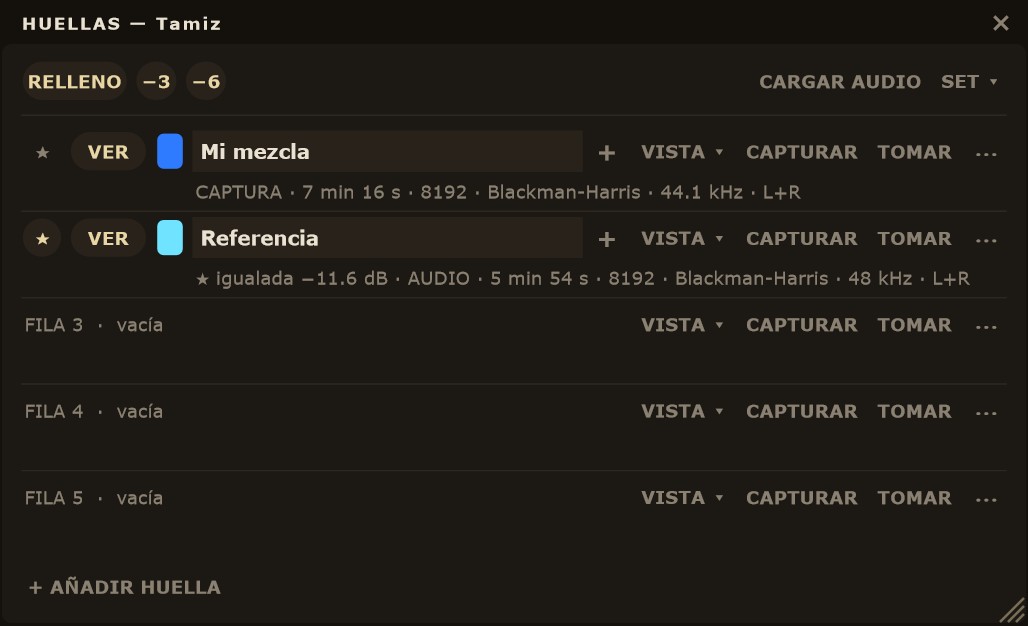
Una huella es el espectro promediado de lo que suena mientras la capturas. Abre la ventana con el botón HUELLAS de la cabecera. Cada fila es una huella: CAPTURAR empieza a promediar el audio que pasa y PARAR la cierra; TOMAR guarda al instante la curva que ves (con CONGELAR, la congelada) y TOMAR 2.ª, en el menú ⋯, guarda la segunda línea. Lo que se guarda es la medida en bruto: el suavizado solo cambia cómo se dibuja.
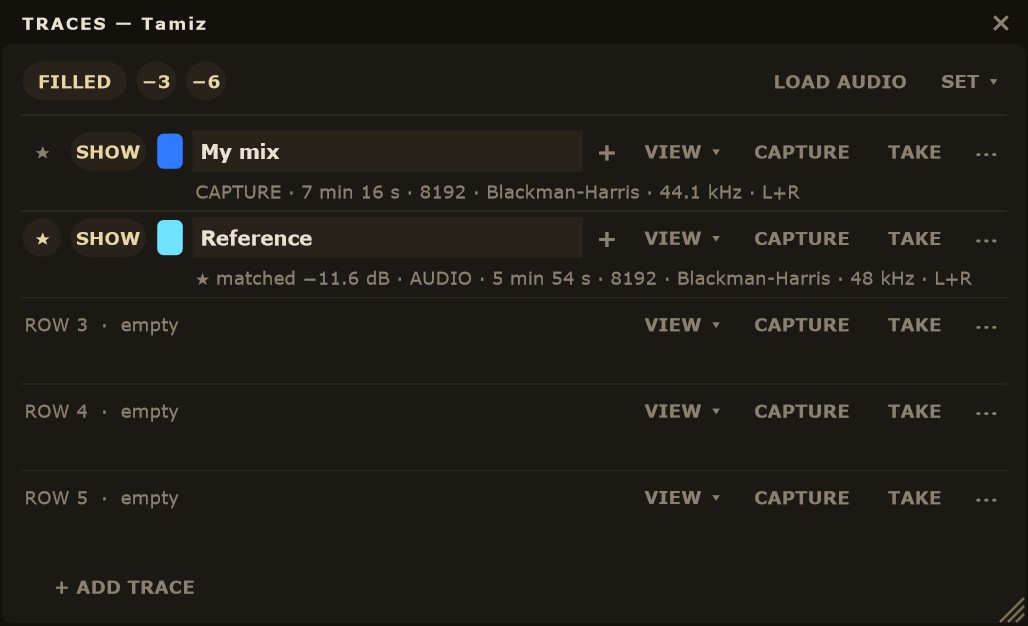
A trace is the averaged spectrum of whatever plays while you capture it. Open the window with the TRACES button in the header. Each row is one trace: CAPTURE starts averaging the audio passing through and STOP closes it; TAKE instantly stores the curve on screen (with FREEZE, the frozen one), and TAKE 2ND, in the ⋯ menu, stores the second line. What gets stored is the raw measurement: smoothing only changes how it is drawn.
La ★ marca la referencia, la huella con la que comparas tu mezcla. Solo puede haber una. Se iguala sola al nivel de lo que suena, así que la comparas por tono y no por volumen. VER la muestra u oculta, el cuadro de color pasa al siguiente con un clic y el nombre se escribe con otro clic (hasta 32 caracteres). Caben hasta 64 huellas: + AÑADIR HUELLA añade filas bajo la lista y, con muchas, la lista se desplaza con la rueda.
The ★ marks the reference, the trace you compare your mix against. There can only be one. Its level follows what is playing automatically, so you compare tone, not loudness. SHOW shows or hides it, a click on the colour swatch moves to the next colour, and another click on the name lets you type one (up to 32 characters). You can have up to 64 traces: + ADD TRACE adds rows below the list and, with many, the list scrolls with the wheel.
Cada huella visible tiene su entrada en la leyenda del espectro, y desde ahí se maneja sin abrir la ventana. Arriba de la ventana están RELLENO (rellena las curvas guardadas con su color) y las guías −3 y −6 (pendientes de −3 y −6 dB por octava ancladas a la curva en vivo cerca de 1 kHz; −3 es la del ruido rosa). El suavizado del dibujo se elige en AJUSTES › SUAVIZADO DE HUELLAS: 1/3 de octava de serie, 1/6, 1/12 o COMO LA VISTA.
Every visible trace has an entry in the spectrum legend, and you can work from there without opening the window. At the top of the window you have FILLED (fills stored curves with their colour) and the −3 and −6 guides (−3 and −6 dB per octave slopes anchored to the live curve near 1 kHz; −3 is the pink noise slope). Drawing smoothing is set in SETTINGS › TRACE SMOOTHING: 1/3 octave by default, 1/6, 1/12 or AS VIEW.
Leyenda del espectroSpectrum legend
- Clic
- Ocultar o mostrar la huella. No reinicia las curvas.
- Arrastrar en vertical
- Desplazar la huella en dB. Shift = fino.
- Arrastrar en horizontal
- Opacidad, del 15 al 100 %. A la derecha, más opaca.
- Doble clic
- Volver a 0 dB.
- «+N más»
- Hay más entradas de las que caben. Clic: abrir HUELLAS.
- Click
- Hide or show the trace. It does not reset the curves.
- Vertical drag
- Offset the trace in dB. Shift = fine.
- Horizontal drag
- Opacity, 15 to 100 %. To the right, more opaque.
- Double-click
- Back to 0 dB.
- "+N more"
- More entries than fit. Click: open TRACES.
En la ★ el desplazamiento y el doble clic no hacen nada (se iguala sola); la opacidad sí.
On the ★, offset and double-click do nothing (it is matched automatically); opacity still works.
Menú ⋯ de una huellaTrace ⋯ menu
- TOMAR 2.ª
- Guarda la segunda línea. Apagado si el 2.º TIPO es NINGUNO.
- CARGAR… / GUARDAR…
- Una huella en un archivo
.tzh. - DESPLAZAR…
- Escribe el desplazamiento en dB (−24 a +24).
- VOLVER A 0 dB
- Quita el desplazamiento.
- OPACIDAD ▸
- 100, 75, 50 o 25 %.
- SECCIONES ▸
- Ver Secciones.
- BORRAR ▸
- Vacía la fila. Pide confirmación.
- TAKE 2ND
- Stores the second line. Disabled if 2ND TYPE is NONE.
- LOAD… / SAVE…
- One trace to or from a
.tzhfile. - OFFSET…
- Type the offset in dB (−24 to +24).
- RESET TO 0 dB
- Removes the offset.
- OPACITY ▸
- 100, 75, 50 or 25 %.
- SECTIONS ▸
- See Sections.
- DELETE ▸
- Empties the row. Asks for confirmation.
Si TOMAR, CAPTURAR o CARGAR sustituyen una huella con datos, la ventana ofrece DESHACER durante unos segundos.
If TAKE, CAPTURE or LOAD replaces a trace that had data, the window offers UNDO for a few seconds.
La ventana HUELLAS, control por controlThe TRACES window, control by control
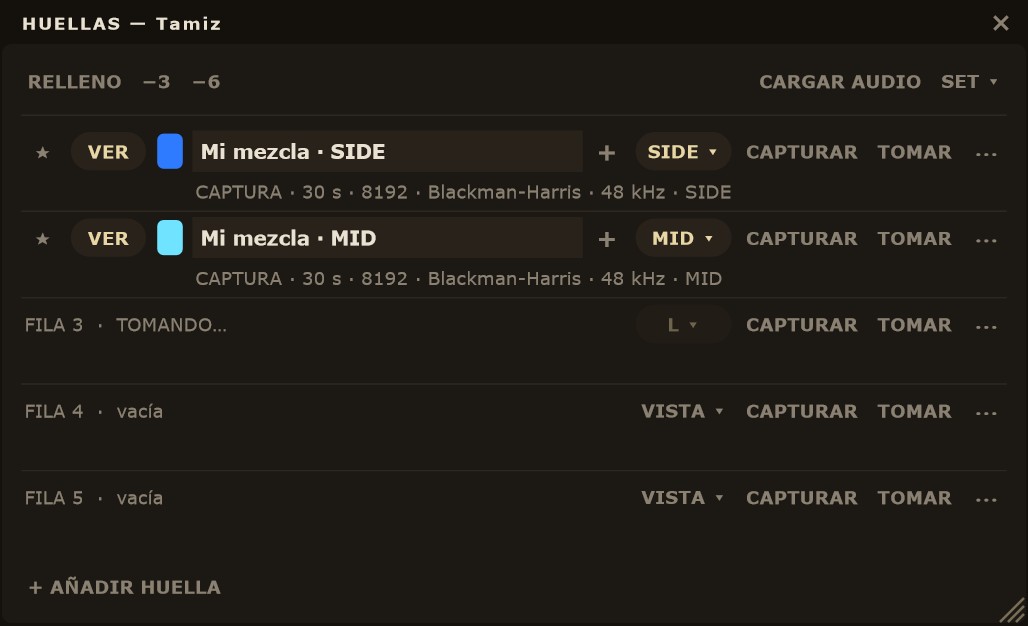
La ventana se abre con HUELLAS en la cabecera de Tamiz y flota encima del DAW mientras trabajas. Se agranda o se achica desde la esquina de abajo a la derecha y recuerda su tamaño. Arriba están los controles de toda la ventana; debajo, una fila por huella y, dentro de cada huella, sus secciones.
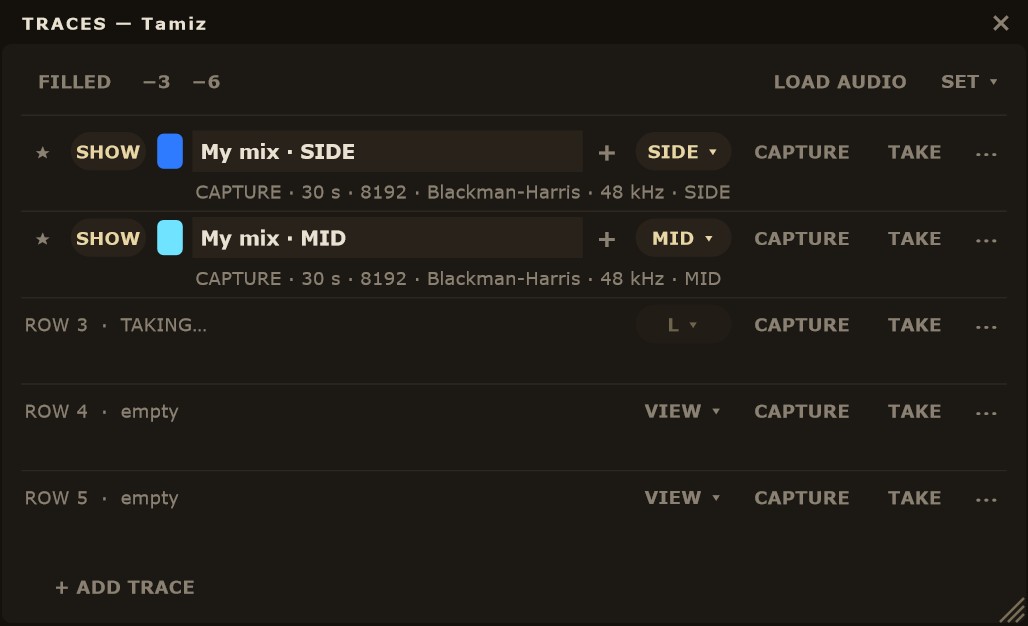
The window opens with TRACES in Tamiz's header and floats above the DAW while you work. Resize it from the bottom-right corner; it remembers its size. At the top are the controls for the whole window; below, one row per trace and, inside each trace, its sections.
Cabecera de la ventanaWindow header
- RELLENO
- Rellena bajo cada huella con su color. Apagado, solo se ven las líneas.
- −3 · −6
- Guías de −3 y −6 dB por octava, ancladas a la curva en vivo cerca de 1 kHz. −3 es la pendiente del ruido rosa.
- CARGAR AUDIO
- Analiza un WAV, AIFF o FLAC de hasta 30 minutos y lo pone como ★ referencia.
- SET ▾
- GUARDAR SET… guarda todas las filas con datos en un
.tzhs; CARGAR SET… lo lee en las filas libres.
- FILLED
- Fills under each trace with its colour. Off, only the lines show.
- −3 · −6
- −3 and −6 dB per octave guides, anchored to the live curve near 1 kHz. −3 is the pink noise slope.
- LOAD AUDIO
- Analyzes a WAV, AIFF or FLAC file up to 30 minutes long and sets it as the ★ reference.
- SET ▾
- SAVE SET… stores every row with data in a
.tzhsfile; LOAD SET… reads one into the free rows.
Una fila de huella, de izquierda a derechaA trace row, left to right
- ★
- La marca como referencia. Solo puede haber una; se iguala sola al nivel de lo que suena.
- VER
- Muestra u oculta la huella en el espectro (también con un clic en la leyenda).
- Color
- Un clic pasa al siguiente color de la paleta.
- Nombre
- Clic para escribirlo, hasta 32 caracteres. Sin nombre, la fila se llama HUELLA n.
- ▸ / ▾
- Pliega o despliega sus secciones (sale si tiene alguna).
- +
- Añade una fila de sección vacía debajo.
- [VISTA ▾]
- Qué captura esta fila: VISTA (lo que muestra el analizador) o una fuente fija: L+R, L, R, MID, SIDE o M+S. Ver Capturar cada fuente por separado.
- CAPTURAR
- Graba el audio que pasa y lo promedia hasta que pulses PARAR. Mientras captura, TOMAR pasa a ser SIGUIENTE SECCIÓN.
- TOMAR
- Guarda al momento la curva que se ve (con CONGELAR, la congelada). Con una fuente distinta de la del analizador, promedia medio segundo de esa fuente.
- ⋯
- TOMAR 2.ª, CARGAR…, GUARDAR…, DESPLAZAR…, VOLVER A 0 dB, OPACIDAD ▸, SECCIONES ▸ y BORRAR ▸.
- ★
- Marks it as the reference. There can only be one; its level follows what is playing.
- SHOW
- Shows or hides the trace on the spectrum (also with a click on the legend).
- Colour
- A click moves to the next colour in the palette.
- Name
- Click to type it, up to 32 characters. Left empty, the row is called TRACE n.
- ▸ / ▾
- Folds or unfolds its sections (shown when it has some).
- +
- Adds an empty section row below.
- [VIEW ▾]
- What this row captures: VIEW (what the analyzer shows) or a fixed source: L+R, L, R, MID, SIDE or M+S. See Capturing each source separately.
- CAPTURE
- Records the audio passing through and averages it until you press STOP. While capturing, TAKE becomes NEXT SECTION.
- TAKE
- Instantly stores the curve on screen (with FREEZE, the frozen one). With a source other than the analyzer's, it averages half a second of that source.
- ⋯
- TAKE 2ND, LOAD…, SAVE…, OFFSET…, RESET TO 0 dB, OPACITY ▸, SECTIONS ▸ and DELETE ▸.
La línea de datosThe data line
Debajo de cada nombre, una línea dice cómo se hizo la huella: CAPTURA, TOMA o AUDIO (cargada de un archivo), cuánto duró, el bloque, la ventana, la frecuencia de muestreo y la fuente. En la ★ empieza por «★ igualada −5,8 dB»; si la desplazaste, por «desplazada +2,4 dB». Mientras captura dice «CAPTURANDO» y, en una pasada con marcas, la sección en curso.
Under each name, a line tells you how the trace was made: CAPTURE, TAKE or AUDIO (loaded from a file), how long it lasted, block size, window, sample rate and source. On the ★ it starts with "★ matched −5.8 dB"; if you offset it, with "offset +2.4 dB". While capturing it reads "CAPTURING" and, in a pass with markers, the current section.
Una fila de secciónA section row
- ✓
- La muestra u oculta en el espectro (si el VER de su huella está puesto).
- Tono
- Cada sección lleva un tono del color de su huella, más claro o más oscuro.
- Nombre
- Clic para escribirlo, o ⋯ NOMBRE ▸ para la lista rápida (INTRO, ESTROFA, ESTRIBILLO…).
- [HUELLA ▾]
- La fuente de esta sección: HUELLA usa la de su huella; también L+R, L, R, MID o SIDE.
- CAPTURAR
- Captura solo esta sección.
- ⋯
- TOMAR, TOMAR 2.ª, NOMBRE ▸, DESPLAZAR…, VOLVER A 0 dB, OPACIDAD y BORRAR.
- Duración
- Los segundos que promedió, a la derecha.
- ✓
- Shows or hides it on the spectrum (when its trace's SHOW is on).
- Tone
- Each section gets a lighter or darker tone of its trace's colour.
- Name
- Click to type it, or ⋯ NAME ▸ for the quick list (INTRO, VERSE, CHORUS…).
- [TRACE ▾]
- This section's source: TRACE uses its trace's; also L+R, L, R, MID or SIDE.
- CAPTURE
- Captures this section only.
- ⋯
- TAKE, TAKE 2ND, NAME ▸, OFFSET…, RESET TO 0 dB, OPACITY and DELETE.
- Duration
- The seconds it averaged, on the right.
Referencias externasExternal references
CARGAR AUDIO, en la cabecera de la ventana HUELLAS, analiza un archivo WAV, AIFF o FLAC de hasta 30 minutos, mono o estéreo, con el bloque y la ventana de la vista. El resultado entra como ★ referencia en la primera fila libre, con el nombre del archivo. También puedes soltar el archivo en la ventana (sobre una fila, entra en esa fila) o directamente en el espectro. Mientras analiza, la ventana muestra el progreso; el audio de la sesión no se toca.
LOAD AUDIO, in the header of the TRACES window, analyzes a WAV, AIFF or FLAC file up to 30 minutes long, mono or stereo, with the view's block size and window. The result goes in as the ★ reference in the first free row, named after the file. You can also drop the file onto the window (onto a row, it goes into that row) or straight onto the spectrum. The window shows progress while it analyzes; the session audio is not touched.
La ★ se iguala sola al nivel de lo que suena. Tamiz lleva una media larga de la mezcla (los últimos 30 segundos) y compara las dos curvas a 1/3 de octava entre 100 Hz y 10 kHz. La ★ se mueve hacia ese nivel a 3 dB por segundo, así que no salta con cada golpe. Con menos de 3 segundos de audio no se toca. La línea de datos de la fila dice cuánto: «★ igualada −5,8 dB».
The ★ is level-matched to what is playing. Tamiz keeps a long average of the mix (the last 30 seconds) and compares both curves at 1/3 octave between 100 Hz and 10 kHz. The ★ moves toward that level at 3 dB per second, so it does not jump with every hit. With less than 3 seconds of audio it is left alone. The row's data line shows the amount: "★ matched −5.8 dB".
Compara partes equivalentes: el estribillo de tu mezcla con el estribillo de la referencia, no la canción entera con un tramo suelto. Una referencia con un arreglo muy distinto marca diferencias que no son de mezcla. Y la DELTA mira el tono, no el volumen: el igualado quita la diferencia de nivel a propósito. La sonoridad se juzga con los medidores LUFS.
Compare like with like: your chorus against the reference chorus, not a whole song against a single section. A reference with a very different arrangement shows differences that have nothing to do with the mix. And DELTA reads tone, not loudness: matching removes the level difference on purpose. Judge loudness with the LUFS meters.
- CARGAR AUDIO
- WAV, AIFF o FLAC, hasta 30 min. Entra como ★ en la primera fila libre.
- Soltar en la ventana
- Sobre una fila, a esa fila; en otro sitio, a la primera libre.
- Soltar en el espectro
- A la primera fila libre.
- LOAD AUDIO
- WAV, AIFF or FLAC, up to 30 min. Goes in as the ★ in the first free row.
- Drop onto the window
- Onto a row, into that row; anywhere else, the first free one.
- Drop onto the spectrum
- Into the first free row.
SeccionesSections
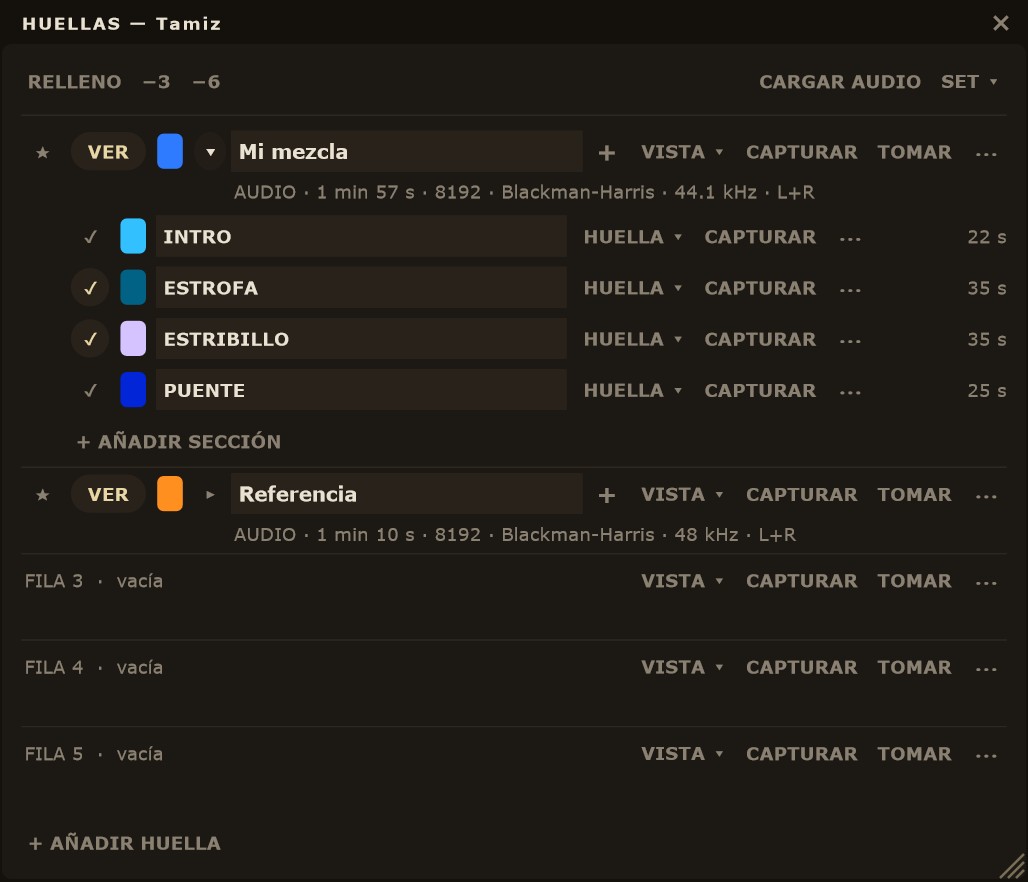
Cada huella puede guardar hasta 16 secciones: estrofa, estribillo, puente… La forma más rápida es una sola pasada. Pulsa CAPTURAR en la huella, dale a play y, en cada cambio de la canción, pulsa SIGUIENTE SECCIÓN (sustituye a TOMAR mientras capturas). Cada pulsación cierra la sección que suena y empieza otra. Al pulsar PARAR, la huella es la canción entera y dentro quedan sus secciones. Mientras tanto, la línea de datos dice «CAPTURANDO · SECCIÓN n». En la 16.ª, la última se queda con el resto.
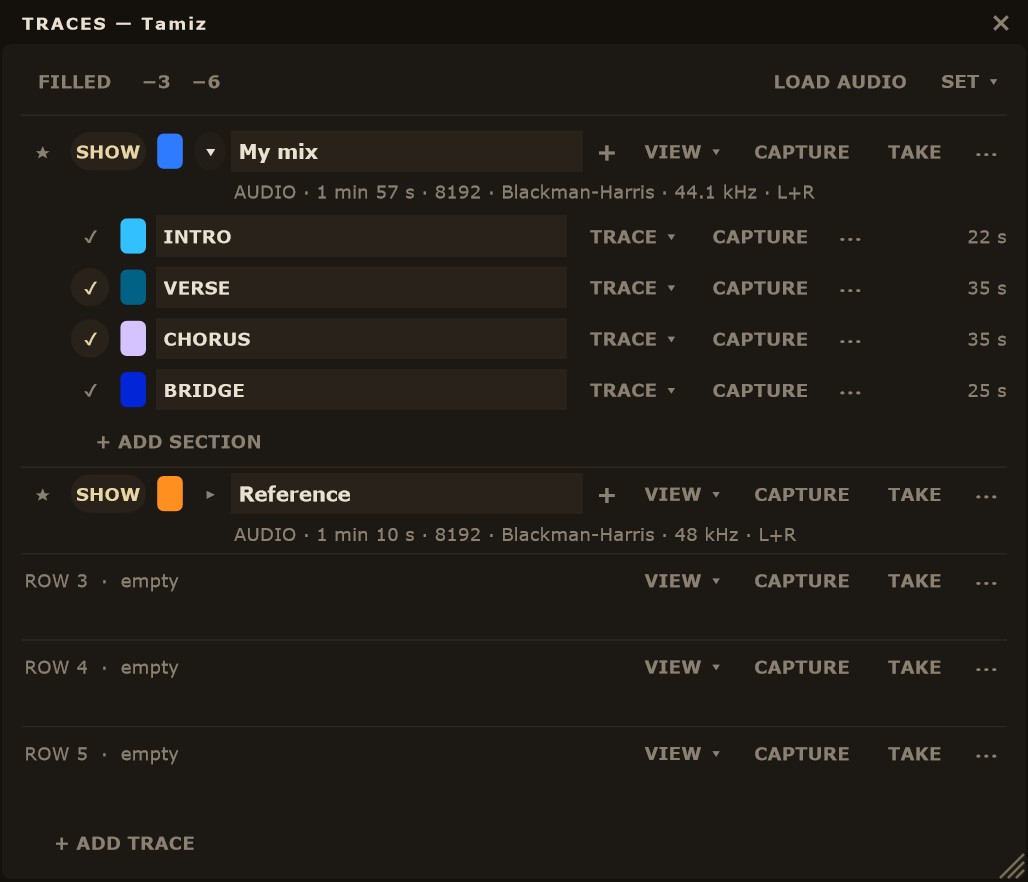
Each trace can hold up to 16 sections: verse, chorus, bridge… The quickest way is a single pass. Press CAPTURE on the trace, hit play and, at each change in the song, press NEXT SECTION (it replaces TAKE while capturing). Each press closes the section playing and starts the next one. When you press STOP, the trace is the whole song with its sections inside. Meanwhile the data line reads "CAPTURING · SECTION n". On the 16th, the last one keeps the rest.
También puedes preparar las secciones antes y capturarlas una a una: el + junto al nombre de la huella, o ⋯ SECCIONES ▸ + AÑADIR SECCIÓN, añade una fila de sección; luego pulsa CAPTURAR en esa fila. Los nombres habituales están en el ⋯ de la sección, NOMBRE ▸: INTRO, ESTROFA, PRE-ESTRIBILLO, ESTRIBILLO, PUENTE, SOLO y FINAL. Sin nombre, se llama SECCIÓN n.
You can also set up sections beforehand and capture them one by one: the + next to the trace name, or ⋯ SECTIONS ▸ + ADD SECTION, adds a section row; then press CAPTURE on that row. Common names are in the section's ⋯ menu, NAME ▸: INTRO, VERSE, PRE-CHORUS, CHORUS, BRIDGE, SOLO and OUTRO. Left empty, it is called SECTION n.
Si la huella se hizo con una pasada, su curva es la captura completa. Si la armaste sección a sección, su curva es la media de sus secciones, pesada por los segundos de cada una. Las secciones se pliegan y despliegan con ▸ / ▾ (empiezan plegadas) y cada una se ve en el espectro si su ✓ y el VER de su huella están puestos. Así puedes poner el estribillo de tu mezcla frente al de la referencia sin que la estrofa, más tranquila, mueva la comparación.
Una fuente por sección. Cada sección tiene su botón [HUELLA ▾] junto a CAPTURAR: HUELLA usa la fuente de su huella (de serie), o eliges L+R, L, R, MID o SIDE. En una pasada con marcas, cada sección se captura con la suya: puedes medir el estribillo en SIDE y la estrofa en MID en la misma escucha.
If the trace came from a single pass, its curve is the full capture. If you built it section by section, its curve is the average of its sections, weighted by each one's duration. Sections fold and unfold with ▸ / ▾ (they start folded), and each one shows on the spectrum when its ✓ and its trace's SHOW are both on. That way you can put your mix's chorus against the reference chorus without a quieter verse pulling the comparison.
A source per section. Each section has its own [TRACE ▾] button next to CAPTURE: TRACE uses its trace's source (the default), or you pick L+R, L, R, MID or SIDE. In a pass with markers, each section is captured with its own: you can measure the chorus in SIDE and the verse in MID in the same listen.
- SIGUIENTE SECCIÓN
- Durante una captura: cierra la sección y empieza otra.
- + (junto al nombre)
- Añade una fila de sección vacía y despliega la huella.
- ▸ / ▾
- Plegar o desplegar las secciones. ⋯ SECCIONES ▸ PLEGAR TODAS / DESPLEGAR TODAS.
- ✓
- Mostrar u ocultar la sección en el espectro.
- ⋯ de una sección
- TOMAR, TOMAR 2.ª, NOMBRE ▸, DESPLAZAR…, VOLVER A 0 dB, OPACIDAD y BORRAR.
- NEXT SECTION
- During a capture: closes the section and starts another.
- + (next to the name)
- Adds an empty section row and unfolds the trace.
- ▸ / ▾
- Fold or unfold sections. ⋯ SECTIONS ▸ FOLD ALL / UNFOLD ALL.
- ✓
- Show or hide the section on the spectrum.
- Section ⋯
- TAKE, TAKE 2ND, NAME ▸, OFFSET…, RESET TO 0 dB, OPACITY and DELETE.
La franja DELTAThe DELTA band


La franja DELTA, bajo el espectro, dibuja una sola curva: A − B, frecuencia a frecuencia, a 1/3 de octava. Antes de restar, Tamiz iguala el nivel de B al de A con la media entre 100 Hz y 10 kHz, y a la derecha dice cuánto ha movido: «B igualada −11,8 dB». Lo que queda es la diferencia de tono, sin la de volumen. De serie, A es MEZCLA EN VIVO (la media de lo que ha sonado en los últimos 30 segundos) y B es la ★ referencia.
The DELTA band, below the spectrum, draws a single curve: A − B, frequency by frequency, at 1/3 octave. Before subtracting, Tamiz level-matches B to A using the average between 100 Hz and 10 kHz, and on the right it shows how far it moved: "B matched −11.8 dB". What remains is the tonal difference, with loudness taken out. By default, A is the LIVE MIX (the average of what has played over the last 30 seconds) and B is the ★ reference.
Arriba a la izquierda de la franja están los selectores A ▾ y B ▾. Cada uno puede ser la mezcla en vivo, cualquier huella o cualquier sección, siempre que esté visible y tenga curva. La escala va de −12 a +12 dB, con líneas en 0 y ±6 dB. Lo que pasa de ±12 dB se marca con una raya roja en el borde. Con CONGELAR puesto, la franja sigue al día.
At the top left of the band are the A ▾ and B ▾ selectors. Each one can be the live mix, any trace or any section, as long as it is visible and has a curve. The scale runs from −12 to +12 dB, with lines at 0 and ±6 dB. Anything beyond ±12 dB is marked with a red stroke at the edge. With FREEZE on, the band keeps updating.
Cómo leerlaHow to read it
Por encima de 0, A tiene más energía que B en esa zona; por debajo, menos. Una curva cerca de 0 en todo el ancho quiere decir que las dos tienen el mismo balance tonal. Fíjate en las zonas anchas antes que en los picos estrechos. Antes de tocar un ecualizador, escucha la zona (Shift + clic en el espectro) y decide si la diferencia es un problema o una elección.
Above 0, A has more energy than B in that area; below 0, less. A curve that stays near 0 across the range means both share the same tonal balance. Look at broad areas before narrow peaks. Before reaching for an EQ, listen to that area (Shift + click on the spectrum) and decide whether the difference is a problem or a choice.
Un ejemplo realA real example
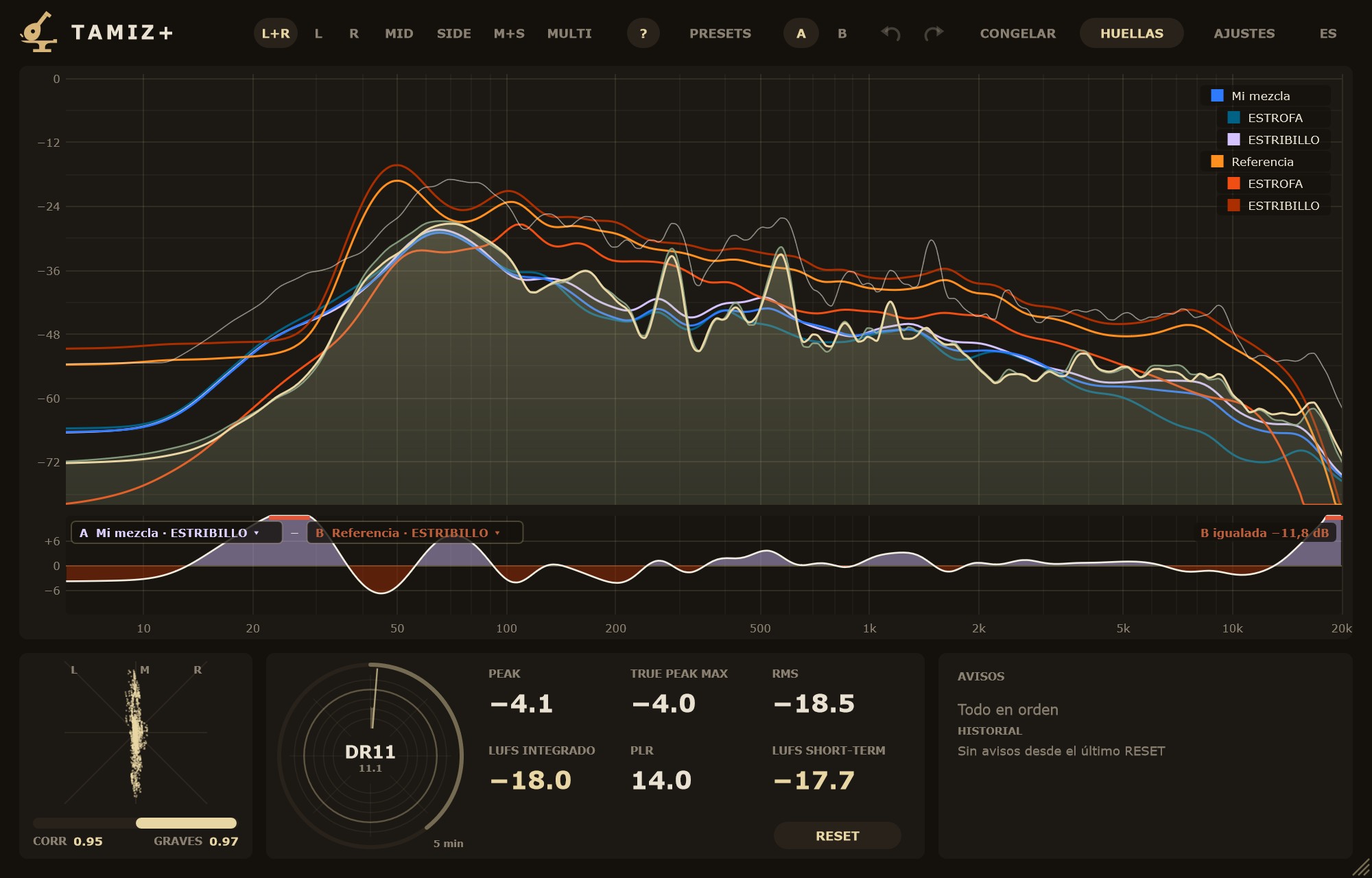
En la captura de arriba, A es «Mi mezcla · ESTRIBILLO» y B es «Referencia · ESTRIBILLO», el estribillo de otro máster. B se igualó −11,8 dB: el máster suena casi 12 dB más fuerte, y la franja quita esa diferencia para mirar solo el tono. Entre 200 Hz y 10 kHz la curva apenas se separa de 0: medios y agudos están equilibrados de forma parecida. Las diferencias están en los extremos. En los graves la curva sube y baja (más energía hacia 25 y 70 Hz, menos hacia 45 y 100 Hz), y por encima de 15 kHz la mezcla tiene más que el máster. Ahí es donde merece la pena escuchar.
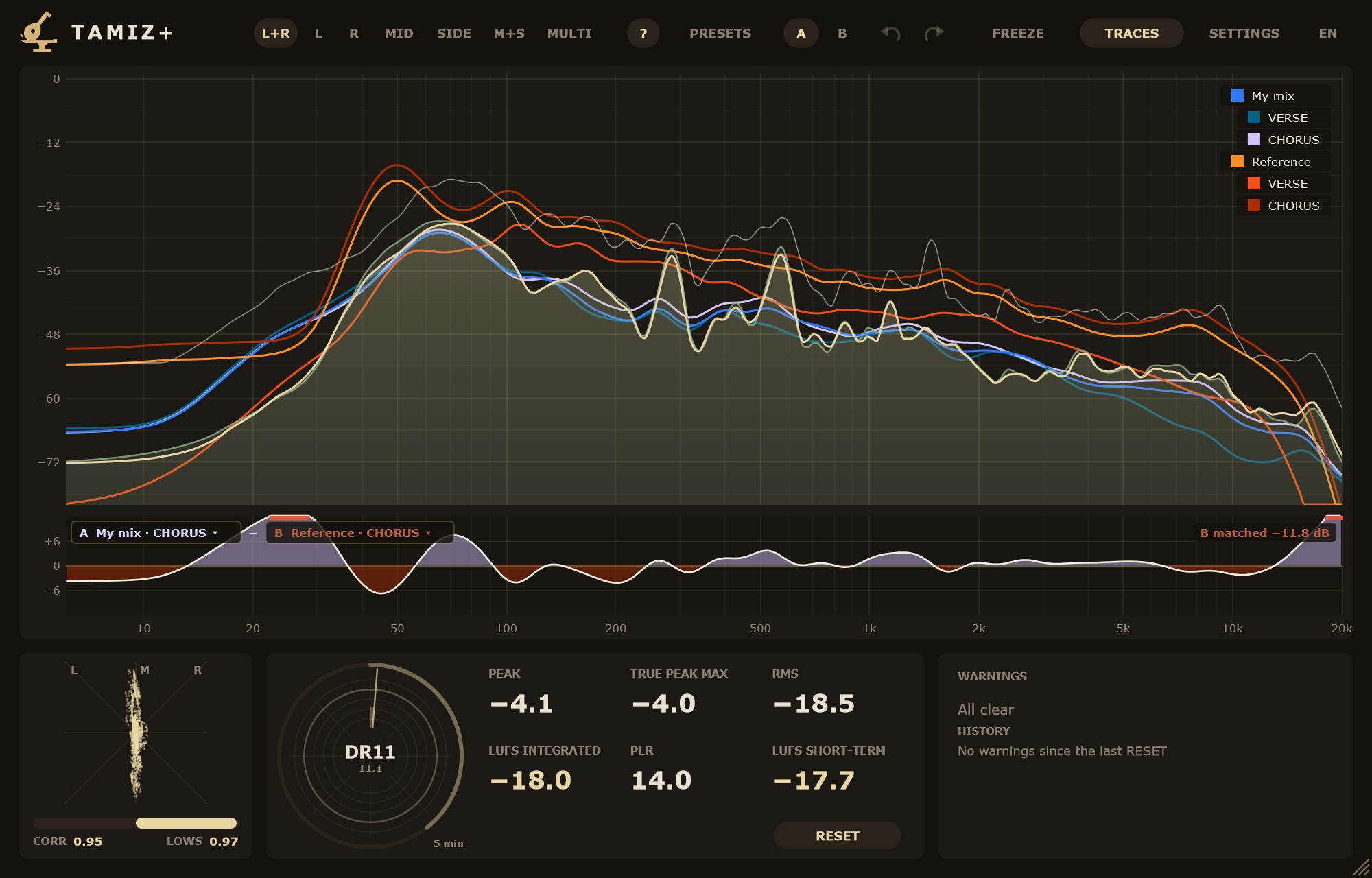
In the screenshot above, A is "My mix · CHORUS" and B is "Reference · CHORUS", the chorus of another master. B was matched −11.8 dB: the master is almost 12 dB louder, and the band removes that difference to look at tone alone. Between 200 Hz and 10 kHz the curve barely leaves 0: mids and highs are balanced in a similar way. The differences are at the extremes. In the low end the curve rises and falls (more energy around 25 and 70 Hz, less around 45 and 100 Hz), and above 15 kHz the mix has more than the master. That is where it pays to listen.
Cuándo desapareceWhen it disappears
La franja, con sus selectores, solo sale cuando A y B valen. Si ocultas, borras o sustituyes A o B, los dos vuelven al defecto (MEZCLA EN VIVO − ★). Si no hay ninguna ★ visible con curva, el defecto no vale: no hay franja y el espectro ocupa todo el alto. Con menos de 3 segundos de audio en vivo, la franja dice «Esperando audio…».
The band and its selectors only show when both A and B are valid. If you hide, delete or replace A or B, both go back to the default (LIVE MIX − ★). With no visible ★ that has a curve, the default is not valid: there is no band and the spectrum takes the full height. With less than 3 seconds of live audio, the band reads "Waiting for audio…".
Capturar cada fuente por separadoCapturing each source separately
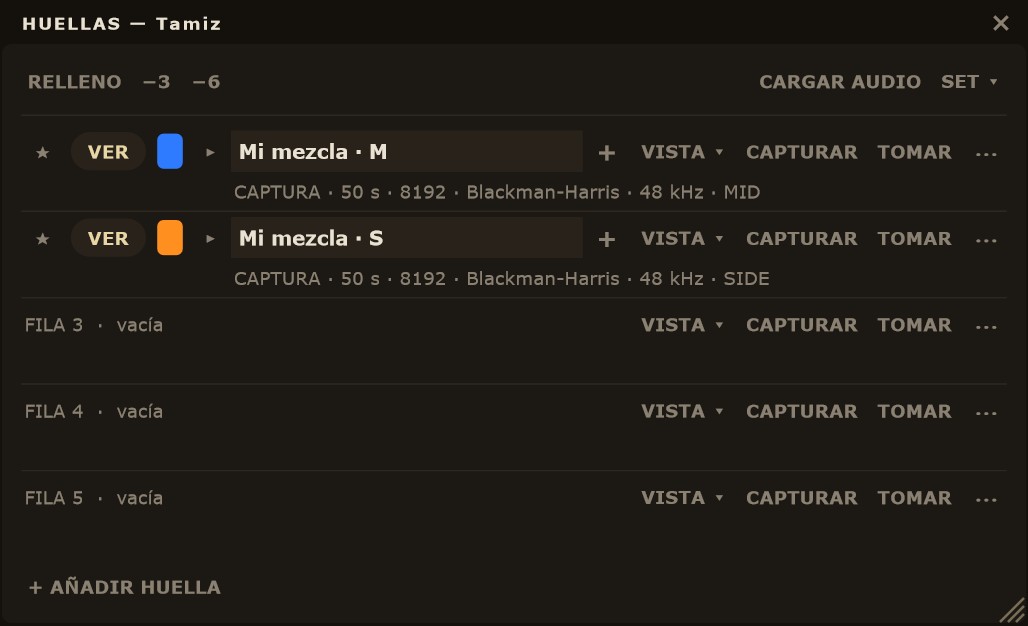
Cada huella puede guardar la mezcla tal como la ves o una sola parte de ella: el canal izquierdo, el derecho, el centro (MID) o los lados (SIDE). Así comparas el centro de tu máster con el centro de la referencia, o sus lados, sin que lo uno tape lo otro. Se elige en el botón [VISTA ▾] de cada fila, junto a CAPTURAR.
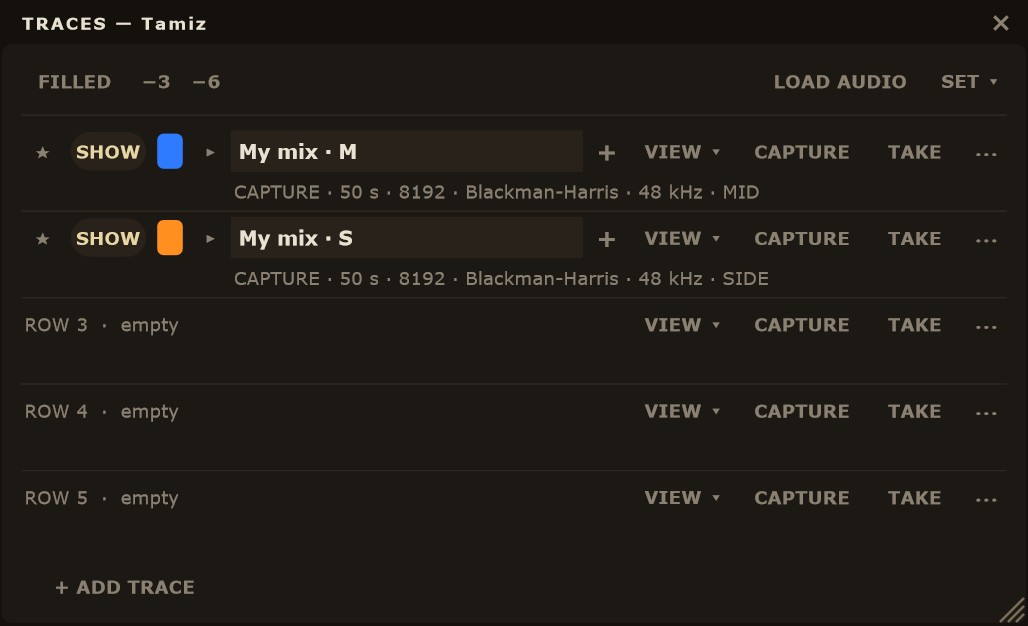
Each trace can store the mix as you see it or just one part of it: the left channel, the right, the centre (MID) or the sides (SIDE). That way you compare your master's centre with the reference's centre, or their sides, without one masking the other. You choose it with the [VIEW ▾] button on each row, next to CAPTURE.
Las fuentesThe sources
- VISTA
- Lo que muestra el analizador en ese momento (de serie). Si cambias la fuente arriba, la huella sigue a la vista.
- L+R
- Las dos señales, una sola curva con la energía media de izquierda y derecha.
- L · R
- Solo el canal izquierdo, o solo el derecho.
- MID
- El centro: lo que está igual en los dos canales (voz, bombo, bajo).
- SIDE
- Los lados: la diferencia entre canales (reverb, coros abiertos, ancho del estéreo).
- M+S
- Dos huellas en una sola captura: «Nombre · M» en esta fila y «Nombre · S» en la siguiente fila en blanco.
- VIEW
- What the analyzer shows at that moment (the default). If you change the source at the top, the trace follows the view.
- L+R
- Both signals, one curve with the average energy of left and right.
- L · R
- The left channel only, or the right only.
- MID
- The centre: what is the same in both channels (vocal, kick, bass).
- SIDE
- The sides: the difference between channels (reverb, wide backing vocals, stereo width).
- M+S
- Two traces from one capture: "Name · M" in this row and "Name · S" in the next blank row.
Paso a paso: el centro y los lados de tu máster y de la referenciaStep by step: the centre and sides of your master and the reference
- Abre HUELLAS. En la fila 1 escribe «Máster MID» y elige MID en su [VISTA ▾]; en la fila 2, «Máster SIDE» con SIDE.
- Pulsa CAPTURAR en las dos filas y reproduce el estribillo. Las dos capturan a la vez, cada una su fuente, sin tocar lo que muestra el analizador.
- Pulsa PARAR en las dos al acabar el estribillo.
- Haz lo mismo con la referencia: reprodúcela en la pista (o pásala por la cadena) y captura «Ref MID» y «Ref SIDE».
- En la franja DELTA elige A = «Máster SIDE» y B = «Ref SIDE»: ves en dB si tus lados tienen más o menos energía que los de la referencia en cada zona. Repite con las dos MID.
- Open TRACES. In row 1 type "Master MID" and choose MID in its [VIEW ▾]; in row 2, "Master SIDE" with SIDE.
- Press CAPTURE on both rows and play the chorus. Both capture at the same time, each its own source, without touching what the analyzer shows.
- Press STOP on both when the chorus ends.
- Do the same with the reference: play it on the track (or through the chain) and capture "Ref MID" and "Ref SIDE".
- In the DELTA band, pick A = "Master SIDE" and B = "Ref SIDE": you see in dB whether your sides carry more or less energy than the reference's in each range. Repeat with both MIDs.
Para lo mismo con un solo botón, elige M+S en la fila: una captura llena «Nombre · M» y «Nombre · S». Si no queda ninguna fila en blanco para la S, Tamiz guarda la M y avisa «Sin fila libre para S»; una fila con nombre o con secciones preparadas no cuenta como libre. Una pasada con SIGUIENTE SECCIÓN pone las mismas secciones en las dos y DESHACER deshace las dos juntas.
To do the same with one button, choose M+S on the row: one capture fills "Name · M" and "Name · S". If there is no blank row left for the S, Tamiz stores the M and says "No free row for S"; a row with a name or with prepared sections does not count as free. A pass with NEXT SECTION puts the same sections into both, and UNDO reverts both together.
Fuente por secciónSource per section
Cada sección tiene además su [HUELLA ▾]: HUELLA usa la fuente de su huella, o eliges L+R, L, R, MID o SIDE para esa sección. En una pasada con marcas cada sección se captura con la suya: en una sola escucha puedes guardar la estrofa en MID y el estribillo en SIDE.
Each section also has its own [TRACE ▾]: TRACE uses its trace's source, or you pick L+R, L, R, MID or SIDE for that section. In a pass with markers each section is captured with its own: in a single listen you can store the verse in MID and the chorus in SIDE.
Cosas que conviene saberGood to know
- Con una fuente propia, cambiar la fuente del analizador arriba no para la captura. Cambiar el bloque, la ventana o la frecuencia de muestreo sí la para.
- El botón de fuente no se puede cambiar mientras esa fila captura o toma.
- La fuente se guarda con la huella, en la sesión y en el archivo
.tzh, y sale en su línea de datos. - Con TOMAR y una fuente distinta de la del analizador, Tamiz promedia medio segundo de esa fuente y la fila dice «TOMANDO…».
- With its own source, changing the analyzer's source at the top does not stop the capture. Changing block size, window or sample rate does.
- The source button cannot change while that row is capturing or taking.
- The source is stored with the trace, in the session and in the
.tzhfile, and shows in its data line. - With TAKE and a source other than the analyzer's, Tamiz averages half a second of that source and the row reads "TAKING…".
Casos típicosTypical cases
Ancho de los graves. Captura en SIDE la referencia y tu máster. Por debajo de 150 Hz, la que tenga la curva más alta tiene los graves más abiertos; con la franja DELTA entre las dos, la diferencia se lee en dB.
Low-end width. Capture the reference and your master in SIDE. Below 150 Hz, the higher curve has the wider low end; with the DELTA band between the two, you read the difference in dB.
Sibilancia en los lados. Las eses de un coro doblado o de una reverb suelen vivir en el SIDE. Compara la huella SIDE de tu mezcla con la de la referencia entre 5 y 10 kHz: si la tuya sobresale ahí y la MID no, el problema está en los lados, no en la voz principal.
Sibilance in the sides. The esses of a doubled backing vocal or a reverb usually live in the SIDE. Compare your mix's SIDE trace with the reference's between 5 and 10 kHz: if yours sticks out there and the MID does not, the problem is in the sides, not in the lead vocal.
Un canal descompensado. Captura L y R de la misma pasada y ponlas como A y B en la DELTA: lo que se separe de 0 es lo que un lado tiene de más.
An unbalanced channel. Capture L and R from the same pass and set them as A and B in DELTA: whatever leaves 0 is what one side has too much of.
Modo MULTIMULTI mode
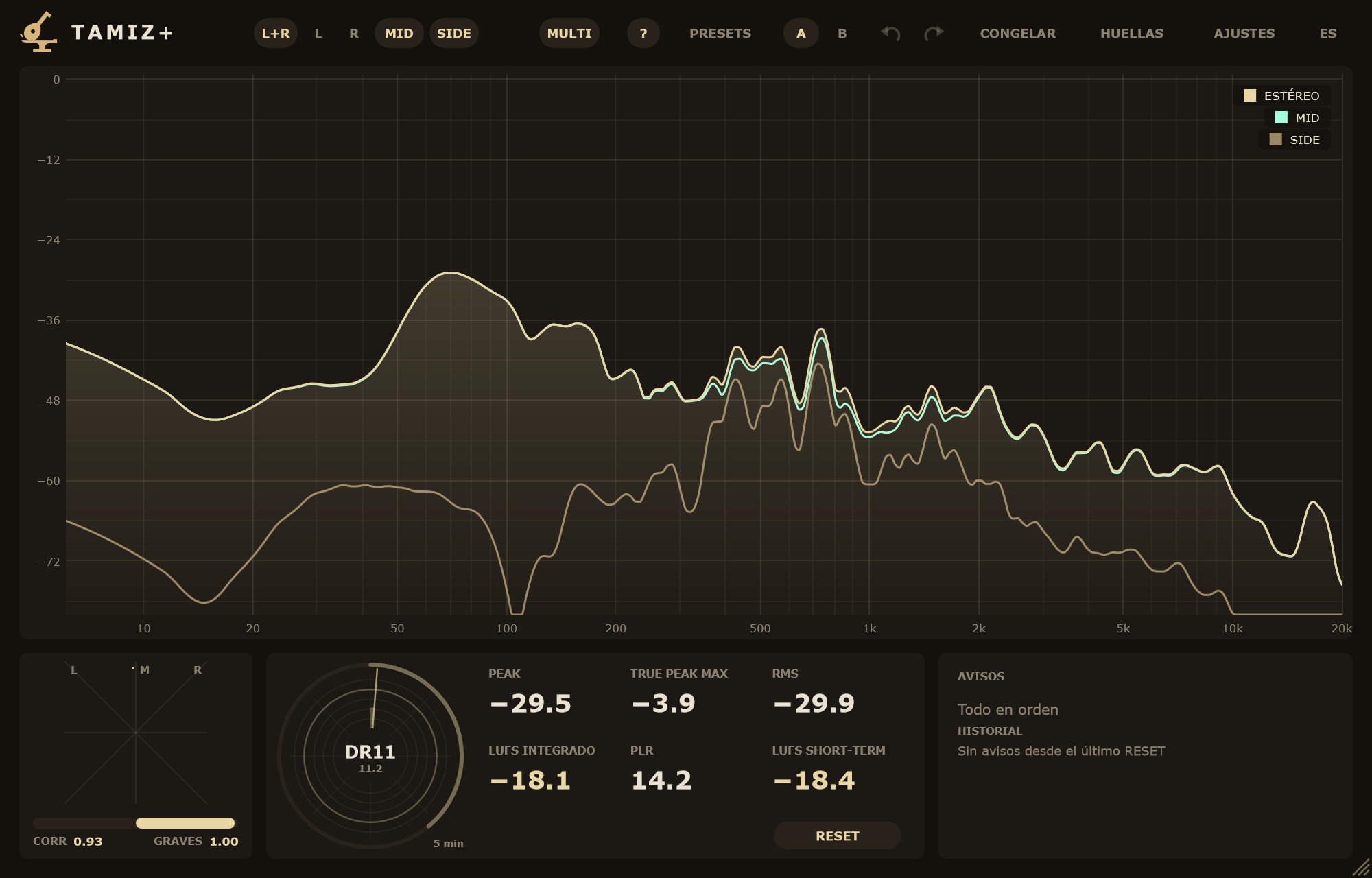
MULTI enseña varias fuentes del analizador en vivo a la vez, cada una con su color. Pulsa MULTI en la cabecera, junto a M+S: los botones de fuente pasan a ser interruptores y enciendes las que quieras entre ESTÉREO, L, R, MID y SIDE (de serie, ESTÉREO, MID y SIDE). ESTÉREO es una sola curva, la energía media de L y R.
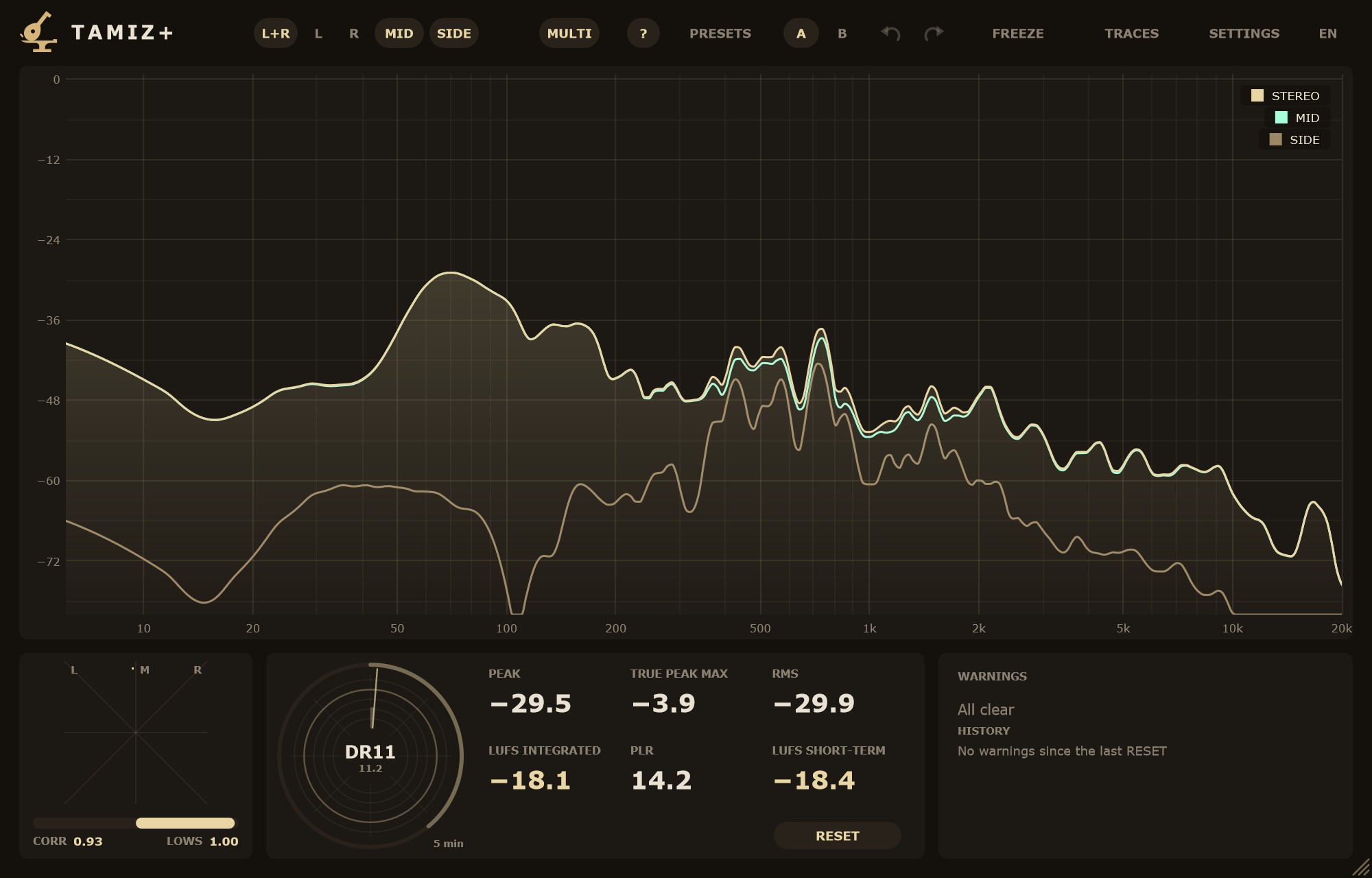
MULTI shows several analyzer sources live at the same time, each in its own colour. Press MULTI in the header, next to M+S: the source buttons become toggles and you switch on any of STEREO, L, R, MID and SIDE (by default, STEREO, MID and SIDE). STEREO is a single curve, the average energy of L and R.
La primera fuente encendida, en el orden ESTÉREO › L › R › MID › SIDE, es la principal: va encima, lleva el relleno y es la que usan la lectura bajo el puntero, CAPTURAR con VISTA y la DELTA en vivo. En la leyenda, cada fuente tiene su muestra de color: un clic abre la paleta de 8 colores o «Color del tema». TIPOS EN MULTI, en AJUSTES › VISTA, dibuja también el 2.º tipo a rayas y el 3.º a puntos en cada fuente. CONGELAR congela el cuadro entero, y la pantalla remota dibuja todas las curvas.
The first source switched on, in the order STEREO › L › R › MID › SIDE, is the main one: it is drawn on top, carries the fill and is the one used by the readout under the pointer, CAPTURE with VIEW and the live DELTA. In the legend, each source has its colour swatch: a click opens the 8-colour palette or "Theme colour". TYPES IN MULTI, in SETTINGS › VIEW, also draws the 2nd type dashed and the 3rd dotted for each source. FREEZE freezes the whole picture, and the remote display draws every curve.
Para qué sirve. Ver MID y SIDE juntos mientras mezclas: si el SIDE crece en los graves o en las eses, lo ves al momento. Encender L y R para pillar un desequilibrio entre canales en una zona concreta.
What it is for. Watching MID and SIDE together while you mix: if the SIDE grows in the low end or in the esses, you see it straight away. Switching on L and R to catch an imbalance between channels in a specific range.
SetsSets
Una huella, un archivo. En el menú ⋯ de cada fila, GUARDAR… escribe esa huella en un archivo .tzh, con sus secciones y su fuente, y CARGAR… lee un .tzh en esa fila.
One trace, one file. In each row's ⋯ menu, SAVE… writes that trace to a .tzh file, with its sections and its source, and LOAD… reads a .tzh file into that row.
Todas a la vez. En la ventana HUELLAS, SET ▾ › GUARDAR SET… guarda todas las filas con datos en un solo archivo .tzhs. SET ▾ › CARGAR SET… lee un .tzhs en las filas libres, en orden: no borra lo que ya tienes. De serie se guardan en Documentos/Martillolaud/Tamiz/Huellas; puedes elegir otra carpeta en cada guardado. La ★ no viaja en los archivos: se pone en la sesión.
All at once. In the TRACES window, SET ▾ › SAVE SET… stores every row that has data in a single .tzhs file. SET ▾ › LOAD SET… reads a .tzhs file into the free rows, in order: it does not erase what you already have. By default they go to Documents/Martillolaud/Tamiz/Huellas; you can pick another folder each time you save. The ★ is not stored in the files: you set it in the session.
Una biblioteca de referencias. Por cliente: un set por artista o sello, con los másters que ya aprobó, para comprobar que el siguiente disco encaja con los anteriores. Por género: un set de referencias por estilo, a un clic.
A reference library. By client: one set per artist or label, with the masters they already approved, to check that the next record sits with the previous ones. By genre: one set of references per style, one click away.
Pantalla remotaRemote display
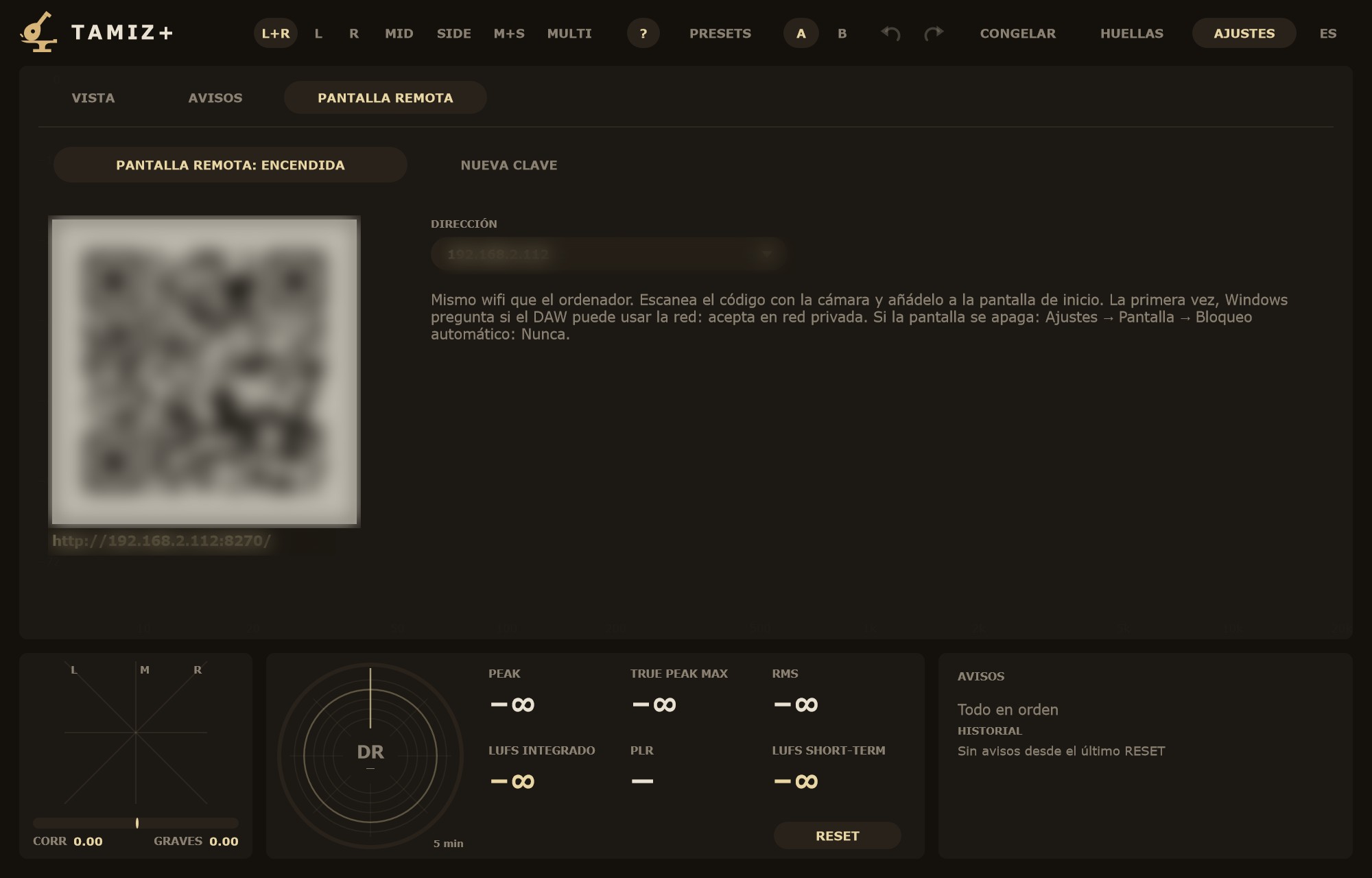
Encenderla. En AJUSTES › PANTALLA REMOTA, pulsa PANTALLA REMOTA: APAGADA para que pase a PANTALLA REMOTA: ENCENDIDA. Aparece un código QR y, debajo, la dirección. Si la computadora tiene más de una red, elige la del estudio en DIRECCIÓN.
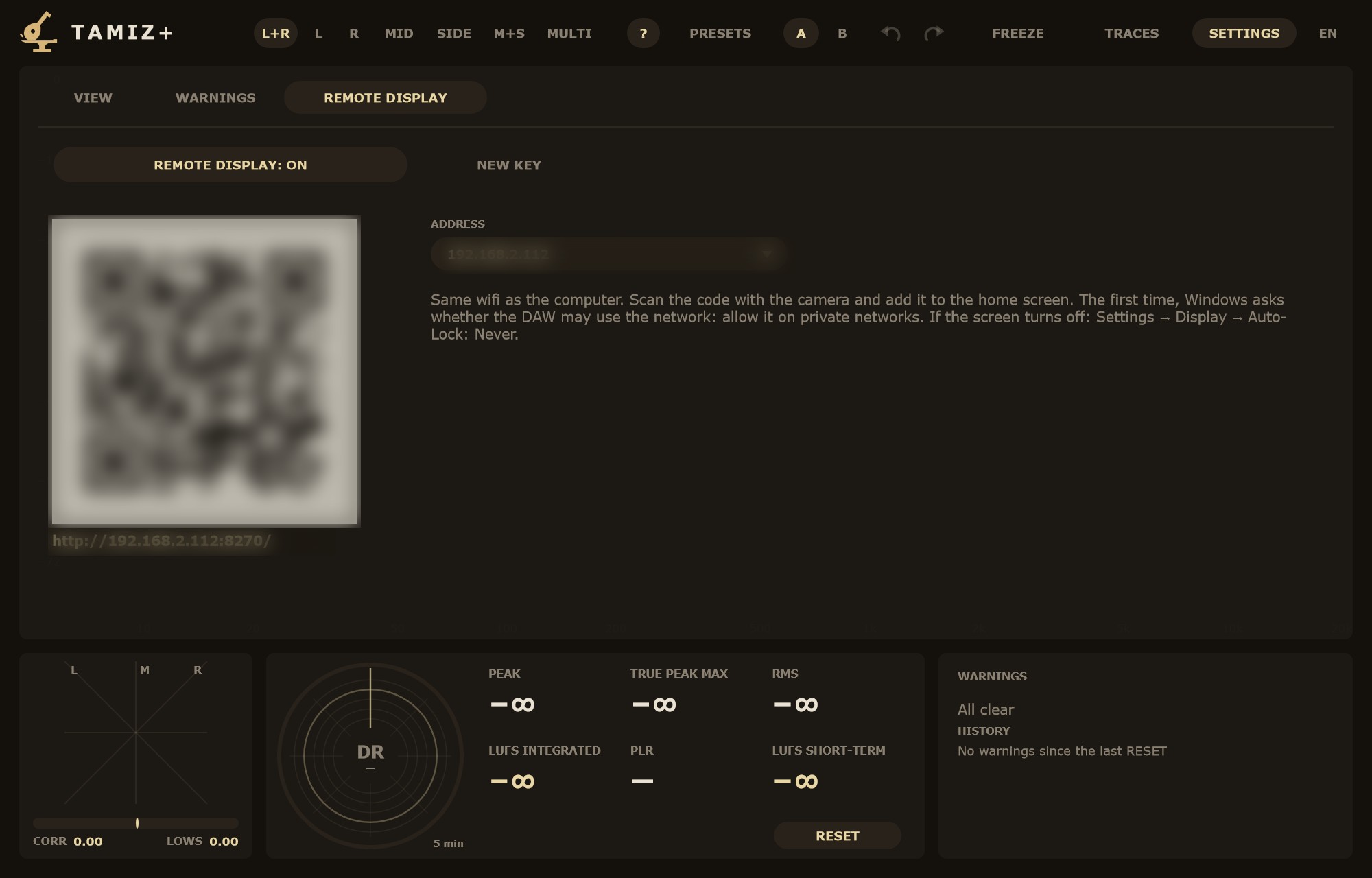
Turning it on. In SETTINGS › REMOTE DISPLAY, press REMOTE DISPLAY: OFF so it changes to REMOTE DISPLAY: ON. A QR code appears with the address below it. If the computer has more than one network, pick the studio's in ADDRESS.
Conectar el teléfono o la tableta. Conéctalo al mismo wifi que la computadora y escanea el código con la cámara. Para quitar las barras del navegador, añádelo a la pantalla de inicio (en iPhone y iPad: Compartir › Añadir a pantalla de inicio). Si la pantalla se apaga sola, desactiva el bloqueo automático del dispositivo. En vertical ves los medidores en baldosas grandes; en horizontal o con VISTA COMPLETA, la pantalla entera.
Connecting a phone or tablet. Join the same Wi-Fi network as the computer and scan the code with the camera. To get rid of the browser bars, add it to the home screen (on iPhone and iPad: Share › Add to Home Screen). If the screen turns off by itself, disable the device's auto-lock. In portrait you get the meters as large tiles; in landscape or with FULL VIEW, the whole display.
Hasta 4 pantallas. Pueden mirar a la vez hasta cuatro dispositivos; una quinta espera y vuelve a intentarlo sola. NUEVA CLAVE cambia la clave de la dirección: corta a todas las pantallas conectadas y el QR anterior deja de valer.
Up to 4 screens. Up to four devices can watch at the same time; a fifth waits and retries by itself. NEW KEY changes the key in the address: every connected screen is dropped and the old QR code stops working.
Solo red local, sin cifrar. La pantalla remota solo responde a direcciones de red privada: no sale a internet ni hace falta abrir puertos. La conexión no va cifrada, así que quien esté en tu misma red wifi y analice el tráfico podría leer la clave. Úsala en la red de tu estudio, no en una red pública. Por eso la dirección que se ve en pantalla no lleva la clave; solo la lleva el QR. Si dudas, pulsa NUEVA CLAVE. La primera vez, Windows pregunta si el DAW puede usar la red: acepta en redes privadas.
Local network only, unencrypted. The remote display only answers private network addresses: it does not go out to the internet and you do not need to open ports. The connection is not encrypted, so anyone on the same Wi-Fi who inspects the traffic could read the key. Use it on your studio network, not on a public one. That is why the address shown on screen leaves the key out; only the QR code carries it. If in doubt, press NEW KEY. The first time, Windows asks whether the DAW may use the network: allow it on private networks.
RecetasRecipes
La referencia del clienteThe client's reference
- Inserta Tamiz al final de la cadena del máster.
- Abre HUELLAS y pulsa CARGAR AUDIO, o suelta el archivo del cliente sobre el espectro. Entra como ★.
- Reproduce el máster. La franja DELTA compara MEZCLA EN VIVO con la ★: lo que queda por encima de 0 es lo que tu máster tiene de más; lo de debajo, lo que le falta.
- Cuando estés conforme, pulsa CAPTURAR en una fila vacía, deja sonar la canción y pulsa PARAR. Ya tienes la versión aprobada como huella.
- Insert Tamiz at the end of the mastering chain.
- Open TRACES and press LOAD AUDIO, or drop the client's file onto the spectrum. It goes in as the ★.
- Play the master. The DELTA band compares LIVE MIX with the ★: whatever sits above 0 is what your master has too much of; below it, what it lacks.
- Once you are happy, press CAPTURE on an empty row, let the song play and press STOP. The approved version is now a trace.
Un álbum por seccionesAn album, section by section
- Crea una huella por canción y ponle el título.
- En cada una, pulsa CAPTURAR al empezar y SIGUIENTE SECCIÓN en cada cambio.
- Nombra las secciones desde ⋯ NOMBRE ▸.
- En la franja DELTA, elige como A y B el estribillo de la primera canción y el de la quinta: ves si el disco mantiene el mismo color de una canción a otra.
- Al terminar, SET ▾ › GUARDAR SET…: el álbum entero en un archivo, para la próxima revisión.
- Create one trace per song and give it the title.
- On each one, press CAPTURE at the start and NEXT SECTION at every change.
- Name the sections from ⋯ NAME ▸.
- In the DELTA band, pick the chorus of the first song as A and the chorus of the fifth as B: you see whether the record keeps the same tonal colour from song to song.
- When you finish, SET ▾ › SAVE SET…: the whole album in one file, ready for the next review.
Coherencia de episodios en postproducciónEpisode consistency in post-production
- Captura una escena de diálogo del episodio aprobado y nómbrala, por ejemplo «Ep. 1 · diálogo». Haz lo mismo con la música y el ambiente si te interesa.
- Guarda el conjunto con SET ▾ › GUARDAR SET….
- En el episodio siguiente, carga el set con CARGAR SET… y captura las mismas escenas.
- Compara cada pareja con la franja DELTA. Una diferencia grande entre 2 y 5 kHz en el diálogo suele ser un cambio de micrófono o de ecualización entre jornadas.
- Comprueba la sonoridad integrada con el objetivo de tu entrega en AJUSTES › AVISOS, pulsando RESET antes de cada pasada.
- Capture a dialogue scene from the approved episode and name it, for example "Ep. 1 · dialogue". Do the same with music and ambience if you need them.
- Store them together with SET ▾ › SAVE SET….
- On the next episode, load the set with LOAD SET… and capture the same scenes.
- Compare each pair with the DELTA band. A large difference between 2 and 5 kHz in the dialogue usually means a change of microphone or EQ between shooting days.
- Check integrated loudness against your delivery target in SETTINGS › WARNINGS, pressing RESET before each pass.
PreguntasQuestions
¿Necesito internet?Do I need internet?
No. La activación funciona sin conexión y Tamiz no se conecta a ningún servidor. Solo necesitas internet para comprar y descargar el instalador.
No. Activation works offline and Tamiz does not connect to any server. You only need internet to buy and to download the installer.
¿Necesito iLok?Do I need an iLok?
No. Basta con tu correo y tu número de serie.
No. Your email and serial number are enough.
¿Funciona en Pro Tools?Does it work in Pro Tools?
Sí, en macOS, en formato AAX. En Windows y Linux, Tamiz es VST3.
Yes, on macOS, as AAX. On Windows and Linux, Tamiz is VST3.
¿Qué pasa al acabar la demo?What happens when the demo ends?
Tamiz vuelve a la versión gratis y sigue funcionando: espectro, medidores, avisos y una huella. Las huellas que guardaste en la sesión no se pierden: si activas Tamiz Plus después, vuelven todas.
Tamiz goes back to the free version and keeps working: spectrum, meters, warnings and one trace. The traces stored in the session are not lost: if you activate Tamiz Plus later, they all come back.
¿Dónde se guardan las huellas?Where are the traces stored?
En la sesión del DAW, junto con el proyecto: al abrirlo, las huellas, sus secciones y la ★ están donde las dejaste. Y en archivos .tzh o .tzhs si los guardas tú, para usarlos en otra sesión o en otra computadora.
In the DAW session, with the project: when you open it, the traces, their sections and the ★ are where you left them. And in .tzh or .tzhs files if you save them, to use in another session or on another computer.
¿Gasta mucha CPU?Does it use much CPU?
No, el consumo de CPU es muy bajo.
No, it uses very little CPU.
¿Las actualizaciones están incluidas?Are updates included?
Sí. Todas las actualizaciones están incluidas, también las funciones nuevas de Tamiz Plus.
Yes. All updates are included, including new Tamiz Plus features.
Perdí mi número de serieI lost my serial number
Escríbenos a [email protected] desde el correo de la compra y te lo reenviamos.
Write to [email protected] from your purchase email and we will resend it.
PreguntasQuestions
¿De verdad es gratis?Is it really free?
Sí: sin serie, sin aviso de demo y sin límite de tiempo. Lo que añade Tamiz Plus es para comparar con referencias; el analizador entero, con temas, zoom, 3.er tipo y una huella, es gratis.
Yes: no serial, no demo notice and no time limit. Tamiz Plus adds tools for comparing against references; the full analyzer, with themes, zoom, 3rd type and one trace, is free.
¿Gasta mucha CPU?Does it use much CPU?
No, el consumo de CPU es muy bajo.
No, it uses very little CPU.
¿Cambia el sonido de mi pista?Does it change my track's sound?
No. El audio sale bit a bit y sin latencia. Lo único que lo toca es la escucha de una resonancia (Shift + clic), y al pararla vuelve igual.
No. Audio comes out bit for bit with zero latency. The only thing that touches it is listening to a resonance (Shift + click), and it comes back unchanged when you stop.
¿Por qué SUAVE lee menos que Blackman-Harris?Why does SMOOTH read lower than Blackman-Harris?
Con ruido, cada ventana deja pasar un ancho de banda distinto. SUAVE es más estrecha y lee entre 1,5 y 2 dB menos con ruido; con tonos lee igual. Compara siempre con la misma ventana.
On noise, each window lets through a different bandwidth. SMOOTH is narrower and reads 1.5 to 2 dB lower on noise; on tones it reads the same. Always compare with the same window.
¿Por qué el aviso de LUFS salta tan pronto?Why does the LUFS warning fire so early?
De serie, el TECHO (S) está en −7 LUFS short-term. Si trabajas para una plataforma, elige su atajo (SPOTIFY, YOUTUBE, APPLE o CD / CLUB) o pon tu valor en AJUSTES › AVISOS, y guárdalo con GUARDAR COMO MIS AJUSTES.
By default the CEILING (S) is −7 LUFS short-term. If you deliver for a platform, pick its shortcut (SPOTIFY, YOUTUBE, APPLE or CD / CLUB) or set your own value in SETTINGS › WARNINGS, and keep it with SAVE AS MY DEFAULTS.
¿Los avisos funcionan en un render?Do the warnings work in a render?
Sí. Cuentan el tiempo del audio analizado, no el del reloj, así que valen igual en un render más rápido que el tiempo real.
Yes. They count the time of the analysed audio, not wall-clock time, so they work the same in a faster-than-real-time render.
¿Dónde se guardan el tema y las ayudas?Where are the theme and hints stored?
En los ajustes de Tamiz de la computadora: valen para todos los Tamiz y no van en la sesión ni en los presets. La vista, los avisos y el tamaño de la ventana sí van en la sesión.
In Tamiz's settings on your computer: they apply to every Tamiz and are not stored in the session or in presets. View, warnings and window size are stored in the session.
¿Se guarda el zoom?Is the zoom saved?
No. Es solo para mirar. Doble clic en el espectro o ZOOM ✕ vuelve a la vista de AJUSTES.
No. It is for looking only. Double-click the spectrum or ZOOM ✕ to return to the SETTINGS view.